
Zillow Web Scraping: Collecting Public Property and Listing Data
Published: ≈ 14 min read
Quick Answer
Zillow web scraping can produce a property history rather than a spreadsheet of today’s prices. Save the home’s identity, the specific listing, its status, each labelled price, and the time of the check. Keep earlier observations when a value changes, so a later report can distinguish a price cut from a new listing.
Zillow’s Terms of Use prohibit automated queries, including scraping. This guide assumes an approved data source or explicit authorization covering page collection. For regional research, Zillow Research downloads may already contain the series you need. They do not provide an individual listing history for each home.
Key Takeaways
- Use the property ID to connect a home’s appearances and the listing ID to keep its separate offers apart.
- A dated source event can tell you when something happened. Your check time tells you when you found it.
- Keep a “not found in this search” outcome. Verify the property separately before assigning a sale status.
- Include the search area, result limits, and uncompleted pages in the run summary; they affect which homes enter the count.
What Does a Home’s First Appearance Tell You?
Treat the first search card as a discovery record. It gives you a source reference and a few values to verify; the filters explain why this home entered your collection.
Our example begins with a fictional home advertised at $500,000. We will follow this same home through the article. The amounts and observations are illustrative, not results from a Zillow collection or proxy test.
Save the source’s property identifier, commonly called a ZPID on Zillow, together with its property-page reference. Keep any listing identifier separately. The property identifier helps connect appearances of the home; the listing identifier helps distinguish offers to sell or rent it. Where identifiers come from different providers, retain the provider with them.
An address is useful evidence for matching, especially its unit number. An apartment should retain its own price history even when the street address matches another unit. For a building-level rental page, attach a starting rent to the stated floor plan or building until a unit-level record identifies the offer.
The first record also needs the search context. Store the selected area or map boundary, property type, sale or rental filter, price limits, and discovery time. A later price change can move a home outside those filters even while its listing remains active.
At this point, create an internal property reference and attach the source identities. Add an observation with the displayed status, asking price, currency, and collection time. Copy the area label as well as the number. Living area and lot area stay in different fields, each with its supplied unit. Retain fractional bathroom counts and leave absent bedroom or bathroom values blank with a missing-data reason. Use zero only when the source reports zero.
Leave the original listing date unknown unless your source supplies it.
How Do You Extract the Fields You Need?
Give each exported column a source location or documented field. That mapping is what you inspect when a plausible-looking value turns out to describe the wrong thing.
Map an approved feed’s asking-price, valuation, and sale-amount fields to separate columns. Use the same distinction for API responses. With authorized page collection, inspect the response before writing extraction rules. Relevant values may be present in HTML, embedded JSON, or content produced through browser rendering. Determine which representation contains the required property data instead of assuming that a tutorial’s selector or JSON path remains current.
Follow the fictional home from its search card to the permitted detail record. Confirm the property identity and status, then check which amount is the asking price. Keep the detail-check time: search and detail requests made at different times may capture an update between them.
Use a narrow mapping for each field. A rule that extracts the first dollar amount anywhere in a page can select a mortgage payment or an estimate. A rule for living area must not accidentally read lot area. Preserve the original text beside the normalized value when the distinction matters, including a price range or a “from” qualification.
For implementation background, the Python Web Scraping guide explains the general extraction tools. Keep the property-specific mapping separate from that general client code. When one field moves, you can then review its extraction rule without changing the meaning of the whole dataset.
Compare the exported record with its permitted input. Check a fractional bathroom value, a unit address, and an absent fact as well as the straightforward price. Retain an input reference and the extraction version within the source’s retention rules. Those details make a later correction reproducible.
Also verify that the input is a property record at all. A challenge page or an unfinished page load may contain no usable home details. Keep that outcome in the collection log. It supplies no new evidence about the home’s asking price or market status.
How Do You Record a Price Reduction?
Keep the lower asking price as a new observation linked to the existing listing. Leave the earlier price and its check time intact.
The next observation of our fictional home shows $485,000. Its listing identifier still matches the one attached to the earlier $500,000 ask, so the change belongs within that offer’s history.
Accept the comparison only after matching the sale listing and currency. Keep monthly rent, modelled values, and payment figures out of the asking-price series.
Store the Zestimate under its own name and observation date. Zillow describes a Zestimate as a modelled market-value estimate, not an appraisal. Substituting it for a missing asking price could turn a change in the type of displayed amount into a false seller-price-cut alert.
The time of the change needs equal care. Suppose the lower amount is first seen during Monday’s check and the previous check was Friday. The observations establish an interval in which the displayed price changed. A source-supplied price-history entry may identify an event date; your Monday collection time alone cannot do that.
If the source dates an event without giving a time, keep that value as a date. Save your check time in the observation record.
Does Pending Status or a Missing Result Mean the Home Sold?
Pending is a reported listing state. A missing search result describes what your collection did not find. Neither observation establishes a completed sale price.
The fictional home next appears as pending. Save the source’s exact status label and your normalized category. Preserve the asking price as an asking price; it does not become the amount a buyer agreed to pay.
On the following check, the home is absent from the active-listing search. That may be consistent with the earlier pending observation, but the search has not supplied a fresh property status. Keep the last verified state and mark the later check as not observed in that search.
For a status-monitoring project, use the approved source’s property lookup or listing update mechanism to investigate known records after they leave the discovery search. This is a separate queue from finding new active listings. If that check cannot be completed, leave the current state unverified.
Record whether the problem was an absent search match, denied access, a failed detail retrieval, or an unreadable field. These outcomes call for different work. An extraction failure needs a mapping review; an access failure needs investigation through the approved access route. Repeating the same request indefinitely will not distinguish them.
Accept a sale event only when the source supplies evidence for it, and attach the source’s sale date and amount where available. Leave the sale amount unknown if the source reports a sale without disclosing its price.
How Do You Recognize a Relisted Home?
Connect the home’s identity across time, then examine the evidence for a new listing episode. A returning address alone is not enough to determine what changed.
In our example, the same home returns for sale at $490,000 with a different listing identifier from the approved source. Retain the original episode and create a second one linked to the property. The new asking price begins the second listing’s history.
A missing listing identifier leaves the episode boundary uncertain. Record the gap and status labels while you investigate whether the earlier offer resumed. Reappearance alone should not create a confirmed new episode.
Do not calculate total time on market from your first discovery date. Your first_seen value measures when your monitoring encountered the home. The source’s listing dates and market-time measures may describe a different period. Zillow Research, for example, defines Days to Pending separately from the older Days on Zillow measure. Retain the original metric name and definition.
Which Source Can Supply the History You Need?
Choose a source that covers the records and changes your project must observe. A convenient response format does not establish those capabilities.
For listing-level work, Zillow’s MLS Listings documentation describes Bridge access to data normalized to the RESO Data Dictionary. Access is invite-only; the participating MLS controls which data you receive. Confirm the markets, available fields, update delivery, and retention terms for your agreement.
The Zestimate API is the route to investigate when estimates are part of the research. Access must be requested; check the product’s scope and agreement for what you can retrieve and retain. Do not assume that it also supplies complete active-listing records.
For a regional study, Zillow Research housing data may be sufficient. Its downloadable series include home values, rents, and inventory measures. They answer aggregate market questions without giving you an individual record for every advertised home. Check the selected series’ geography and release schedule.
Request several dated records for one property from an external Zillow data scraper or dataset supplier. Check whether an earlier ask survives an update, how failed lookups are labelled, and whether a relisting carries a separate listing reference. Confirm that the agreement allows the retention and reuse your project needs.
How Do You Track Coverage Across a Larger Area?
Keep a defined search specification for each run. Follow the page links or continuation tokens supplied by the approved source, recording where discovery stops. If the source caps results or the run ends early, carry that limitation into the export summary.
Overlapping neighborhoods and map areas can return the same property. Retain each discovery’s search reference, but count the property once in a property-based sample. Count listings separately when the question concerns offers rather than homes. Keep unit identifiers so deduplication does not merge apartments in one building.
A changing result set also complicates pagination. Homes can enter or leave while you work through successive pages. Save the run’s start and end times, look for repeated records, and avoid presenting the resulting sample as a simultaneous inventory unless your source actually provides one.
Separate newly discovered homes from known properties awaiting another observation. This allows the latter queue to continue checking a pending or temporarily absent home. It also makes failures visible instead of silently removing the difficult records from your dataset.
Proxy choices belong to this collection design. An approved feed may work through your ordinary connection. Where the permitted workflow requires a chosen exit or a consistent route across actions, define that requirement before enabling rotation. The Using Proxies for Web Scraping guide covers those infrastructure choices in more detail.
A proxy’s location does not specify the property search area. Set the actual city, boundary, and listing filters in the data request. Track browser state separately where it affects a permitted page sequence; retaining an exit IP does not retain cookies or repair an incorrect search.
Practical Example: Reconstructing One Home’s History
The following fictional ledger brings the same home’s observations together. The dates are collection dates, not independently confirmed event dates. “Home A” and “Listing 1/2” are illustrative internal labels, not real Zillow identifiers.
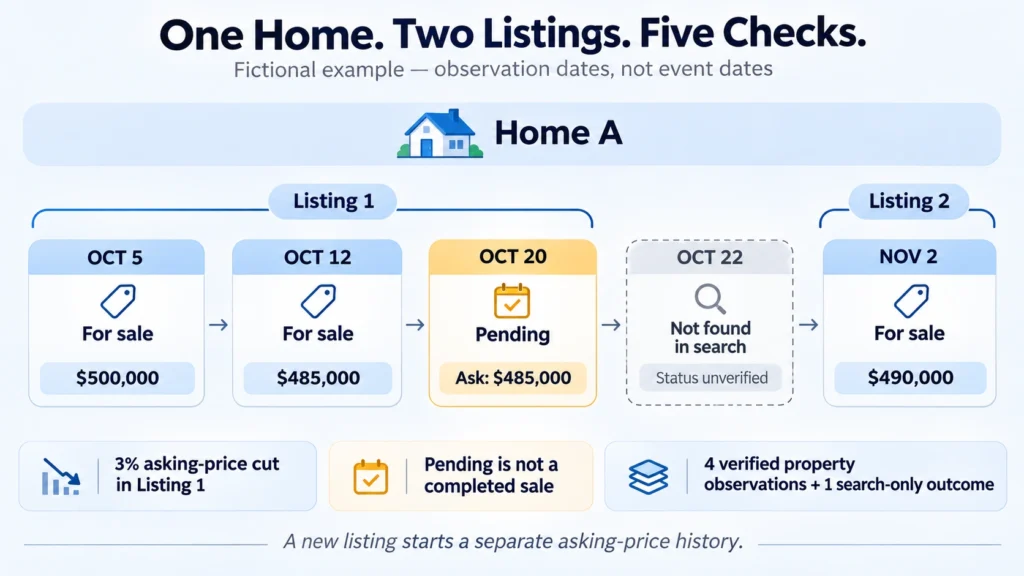
October 5
Home: A. Listing: 1. Observed status: For sale.
Asking price: $500,000. Outcome: Valid property observation.
October 12
Home: A. Listing: 1. Observed status: For sale.
Asking price: $485,000. Outcome: Valid property observation.
October 20
Home: A. Listing: 1. Observed status: Pending.
Asking price: $485,000. Outcome: Valid property observation; no sale price supplied.
October 22
Home: A. Listing: Not freshly verified. Search result: No matching record.
Current asking price and status: Unverified. Last verified listing status: Pending on October 20.
November 2
Home: A. Listing: 2. Observed status: For sale.
Asking price: $490,000. Outcome: Valid property observation under a new listing identifier.
An analyst can now ask several precise questions of the export.
How many homes and listing episodes were observed? One home and two episodes in this fictional source. Keep separate counts for each.
Was there a price cut within Listing 1? The ask fell by $15,000. Dividing that reduction by the earlier $500,000 ask gives 3%. October 12 is when the lower amount was observed; the ledger does not date the seller’s action.
Did the home sell? The ledger contains no confirmed sale event. Pending status followed by absence from search is insufficient to answer that question.
How complete is the monitoring history? There are five scheduled checks and four valid property observations. October 22 contributes a search outcome, not a new property observation.
For a spreadsheet export, give each observation its own row and set identifier and ZIP-code columns to text during import. Build the current view from the most recent verified records, keeping the historical rows and missing-data notes in the underlying table.
Choose Connection Settings Around the Collection Sequence
Mark which actions must share a network route and where an independent job begins. That gives you a concrete basis for choosing between retained and changing exits.
MangoProxy Residential proxies provide geographic targeting, rotation, and sticky-session options. Review those controls against your permitted collection sequence and the source’s connection requirements. Record any route interruption alongside the affected checks so it can be investigated. Product features alone do not establish access to Zillow or verify the records returned by a collector.
Glossary
ZPID – Zillow’s property identifier.
Listing episode – A distinct period of offering a property for sale or rent, separated according to the source evidence and the project’s rules.
Zestimate – Zillow’s modelled estimate of a home’s market value.
MLS – Multiple Listing Service, with its own listing data and access arrangements.
RESO (Real Estate Standards Organization): publishes the Data Dictionary referenced by listing-data providers.
API (application programming interface): a software interface with defined operations for other programs to use.
HTML (HyperText Markup Language): describes a web document through elements and attributes.
JSON (JavaScript Object Notation): a text representation of structured data.
Selector: identifies the page element an extraction rule should read.
Pagination: delivery of a result set in several pages or batches.
Deduplication: detecting repeated entries before counting unique records.
IP address (Internet Protocol address): the network address used as a packet’s source or destination.
Sticky session: a proxy mode that aims to retain an exit address for a provider-defined period.
Final Thoughts
Deliver the dated observations together with their source references. The next analyst should be able to reconstruct the $500,000 listing, the later $490,000 offer, and the unresolved check between them without consulting today’s page.
Frequently asked questions
Here we answered the most frequently asked questions.
How often should I check properties for changes?
Check when the source publishes updates before choosing an interval. Repeated requests cannot produce a change the source has not released. Fit the schedule to your report or alert window and the agreed access limits, and log any missed runs.
Can I match a Zillow property directly to county records using its ZPID?
Label the two identifier columns by source: Zillow and the relevant county. Where parcel identifiers are available, match them within the correct jurisdiction and check the address and unit. A ZPID should not be treated as the county’s parcel key. Preserve uncertain matches rather than forcing similar-looking addresses into one property record.
Should I collect photos and full listing descriptions?
Only where they serve the project and the relevant rights permit their collection and use. A factual price-and-status history can often use source references without storing images or copying full descriptions. Treat any media collection as a separate requirement.
How should corrections affect historical records?
Distinguish a correction to your extraction from a genuine source update. If a parser read lot area as living area, repair the affected derived values and retain a correction record. If the source later changes the stated living area, preserve the dated observations so that update remains visible.