


Cookie Persistence vs Session Persistence: What is the Difference and When Do You Need Each?
Published: ≈ 14 min read
Quick Answer
Cookie persistence and session persistence are often used interchangeably, but they describe different concepts. Cookie persistence refers to saving browser cookies between visits or automation runs, while session persistence is the broader process of maintaining a trusted user identity across multiple requests. Modern websites rely not only on cookies but also on authentication tokens, browser storage, device fingerprints, IP consistency, and server-side validation to keep users logged in.
Key Takeaways
- Cookie persistence stores cookies for future browser sessions.
- Session persistence preserves the entire authenticated browser state.
- Cookies alone are often insufficient for maintaining logged-in sessions.
- Modern applications combine cookies, tokens, Local Storage, browser fingerprints, and server-side validation.
- Browser automation becomes significantly more reliable when preserving complete session state rather than cookies alone.
- Choosing the right persistence strategy depends on your workflow and authentication requirements.
Why These Terms Are Often Confused
If you’ve worked with browser automation, you’ve probably seen advice like:
“Just save the cookies.”
Sometimes it works.
Sometimes it doesn’t.
The reason is simple: many developers treat cookie persistence and session persistence as if they were the same thing.
They are not.
Cookies certainly play an important role in maintaining authenticated sessions, but they represent only one layer of a much larger identity system.
As explained in How Session Persistence Works, modern web applications evaluate multiple signals before deciding whether a request belongs to a trusted user. Cookies are only one of those signals.
Understanding this distinction helps explain why copying cookies from one browser to another sometimes restores a login-and other times results in an immediate authentication challenge.
Cookie Persistence vs Session Persistence: The Simple Difference
The easiest way to understand the difference is to think about what is actually being preserved.
Cookie persistence focuses on one specific type of browser data.
Session persistence focuses on maintaining the user’s complete identity.
| Feature | Cookie Persistence | Session Persistence |
| Browser Cookies | ✅ | ✅ |
| Local Storage | ❌ | ✅ |
| Session Storage | ❌ | ✅ |
| Access Tokens | ❌ | ✅ |
| Refresh Tokens | ❌ | ✅ |
| Browser Fingerprint Consistency | ❌ | ✅ |
| Authentication State | Partial | Complete |
| Server Trust | Limited | Full |
This comparison illustrates why modern authentication systems rarely depend on cookies alone.
A browser can present perfectly valid cookies while still failing authentication because another part of the identity profile has changed.
What Cookie Persistence Actually Means
Cookie persistence simply means that browser cookies survive beyond the current browsing session.
Instead of disappearing when the browser closes, cookies are stored and reused during future visits.
This allows websites to remember information such as:
- login status;
- language preferences;
- shopping carts;
- personalization settings;
- analytics identifiers.
For example, when you check the “Remember me” box during login, the website usually creates one or more persistent cookies with a future expiration date.
The next time you visit the site, the browser automatically sends those cookies back to the server.
In many cases, this allows the application to recognize you immediately.
However, cookie persistence does not guarantee that your authenticated session will still be trusted.
The server may decide to perform additional verification if other identity signals no longer match.
How Persistent Cookies Work
Most persistent cookies include an expiration date.
For example:
Set-Cookie:
remember_user=true;
Expires=Wed, 15 Jul 2026 12:00:00 GMT;
Secure;
HttpOnly;
SameSite=Lax
Because the cookie contains an expiration time, the browser stores it even after being closed.
During the next visit:
Cookie Persistence Workflow
User Returns
↓
Browser Loads Saved Cookies
↓
HTTP Request
↓
Server Reads Cookies
↓
User Recognized
At first glance, this seems like complete session restoration.
In reality, the server usually performs additional checks before granting access.
What Session Persistence Actually Means
Session persistence is much broader than cookie persistence.
Rather than preserving one type of browser data, it preserves the complete environment that allows an application to continue trusting a returning user.
A modern authenticated session may include:
- persistent cookies;
- session cookies;
- Local Storage;
- Session Storage;
- access tokens;
- refresh tokens;
- browser fingerprint consistency;
- IP reputation;
- server-side session records.
This layered approach explains why browser automation tools increasingly save complete browser states instead of exporting cookies alone.
For example, Playwright Browser Contexts can preserve cookies together with Local Storage and other browser data, making restored sessions significantly more reliable than simple cookie exports.
Session persistence is not about remembering one identifier.
It is about preserving enough context for the server to confidently conclude that the same trusted browser has returned.
Why Cookies Alone Are Often Not Enough
Saving cookies is often the first technique developers learn when working with browser automation.
For simple websites, this may be all that’s required.
Modern web applications, however, rarely trust cookies as the only proof of identity.
Instead, authentication decisions are based on multiple independent signals that together form a trusted browser session.
Imagine the following scenario:
- You export cookies from Browser A.
- You import them into Browser B.
- Both browsers send identical cookies.
Yet Browser B is immediately redirected to the login page.
Nothing is wrong with the cookies.
The problem is that the overall browser identity has changed.
Modern authentication systems compare far more than a session cookie before deciding whether a request belongs to an existing user.
Why Cookies Sometimes Stop Working
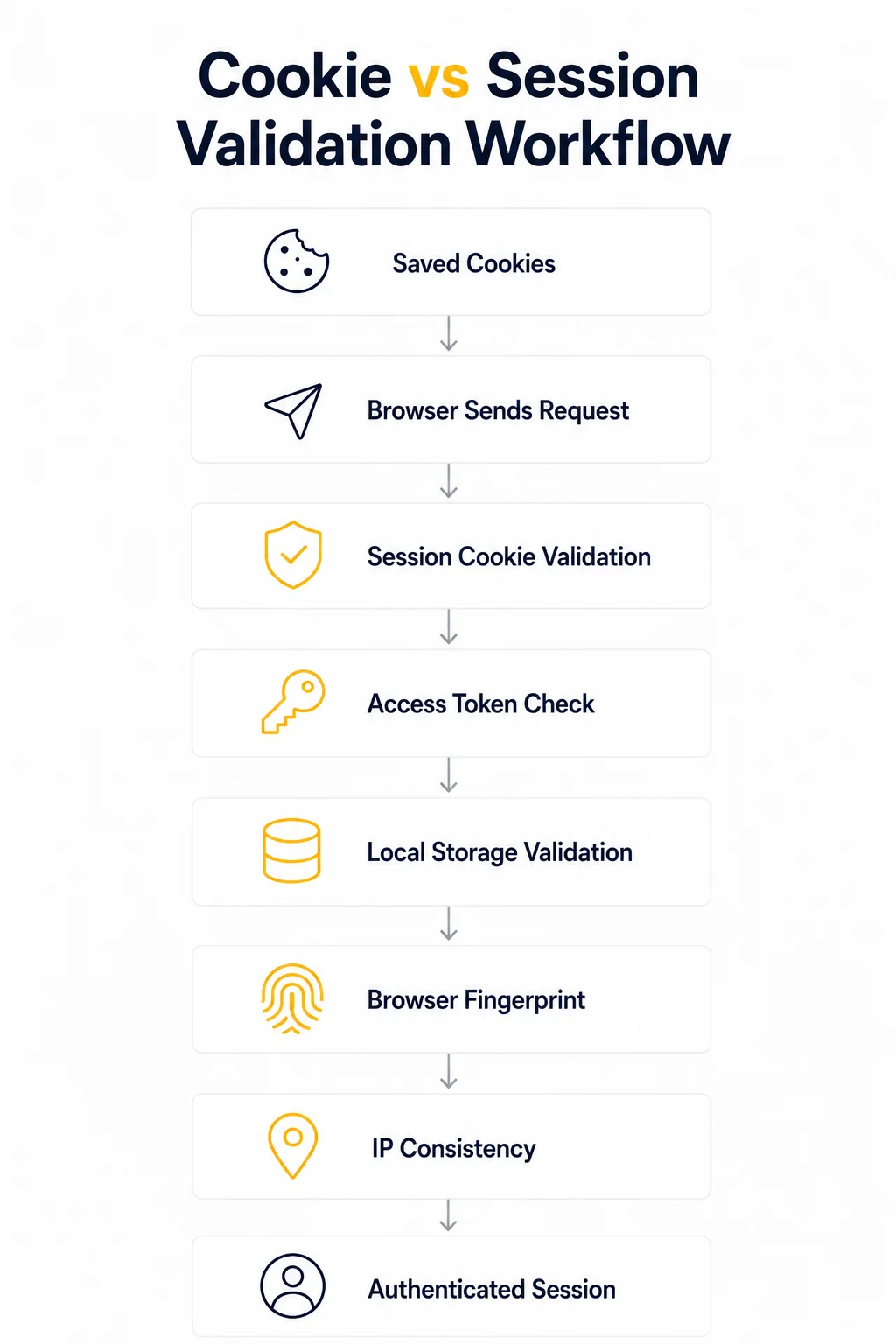
A typical authentication request may involve several verification layers.
Session Validation Workflow
Saved Cookies
↓
Browser Sends Request
↓
Server Checks Session ID
↓
Access Token Validation
↓
Browser Fingerprint Check
↓
IP Consistency Check
↓
Authenticated or Rejected
If any of these stages fails, the server may decide that the request no longer belongs to the original authenticated browser.
The result is often one of the following:
- login page appears again;
- multi-factor authentication is requested;
- CAPTCHA challenge is shown;
- access token is refreshed;
- the session is invalidated completely.
This explains why copying cookies between browsers frequently produces inconsistent results.
What Else Does a Website Check?
Cookies are only one component of a much larger trust model.
Many applications evaluate additional signals before restoring an authenticated session.
These commonly include:
| Identity Signal | Why It Matters |
| Session Cookies | Identifies the session. |
| Access Tokens | Confirms the user is still authenticated. |
| Refresh Tokens | Allows silent session renewal. |
| Local Storage | Stores authentication and application state. |
| Session Storage | Preserves temporary browser state. |
| Browser Fingerprint | Helps identify the device. |
| IP Address | Detects unusual network changes. |
| User Behavior | Identifies suspicious activity patterns. |
| Server Session Database | Verifies that the session is still active. |
As you can see, cookies represent only one layer of modern session management.
This is why preserving only cookies often recreates an incomplete identity.
For a deeper explanation of how these signals work together, see How Session Persistence Works.
Cookie Persistence in Browser Automation
Cookie persistence still has an important role in automation.
For relatively simple workflows, restoring cookies can eliminate unnecessary logins and reduce repeated authentication.
Typical examples include:
- continuing anonymous browsing sessions;
- preserving shopping carts;
- remembering language preferences;
- maintaining non-sensitive application settings;
- returning to websites that use cookie-based personalization.
For these scenarios, exporting and restoring cookies may be entirely sufficient.
For example, many lightweight scraping scripts simply load previously saved cookies before sending requests.
However, browser automation projects become more demanding as authentication grows more sophisticated.
Enterprise dashboards, SaaS platforms, banking applications, social media websites, and anti-bot protected services usually expect much more than persistent cookies.
Session Persistence in Browser Automation
Session persistence aims to recreate the browser environment as completely as possible.
Instead of restoring only cookies, automation preserves the browser’s identity.
A fully restored session may include:
- cookies;
- Local Storage;
- Session Storage;
- authentication tokens;
- browser permissions;
- browser preferences;
- cache metadata;
- profile-specific configuration.
This is one reason why Playwright Browser Contexts provide a much more reliable approach than exporting cookies alone.
Playwright’s storageState() feature stores multiple layers of browser state in a single file, allowing automation to resume authenticated sessions with significantly greater consistency.
Similarly, browser profile reuse in Selenium preserves much more than cookies because Chrome or Edge loads the same profile directory during every execution.
The closer an automation environment resembles the original browser, the more likely the session will remain trusted.
Cookie Persistence vs Session Persistence in Practice
Choosing the right strategy depends on what you’re trying to automate.
| Scenario | Cookie Persistence | Full Session Persistence |
| Language preferences | ✅ | Optional |
| Shopping cart | ✅ | Optional |
| Anonymous browsing | ✅ | Optional |
| Authenticated dashboard | ⚠️ Limited | ✅ Recommended |
| Long-running automation | ❌ | ✅ |
| Multi-account management | ❌ | ✅ |
| Browser testing | ⚠️ | ✅ |
| Authenticated web scraping | ⚠️ | ✅ |
A useful rule of thumb is simple:
The more valuable the authenticated session becomes, the less likely cookies alone will be sufficient.
Long-lived sessions almost always depend on preserving a complete browser identity rather than only a handful of stored cookies.
When Cookie Persistence Is Enough
Cookie persistence remains an excellent solution when authentication is simple or not required at all.
Typical use cases include:
- public websites;
- documentation portals;
- news websites;
- product catalogs;
- preference management;
- marketing personalization;
- lightweight automation tasks.
In these situations, cookies mainly improve user convenience rather than acting as the primary security mechanism.
They allow browsers to remember information without reconstructing an entire authenticated identity.
For many automation projects, this lightweight approach is both faster and easier to maintain.
Common Mistakes
Many session-related issues are caused by incorrect assumptions rather than technical limitations.
Understanding these common mistakes can save hours of debugging and significantly improve browser automation reliability.
Assuming Cookies Store Everything
One of the biggest misconceptions is believing that cookies contain the entire login state.
In reality, modern web applications often distribute authentication across multiple storage mechanisms.
A browser may contain:
- authentication cookies;
- access tokens in Local Storage;
- refresh tokens;
- server-side session records;
- browser fingerprint data.
Exporting cookies alone preserves only one part of that identity.
Copying Cookies Between Different Browsers
Another common mistake is exporting cookies from one browser and importing them into a completely different environment.
For example:
- Chrome → Firefox
- Local Chrome → Cloud Browser
- Personal Browser → Automation Browser
Although the cookies remain identical, the surrounding browser environment changes.
Websites may notice differences in:
- browser fingerprint;
- installed fonts;
- graphics rendering;
- browser APIs;
- operating system details.
These changes can invalidate an otherwise healthy session.
This is one reason why Browser Fingerprinting Explained will become an important companion article to this guide.
Ignoring Local Storage
Many modern applications store critical authentication information outside cookies.
Common examples include:
- JWT access tokens;
- application state;
- account preferences;
- temporary authentication metadata.
Deleting or failing to restore Local Storage often forces users to authenticate again, even when cookies remain valid.
Rotating IP Addresses During Authenticated Sessions
Another frequent mistake is changing IP addresses while a user is actively logged in.
Some websites tolerate IP changes.
Others interpret sudden network changes as suspicious activity.
For long-running authenticated workflows, using Static ISP Proxies or sticky Residential Proxies often provides much greater session stability than continuously rotating addresses.
If you suspect network changes are affecting your session, first verify your current connection using My IP, then confirm that your proxy is functioning correctly with Proxy Checker.
Logging In on Every Automation Run
Many automation scripts start by logging into the application every time they execute.
Although simple, this approach creates unnecessary authentication traffic.
Repeated logins may trigger:
- security alerts;
- rate limits;
- CAPTCHA challenges;
- account protection mechanisms.
Whenever possible, reuse existing authenticated sessions instead of recreating them.
Production Tips
Reliable session management is based on consistency rather than complexity.
The following practices are widely used in production automation systems.
Preserve Complete Browser State
Whenever possible, save:
- cookies;
- Local Storage;
- Session Storage;
- browser preferences;
- authentication tokens.
The closer the restored browser matches the original environment, the more likely the session will remain trusted.
Keep Browser Profiles Consistent
Avoid changing browser versions, screen resolutions, language settings, or hardware characteristics between automation runs.
Consistency is generally more valuable than attempting to randomize browser properties.
Separate Browser Profiles Per Account
Each automated account should use its own dedicated browser profile.
This prevents authentication data from leaking between accounts and reduces unexpected session conflicts.
A good structure might look like:
Account A
↓
Browser Profile A
↓
Cookies
Local Storage
Tokens
————————-
Account B
↓
Browser Profile B
↓
Cookies
Local Storage
Tokens
Profile isolation becomes especially important when managing multiple authenticated accounts simultaneously.
Validate Your Network Before Debugging Sessions
Not every authentication problem is caused by cookies.
Before assuming that session persistence has failed, verify that your connection is behaving as expected.
A quick troubleshooting sequence might be:
Check My IP
↓
Validate Proxy
↓
Confirm Session Data
↓
Inspect Browser Storage
↓
Retry Authentication
Using My IP and Proxy Checker as the first diagnostic step often eliminates unnecessary debugging.
Respect Session Expiration
Every application defines its own session lifetime.
Some expire after minutes.
Others remain active for weeks.
Instead of fighting expiration, design automation workflows that detect expired sessions and perform a clean re-authentication when necessary.
This approach is significantly more reliable than repeatedly retrying failed requests.
Code Disclaimer
The examples and workflows presented in this article illustrate the core concepts behind cookie persistence and session persistence.
Production environments usually require additional considerations, including:
- secure credential management;
- encrypted storage;
- token refresh logic;
- retry strategies;
- browser profile isolation;
- proxy management;
- comprehensive error handling.
Treat these examples as architectural building blocks rather than complete production implementations.
They are intended to help you understand why preserving the complete browser environment generally produces more reliable results than saving cookies alone.
Glossary
Access Token
A short-lived credential used to prove that a user has successfully authenticated. Access tokens are typically sent with every authenticated request and expire after a limited period.
Browser Fingerprint
A collection of browser and device characteristics that help websites distinguish one browser from another. Common signals include screen resolution, fonts, GPU information, time zone, browser APIs, and hardware capabilities.
Cookie
A small piece of data stored by the browser and automatically sent with matching HTTP requests. Cookies commonly store session identifiers, preferences, and authentication information.
Cookie Persistence
The practice of storing browser cookies beyond the current browsing session so they can be reused during future visits or automation runs.
Local Storage
A browser storage mechanism that persists data after the browser closes. Many modern web applications store authentication tokens and application settings here.
Refresh Token
A long-lived credential used to request new access tokens without requiring the user to log in again.
Session
The relationship between a browser and a web application across multiple HTTP requests.
Session Persistence
The ability of a web application to recognize and trust the same user across multiple requests by combining cookies, browser storage, authentication tokens, fingerprints, and server-side validation.
Final Thoughts
Cookie persistence and session persistence solve related but fundamentally different problems.
Cookies allow browsers to remember information between visits, making websites more convenient to use. Session persistence goes much further by preserving the complete identity that modern applications rely on when deciding whether to trust a returning user.
As authentication systems continue to evolve, successful browser automation depends less on copying cookies and more on maintaining a consistent browser environment. Cookies, Local Storage, authentication tokens, browser fingerprints, and stable network behavior all contribute to keeping long-running sessions active.
Understanding the difference between these two concepts helps developers build more reliable automation workflows, reduce unnecessary logins, and troubleshoot authentication issues more effectively.
Frequently asked questions
Here we answered the most frequently asked questions.
Is cookie persistence the same as session persistence?
No. Cookie persistence refers only to storing cookies between browser sessions. Session persistence includes cookies together with authentication tokens, browser storage, browser fingerprints, server-side validation, and other identity signals.
Why do my saved cookies stop working?
Saved cookies may still be valid while another part of the browser identity has changed.
Common reasons include:
- expired authentication tokens;
- deleted Local Storage;
- browser fingerprint changes;
- IP address changes;
- server-side session expiration.
Should I save cookies or the entire browser profile?
It depends on the application. For lightweight websites, cookies may be sufficient. For authenticated dashboards, SaaS platforms, browser automation, and long-running workflows, preserving the complete browser profile usually provides much greater reliability.
Does Local Storage affect authentication?
Yes. Many modern applications store access tokens, application state, and authentication metadata in Local Storage. Removing or failing to restore this information may invalidate an otherwise healthy session.
Are persistent cookies permanent?
No. Persistent cookies include an expiration date.Once that date passes-or the cookie is manually deleted-the browser stops sending it to the server.
Which proxy type is best for maintaining authenticated sessions?
For workflows that require a stable browser identity, sticky Residential Proxies and Static ISP Proxies generally provide more consistent results than frequently rotating IP addresses. The right choice depends on your workflow, session duration, and the target application.