


How Session Persistence Works: The Hidden Layer Behind Stable Browser Automation
Published: ≈ 17 min read
Quick Answer
Session persistence is the mechanism that allows websites to recognize the same user across multiple requests. Instead of treating every page visit as a new connection, modern web applications combine cookies, session IDs, authentication tokens, browser storage, device fingerprints, and behavioral signals to maintain a continuous authenticated session. Understanding how these components work together is essential for developers, QA engineers, web scraping projects, and browser automation.
Key Takeaways
- Session persistence is much more than storing cookies.
- Modern websites combine multiple identifiers to recognize returning users.
- Authentication tokens, local storage, and browser fingerprints often matter as much as session cookies.
- Stable browser automation depends on preserving an entire browser environment, not just the IP address.
- Sticky proxies help maintain session consistency but cannot replace proper session management.
- Understanding the session lifecycle makes browser automation significantly more reliable.
Introduction
Every interaction with a modern website begins with a simple HTTP request. Yet behind that seemingly ordinary exchange lies a surprisingly sophisticated system responsible for keeping users logged in, preserving shopping carts, remembering preferences, and protecting accounts from unauthorized access.
Without session persistence, every click would feel like visiting a website for the very first time. You would need to log in again after opening each page, online stores would forget your cart, and web applications like Gmail, GitHub, or Slack would become practically unusable.
For developers and browser automation engineers, session persistence is equally important. A scraping script that unexpectedly loses authentication, a browser profile that triggers repeated login prompts, or an automation workflow interrupted by expired sessions often traces back to an incomplete understanding of how websites maintain user identity.
This article follows the complete lifecycle of a browser session – from the very first request to long-term authenticated activity – explaining how modern web applications recognize users while balancing usability, security, and fraud prevention.
The Life of a Browser Session
Many developers imagine sessions as nothing more than a cookie stored inside a browser. In reality, modern web applications maintain sessions through multiple layers working together.
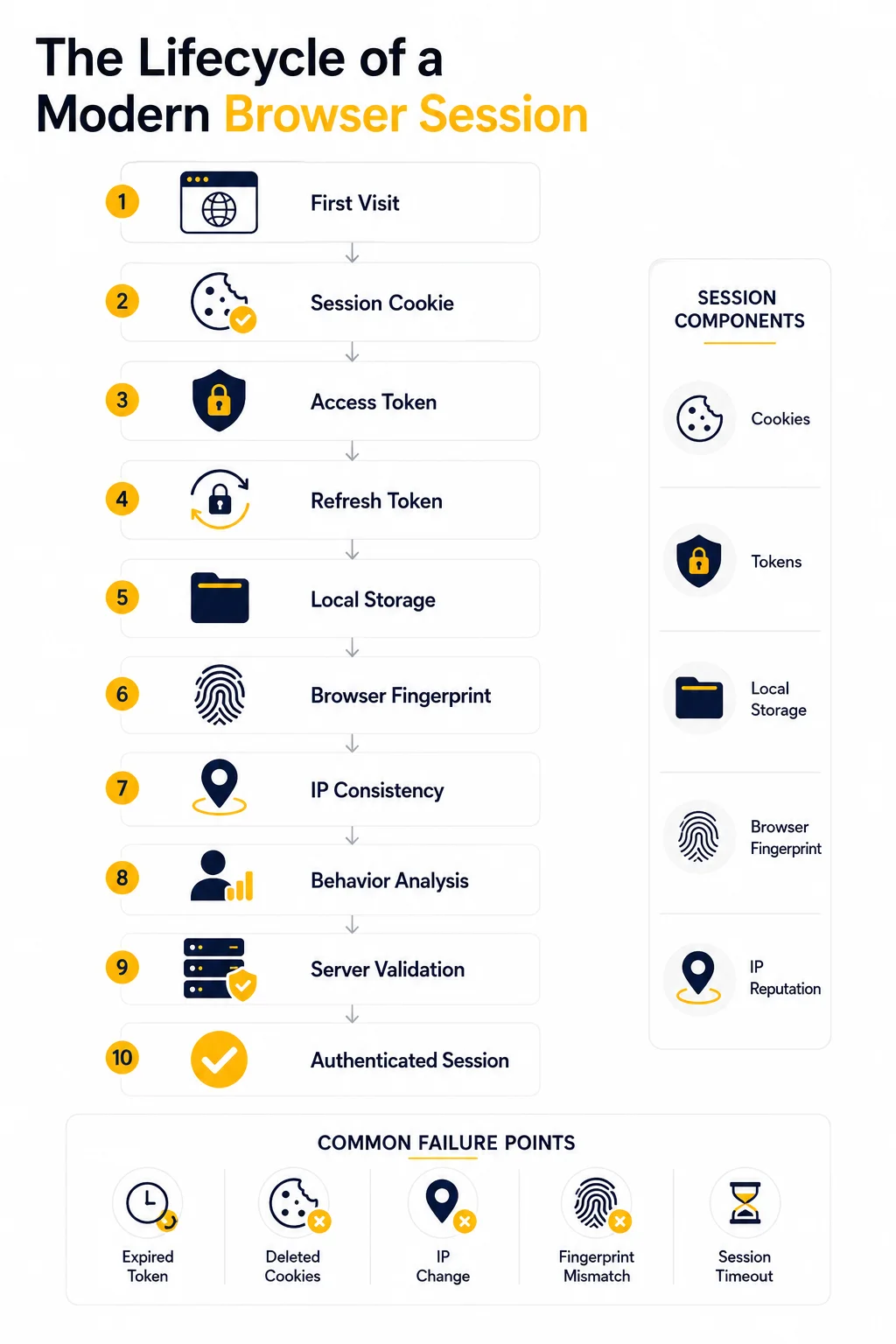
A typical authenticated session involves several components:
- Session cookies
- Session identifiers
- Access and refresh tokens
- Local Storage
- Session Storage
- Browser fingerprint signals
- IP address consistency
- Behavioral analysis
- Server-side session validation
Think of a browser session as an identity profile rather than a single identifier.
Instead of asking only one question –
“Do I still have this cookie?”
Modern websites ask a series of questions every time a request arrives:
- Does the session ID still exist?
- Is the authentication token valid?
- Is the browser profile consistent?
- Has the IP changed unexpectedly?
- Are browser characteristics still the same?
- Does this behavior resemble the previous activity?
Only after evaluating multiple signals does the server decide whether the request belongs to an existing authenticated user.
This layered approach explains why copying cookies alone often fails to reproduce a logged-in session on another machine or automation environment.
Step 1. The First Visit
Imagine opening a website you’ve never visited before.
At this moment, the browser knows nothing about the server, and the server knows nothing about you.
The first HTTP request typically looks like this:
GET / HTTP/1.1
Host: example.com
User-Agent: Mozilla/5.0
Accept: text/html
Notice what’s missing.
There is:
- no session ID;
- no authentication token;
- no user identifier;
- no stored preferences.
From the server’s perspective, this request comes from an anonymous visitor.
The application now decides whether a session should be created immediately or only after the user performs an action such as logging in or adding an item to a shopping cart.
Many modern websites create anonymous sessions even before authentication. This allows them to remember language preferences, consent settings, shopping carts, A/B testing assignments, and personalization data before the user signs in.
At this point, the server prepares the foundation for future requests.
Step 2. Creating a Session
Once the server decides to establish a session, it generates a unique identifier.
This identifier acts like a temporary passport for the browser throughout the interaction.
A simplified response might include:
HTTP/1.1 200 OK

Set-Cookie:
session_id=5a9f8c12e31b;
HttpOnly;
Secure;
SameSite=Lax
The browser stores this value automatically.
From this moment forward, every request to the same domain includes the session identifier:
Cookie:
session_id=5a9f8c12e31b
The important detail is that the session ID itself usually contains no meaningful user information.
Instead, it references server-side data such as:
- authenticated user ID;
- login timestamp;
- account permissions;
- shopping cart;
- CSRF tokens;
- security state;
- expiration rules.
This architecture improves security because sensitive information remains on the server rather than inside the browser.
If an attacker somehow guesses a valid session ID, modern applications still perform additional verification using expiration times, browser characteristics, IP reputation, and behavioral analysis before granting access.
Step 3. Session Cookies
Cookies remain one of the most visible components of session persistence, but they are often misunderstood.
A session cookie is simply a small piece of browser storage automatically attached to future requests matching its domain and security rules.
A typical session cookie might look like:
session_id=5a9f8c12e31bHowever, modern applications rarely rely on only one cookie.
A logged-in session may contain several different cookies serving distinct purposes:
| Cookie Type | Purpose |
| Session Cookie | Identifies the current session |
| Authentication Cookie | Confirms login status |
| CSRF Cookie | Protects against cross-site request forgery |
| Preference Cookie | Stores language, theme, or user settings |
| Analytics Cookie | Tracks anonymous usage metrics |
Each cookie has its own lifetime and security configuration.
Common attributes include:
- HttpOnly – prevents JavaScript from accessing the cookie.
- Secure – sends the cookie only over HTTPS.
- SameSite – limits cross-site cookie transmission.
- Expires / Max-Age – defines when the cookie becomes invalid.
One of the biggest misconceptions in browser automation is believing that exporting cookies is enough to recreate a session.
For many modern applications, cookies represent only one piece of a much larger identity puzzle.
Authentication tokens, browser storage, fingerprint consistency, and server-side validation all contribute to determining whether a session should remain trusted.
Step 4. Local Storage and Authentication Tokens
By the time a user successfully signs in, most modern web applications have already moved far beyond simple session cookies.
Today’s authentication systems typically combine several storage mechanisms, each serving a different purpose.
The most common are:
- Cookies
- Local Storage
- Session Storage
- Access Tokens
- Refresh Tokens
Rather than storing everything in a single place, applications distribute identity across multiple components.
A simplified authentication flow often looks like this:
User Login
↓
Server Authentication
↓
Access Token
↓
Refresh Token
↓
Local Storage / Cookies
↓
Authenticated Requests
Access Tokens
An access token proves that the current user has already authenticated.
Instead of checking usernames and passwords with every request, the browser simply sends the token.
Typical characteristics include:
- valid for only a few minutes;
- digitally signed by the server;
- contains user claims or references;
- automatically renewed before expiration.
This approach reduces server load while improving security.
Refresh Tokens
Refresh tokens solve a different problem.
Imagine your access token expires every 15 minutes. Without a refresh mechanism, users would constantly be forced to log in again.
Instead, applications issue a longer-lived refresh token.
When the access token expires:
- The browser sends the refresh token.
- The server validates it.
- A new access token is generated.
- The user remains logged in without noticing.
This silent renewal process is why many services keep users signed in for weeks or even months.
Local Storage
Unlike cookies, Local Storage is never sent automatically with HTTP requests.
Instead, JavaScript retrieves stored values and attaches them when necessary.
Applications frequently use Local Storage for:
- JWT access tokens;
- UI preferences;
- cached application data;
- feature flags;
- onboarding progress.
Because Local Storage persists after closing the browser, it enables longer-lasting user experiences than session-only storage.
However, it also requires careful security practices since JavaScript can access its contents.
Session Storage
Session Storage behaves similarly but exists only for the current browser tab.
Once the tab closes, its contents disappear.
Developers often store:
- temporary workflow data;
- form progress;
- one-time verification states;
- navigation context.
For browser automation, failing to preserve Local Storage often causes authenticated sessions to disappear even when cookies remain intact.
Step 5. Browser Fingerprinting
Suppose two browsers present the same session cookie.
Should the server automatically trust both?
Modern websites increasingly answer:
No.
Instead, they evaluate whether the browser itself still looks like the same device.
This process is known as browser fingerprinting.
Rather than relying on a single identifier, websites collect dozens of small characteristics that together create a highly distinctive browser profile.
Common fingerprint signals include:
- User-Agent
- Operating system
- Browser version
- Screen resolution
- Time zone
- Installed fonts
- Language settings
- WebGL information
- Canvas rendering
- Audio processing
- Hardware concurrency
- Device memory
- Touch support
Individually, none of these values identify a user.
Combined, they become surprisingly unique.
For example:
| Browser A | Browser B |
| Windows 11 | Windows 11 |
| Chrome 137 | Chrome 137 |
| English | English |
| 1920×1080 | 1920×1080 |
At first glance they appear identical.
But subtle differences in graphics rendering, installed fonts, GPU drivers, hardware capabilities, and browser APIs often distinguish one browser from another.
This explains why importing cookies into a completely different browser profile frequently triggers:
- additional verification;
- CAPTCHA challenges;
- login confirmation;
- session invalidation.
The cookies may be correct.
The browser identity is not.
Step 6. IP Consistency
Many people assume that an IP address defines a browser session.
In reality, it is only one signal among many.
Changing an IP address does not automatically terminate a session.
Millions of users legitimately switch networks every day:
- home Wi-Fi;
- office networks;
- mobile data;
- public hotspots;
- VPN connections.
Modern applications expect this behavior.
However, they also evaluate how the change occurs.
For example:
A user browsing from New York suddenly appears in Singapore thirty seconds later.
Even if the session cookie remains valid, this abrupt geographic jump may trigger additional verification.
Likewise, rapidly alternating between residential, datacenter, and mobile IP addresses during a single authenticated session often appears suspicious.
Many fraud detection systems evaluate:
- ASN changes;
- country changes;
- network type;
- IP reputation;
- connection frequency;
- historical login locations.
This is where sticky sessions become valuable.
Sticky proxies maintain the same IP address throughout an automation workflow, reducing unnecessary identity changes while preserving session consistency.
However, stable IPs alone cannot compensate for mismatched browser fingerprints or missing authentication tokens.
Step 7. Session Validation
Every authenticated request initiates a new round of trust evaluation.
The server asks a series of questions before processing the request:
- Is the session still active?
- Has the token expired?
- Does the session ID exist?
- Does the browser profile remain consistent?
- Has the account shown suspicious activity?
- Has the user logged out elsewhere?
Only after these checks succeed does the application process the requested action.
A simplified validation flow looks like this:
Incoming Request
↓
Session Cookie
↓
Access Token
↓
Browser Fingerprint
↓
IP Evaluation
↓
Behavior Analysis
↓
Session Database
↓
Authenticated Response
Some platforms evaluate only a handful of signals.
Large cloud platforms and financial services may evaluate hundreds.
For example, a login request might trigger additional checks involving:
- impossible travel detection;
- device history;
- browser fingerprint similarity;
- previous authentication methods;
- behavioral consistency;
- recent password changes;
- risk scoring systems.
If the calculated risk exceeds an acceptable threshold, the application may:
- invalidate the session;
- request multi-factor authentication;
- display a CAPTCHA;
- require password re-entry;
- temporarily restrict account access.
This layered validation process explains why session persistence is no longer just about storing cookies.
It is about maintaining a consistent identity across every interaction with the application.
Why Sessions Break
Even well-designed automation workflows occasionally lose authenticated sessions.
In most cases, the cause is not a single missing cookie but a mismatch somewhere in the broader identity model.
The most common reasons include:
| Cause | Why It Happens |
| Expired access token | Token lifetime has ended and renewal failed. |
| Deleted cookies | Session identifier is no longer available. |
| Missing Local Storage | Authentication state cannot be fully reconstructed. |
| Browser fingerprint changes | The device appears different from previous requests. |
| Sudden IP changes | Geographic or network inconsistencies increase risk. |
| Server-side timeout | The application invalidates inactive sessions automatically. |
| Manual logout | The server intentionally destroys the session. |
| Security policy updates | Risk detection forces re-authentication. |
Understanding these failure points is essential for building reliable browser automation.
A stable session depends on preserving the complete execution environment rather than any single identifier.
Session Persistence in Browser Automation
Understanding how websites maintain sessions is only half of the story.
The real challenge begins when browser automation enters the picture.
Unlike human users, automated browsers are often created from scratch for every execution. Unless the automation deliberately preserves session state, every run starts as a completely new visitor.
This leads to unnecessary logins, repeated authentication challenges, additional CAPTCHAs, and a much higher chance of triggering anti-bot systems.
Successful automation treats session persistence as a first-class engineering concern rather than an afterthought.
Playwright: Preserving the Entire Browser State
One of Playwright’s biggest advantages is its ability to save the complete authentication state.
Instead of exporting only cookies, Playwright can preserve:
- cookies;
- Local Storage;
- Session Storage (where applicable);
- authentication state.
This dramatically improves reliability.
Example: Save Authentication State
const { chromium } = require('playwright');

(async () => {

const browser = await chromium.launch();

const page = await browser.newPage();

await page.goto('https://example.com/login');

// Perform login here

await page.context().storageState({
path: 'auth.json'
});

await browser.close();

})();
The generated auth.json contains everything required to recreate the authenticated browser context.
Example: Restore Authentication State
const { chromium } = require('playwright');

(async () => {

const browser = await chromium.launch();

const context = await browser.newContext({
storageState: 'auth.json'
});

const page = await context.newPage();

await page.goto('https://example.com/dashboard');

})();
No login is required because the browser resumes the previously authenticated session.
For long-running automation workflows, this approach is considerably more stable than repeatedly entering usernames and passwords.
Selenium: Reusing Browser Profiles
Selenium follows a different philosophy.
Instead of exporting browser state, many teams simply reuse an existing browser profile.
A persistent profile preserves:
- cookies;
- Local Storage;
- browser preferences;
- saved permissions;
- cached assets;
- login sessions.
Example: Chrome User Profile
from selenium import webdriver
from selenium.webdriver.chrome.options import Options

options = Options()

options.add_argument(
"--user-data-dir=/path/to/chrome-profile"
)

driver = webdriver.Chrome(options=options)

driver.get("https://example.com")
Because Chrome loads the same user profile every time, authenticated sessions often remain active across multiple executions.
This method is especially useful for:
- QA automation;
- internal dashboards;
- long-running monitoring tasks.
However, it requires careful profile management because corrupted browser profiles can introduce difficult-to-debug issues.
Python Requests: Maintaining HTTP Sessions
Not every automation task requires a browser.
For APIs and traditional web scraping, Python’s requests library provides built-in session management.
The Session() object automatically preserves cookies between requests.
Example
import requests

session = requests.Session()

session.post(
"https://example.com/login",
data={
"username":"user",
"password":"password"
}
)

response = session.get(
"https://example.com/dashboard"
)

print(response.status_code)
Every subsequent request automatically includes the session cookies returned during login.
Without requests.Session(), each request would behave as an independent visitor.
Choosing the Right Persistence Strategy
Different automation projects require different levels of persistence.
| Automation Type | Recommended Approach |
| API requests | Python requests.Session() |
| Simple scraping | Cookie persistence |
| Browser automation | Playwright storageState() |
| Long-term browser workflows | Persistent browser profiles |
| Multi-account management | Dedicated browser profiles for each account |
There is no universal solution.
The best strategy depends on how much of the browser environment needs to remain consistent.
Production Tips
Reliable browser automation depends on consistency rather than complexity.
The following practices significantly improve long-running session stability.
Preserve More Than Cookies
Many modern applications store authentication data in Local Storage or use rotating access tokens.
Saving cookies alone is often insufficient.
Whenever possible, preserve the complete browser state.
Keep Browser Fingerprints Stable
Changing browser versions, screen resolutions, language settings, or graphics capabilities between executions may invalidate otherwise healthy sessions.
Reuse browser profiles whenever practical.
Avoid Frequent IP Changes
Rapid IP switching during authenticated workflows increases risk scores on many platforms.
For workflows that require a continuous login session, sticky residential or ISP proxies generally provide greater stability than rotating proxies.
Refresh Authentication Gracefully
Instead of waiting for a session to expire completely, many production systems periodically refresh authentication before expiration.
This mimics normal user behavior and reduces failed requests.
Respect Session Expiration
Applications intentionally invalidate sessions after inactivity.
Automation should detect expired sessions and perform a clean re-authentication rather than repeatedly retrying failed requests.
Separate Accounts Into Independent Profiles
Sharing one browser profile across multiple accounts often creates cross-session contamination.
Each account should have:
- its own browser profile;
- its own cookies;
- its own Local Storage;
- its own authentication state.
This isolation greatly reduces unexpected authentication issues.
Common Mistakes
Many session-related problems stem from a few recurring implementation mistakes.
Avoid these common pitfalls:
- Exporting only cookies while ignoring Local Storage.
- Logging in again on every automation run instead of reusing session state.
- Recreating browser profiles unnecessarily.
- Rotating IP addresses in the middle of authenticated sessions.
- Changing browser fingerprints between executions.
- Ignoring token expiration.
- Sharing the same browser profile across multiple accounts.
Each of these issues introduces inconsistencies that modern websites can detect.
Code Disclaimer
The code examples shown in this article demonstrate the fundamental concepts of session persistence.
Production environments often require additional safeguards, including:
- encrypted credential storage;
- secure secret management;
- token refresh logic;
- retry mechanisms;
- proxy management;
- browser profile isolation;
- comprehensive error handling.
These examples are intended as educational building blocks rather than complete production implementations.
Glossary
Access Token
A short-lived credential that proves a user has successfully authenticated. Applications validate access tokens on each request to authorize access to protected resources.
Browser Fingerprint
A collection of browser and device characteristics – such as operating system, screen resolution, installed fonts, GPU information, and browser APIs – used to distinguish one browser from another.
Cookie
A small piece of data stored by the browser and automatically sent with future HTTP requests to the same domain.
Local Storage
A browser storage mechanism that persists data even after the browser is closed. Modern web applications often use it to store authentication-related information and application settings.
Refresh Token
A long-lived credential used to obtain new access tokens without requiring users to log in again.
Session
The logical relationship between a user and a web application across multiple HTTP requests.
Session Cookie
A cookie containing a session identifier that allows the server to associate incoming requests with an existing session.
Session Persistence
The ability of a web application to recognize and maintain the same user session across multiple requests by combining cookies, tokens, browser storage, and identity signals.
Sticky Session
A browsing session that consistently uses the same IP address throughout its lifetime. Sticky sessions reduce identity changes and are commonly used in browser automation and authenticated workflows.
Storage State
A saved browser state containing cookies and storage information that can be restored to recreate an authenticated browser session.
Final Thoughts
Session persistence has evolved far beyond the simple session cookies that powered early web applications.
Today’s platforms combine multiple identity signals – including cookies, authentication tokens, browser storage, device fingerprints, IP consistency, and behavioral analysis – to determine whether an incoming request belongs to a trusted user.
For developers, QA engineers, and browser automation teams, understanding this layered architecture is essential. Reliable automation is no longer about replaying HTTP requests or copying cookies between browsers. It requires preserving a consistent browser environment that closely mirrors legitimate user behavior.
As fraud detection systems continue to become more sophisticated, successful automation will increasingly depend on maintaining stable identities rather than finding ways to bypass security mechanisms. Projects that treat session persistence as part of their overall architecture – rather than a workaround – are far more likely to remain reliable over time.
Frequently asked questions
Here we answered the most frequently asked questions.
Is session persistence the same as cookies?
No. Cookies are only one part of session persistence. Modern applications also rely on authentication tokens, Local Storage, browser fingerprints, server-side validation, behavioral analysis, and other signals to maintain user identity.
Why do websites log me out even if my cookies are still valid?
A valid cookie alone does not guarantee a trusted session. Applications may invalidate sessions because of expired tokens, browser fingerprint changes, IP inconsistencies, unusual login behavior, security policy updates, or server-side session expiration.
Does changing my IP address always end a session?
No. Many users legitimately switch between Wi-Fi, mobile networks, and office connections. However, sudden geographic changes, frequent IP rotation, or low-reputation networks may increase a website’s risk score and trigger additional verification.
Why does browser automation lose sessions so often?
Automation environments frequently recreate browser profiles from scratch. Without preserving cookies, Local Storage, authentication tokens, and browser characteristics, every execution appears to be a completely new device.
Is preserving cookies enough for Playwright or Selenium?
Sometimes, but increasingly no. Many modern web applications store authentication data outside cookies. For reliable automation, preserving the complete browser state – including Local Storage and authentication tokens – produces significantly better results.
Which proxy type is best for long authenticated sessions?
For workflows requiring stable logins, sticky residential proxies and static ISP proxies generally provide greater consistency than rapidly rotating proxies. The optimal choice depends on your automation workflow, session duration, and target website.
What's the difference between sticky sessions and session persistence?
Sticky sessions refer to maintaining the same IP address throughout a browsing session. Session persistence refers to the entire identity management process, including cookies, tokens, browser storage, fingerprints, and server-side validation. Sticky IPs support session persistence but do not replace it.