


How to Change Your IP Address: Complete Guide for Privacy, Testing and Internet Access
Published: ≈ 6 min read
Quick Answer
You can change your IP address by using a proxy, VPN, mobile network, router restart, or different internet connection. Different methods affect privacy, routing, detection risk and internet performance differently.
Key Takeaways
- Your IP address identifies your internet connection externally
- Different IP change methods provide different levels of privacy and flexibility
- Residential, mobile and datacenter IPs behave differently
- Websites often analyze more than just your IP address
- IP changes affect routing, latency and detection systems
Why People Change Their IP Address
Many users only discover IP addresses when something stops working.
Common situations include:
- websites blocking access
- regional restrictions
- testing location-specific content
- unstable routing
- automation systems failing
- privacy concerns
In real infrastructure environments, changing an IP address is often part of troubleshooting, testing or traffic management rather than anonymity alone.
What an IP Address Actually Does
An IP address identifies your internet connection externally.
Websites use IP addresses to:
- send responses back to your device
- estimate geographic location
- apply security policies
- detect unusual traffic behavior
Without an IP address, internet communication cannot function properly.
You can quickly check your visible public IP using My IP.
Why Your IP Address Sometimes Changes Automatically
Not all IP addresses are permanent.
Many internet providers rotate IPs dynamically.
This is especially common with:
- residential ISPs
- mobile carriers
- CGNAT infrastructure
As a result, users may notice their IP changing naturally over time without doing anything manually.
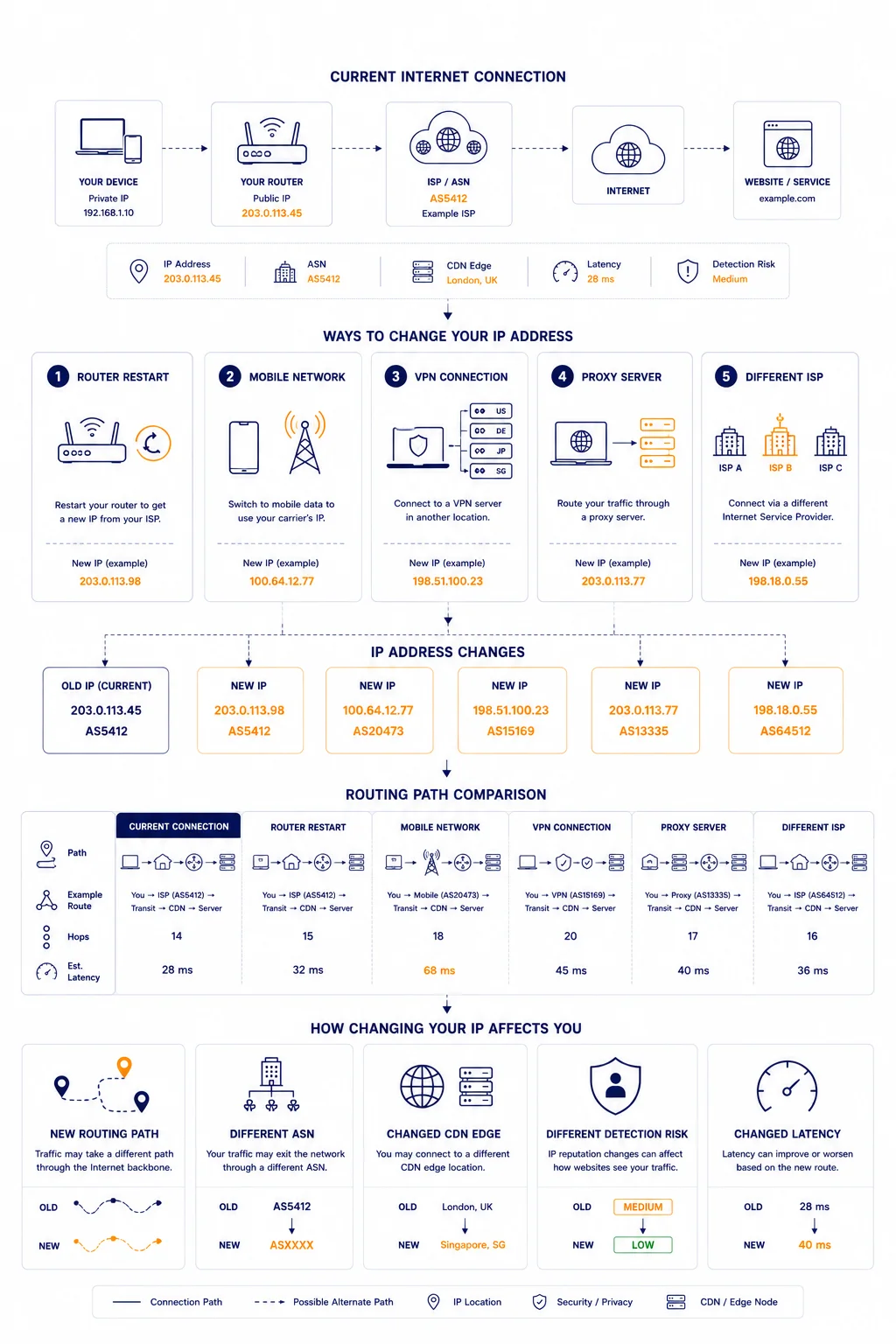
The Most Common Ways to Change Your IP Address
There is no single universal method.
Different approaches work differently depending on the situation.
Method 1 – Restart Your Router
Some ISPs assign dynamic IP addresses temporarily.
Restarting a router may trigger:
- DHCP renewal
- reassignment of external IP
- reconnection to another network pool
However, this method does not work reliably everywhere.
Some providers assign extremely persistent IP leases.
Method 2 – Switch to Mobile Data
Mobile networks frequently rotate IP addresses automatically.
Switching from:
- Wi-Fi → mobile network
often changes:
- IP address
- ASN
- routing path
This is one of the fastest ways to obtain a different external IP temporarily.
Method 3 – Use a VPN
VPNs route traffic through external infrastructure.
When connected:
- websites see the VPN server IP
- your original IP becomes hidden externally
VPNs are commonly used for:
- privacy
- geo-testing
- public Wi-Fi protection
- routing changes
However, many websites already recognize popular VPN infrastructure.
Method 4 – Use a Proxy
Proxies forward traffic through intermediate infrastructure before reaching websites.
Different proxy types behave differently:
| Proxy Type | Typical Use |
| Residential | natural browsing behavior |
| Datacenter | high speed automation |
| ISP | balance between trust and speed |
| Mobile | rotating carrier infrastructure |
For related context, see What Is a Residential IP.
Why Residential IPs Often Behave Differently
Residential IPs originate from ISP infrastructure associated with real consumer networks.
As a result:
- websites often trust them more
- routing appears more natural
- anti-bot systems may apply lower suspicion initially
This is one reason residential infrastructure is widely used for:
- automation
- testing
- verification systems
- regional browsing
Method 5 – Use a Different Network Entirely
Connecting through another network changes:
- IP address
- ASN
- routing path
- sometimes even CDN edge selection
Examples include:
- coworking spaces
- mobile hotspots
- secondary ISPs
- cloud infrastructure
This is often useful during network troubleshooting.
Why Websites Still Detect Users After IP Changes
Modern websites rarely rely on IP addresses alone.
They also analyze:
- browser fingerprints
- TLS behavior
- request timing
- session consistency
This is why simply changing an IP does not always reset detection systems.
For related context, see How Websites Detect Bots vs Real Users and Proxy Fingerprinting Explained.
Why IP Changes Affect Website Performance
Changing an IP often changes:
- routing paths
- ASN exposure
- CDN edge selection
- latency behavior
As a result, the same website may perform differently depending on the network used.
For related context, see What Is ASN and Why It Matters.
Why Some Websites Block Certain IPs
Websites constantly analyze traffic quality.
Some IP ranges become associated with:
- abuse
- scraping
- spam
- bot activity
This may trigger:
- CAPTCHAs
- rate limits
- temporary restrictions
- verification systems
For deeper explanation, see Why Websites Block IPs.
How IP Changes Affect Automation Systems
Automation systems frequently rotate IPs for:
- distributed requests
- geo-testing
- session management
- infrastructure balancing
However, excessive or unrealistic IP rotation may actually increase detection risk.
Stable infrastructure often performs better than aggressive switching.
Why Latency Changes After Switching IPs
Changing an IP frequently changes the network route as well.
This may affect:
- latency
- congestion exposure
- packet loss
- CDN routing behavior
One IP may route efficiently.
Another may follow a congested path.
You can analyze routing behavior using IP Trace Tool.
Real Infrastructure Example
Imagine two users accessing the same service.
User A:
- uses a residential ISP connection
- routes through nearby CDN infrastructure
User B:
- uses overloaded cloud VPN infrastructure
- routes through distant datacenter paths
Even if both users are located in the same country:
- latency
- detection risk
- loading speed
may differ significantly.
Why Engineers Change IPs During Troubleshooting
Infrastructure teams frequently switch IPs to diagnose:
- routing anomalies
- CDN problems
- DNS inconsistencies
- ASN filtering
- regional instability
This helps isolate whether the problem is:
- user-side
- ISP-related
- infrastructure-related
- region-specific
Additional Tools for Network Diagnostics
Changing an IP address often makes more sense together with network diagnostics.
Useful tools include:
• My IP – checks your current public IP address and location visibility
• IP Lookup – identifies ASN ownership and infrastructure information
• IP Trace Tool – analyzes routing paths and latency behavior
• Proxy Checker – verifies connectivity and proxy responsiveness
Combining these tools helps understand how different IPs behave across infrastructure environments.
Glossary
- IP Address
A unique identifier assigned to a device or internet connection. - ASN
An autonomous system controlling routing infrastructure. - Residential IP
An IP address assigned through consumer ISP infrastructure. - Proxy
An intermediary server forwarding traffic between systems.
Frequently asked questions
Here we answered the most frequently asked questions.
What is the easiest way to change an IP address?
Switching networks, restarting a router, or using a proxy/VPN are the most common methods.
Does changing an IP improve privacy?
It may improve external anonymity, but websites also analyze many other signals.
Why do websites still recognize users after IP changes?
Because modern detection systems analyze fingerprints, behavior and session consistency beyond IPs.
Can changing an IP affect website speed?
Yes. Different IPs may route through different infrastructure and CDN paths.