
How Websites Detect Bots vs Real Users
Published: ≈ 5 min read
Quick Answer
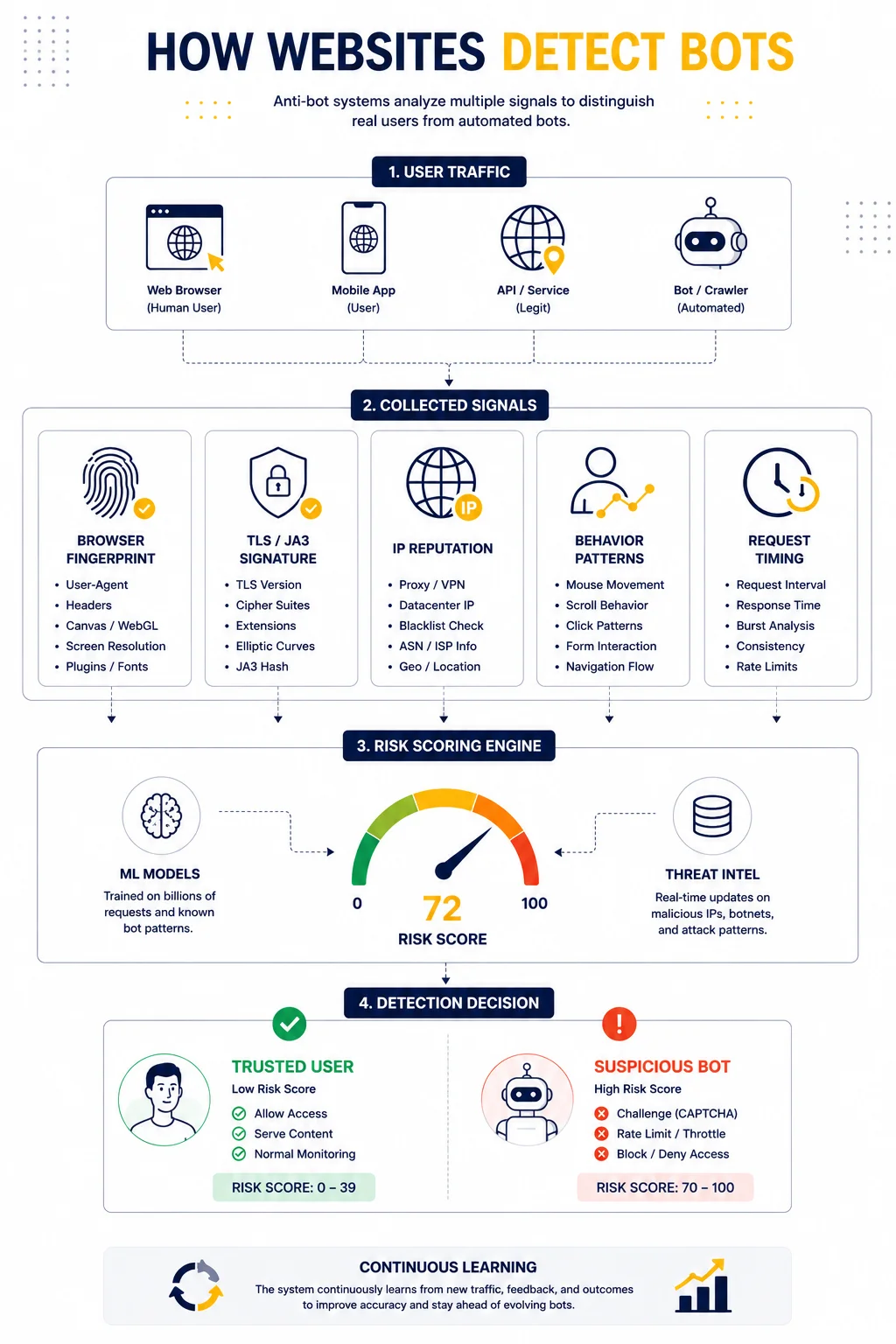
Websites detect bots by analyzing behavior patterns, browser fingerprints, TLS signatures, request timing, IP reputation, and interaction signals. Modern anti-bot systems rarely rely on a single indicator.
Key Takeaways
- Websites analyze behavior more than IP addresses
- Browser and TLS fingerprints are major detection signals
- Bots often fail because their patterns look unnatural
- Detection systems combine many small indicators together
- Realistic traffic behavior matters more than aggressive IP rotation
Why Websites Try to Detect Bots
Modern websites constantly deal with:
- spam traffic
- scraping systems
- fake registrations
- credential stuffing
- automated abuse
Because of this, anti-bot systems have become much more advanced.
Today, websites no longer ask only:
“Is this IP suspicious?”
Instead, they analyze:
“Does this traffic behave like a real person?”
Why IP Address Alone Is No Longer Enough
Years ago, blocking suspicious IPs was often enough.
Today, that approach is unreliable because:
- many users share cloud infrastructure
- VPN usage is common
- mobile networks rotate IPs naturally
- residential traffic changes constantly
As a result, websites now rely on deeper identification systems.
This is why modern detection increasingly depends on:
- browser fingerprints
- TLS behavior
- interaction patterns
- session consistency
For deeper context, see Proxy Fingerprinting Explained and What Is JA3 Fingerprint and How It Works.
Browser Fingerprinting
One of the strongest detection layers is browser fingerprinting.
Websites collect information such as:
- screen resolution
- operating system
- installed fonts
- timezone
- WebGL and Canvas behavior
- browser version
Combined together, these signals create a highly unique browser profile.
Even if the IP changes, the browser fingerprint may remain identical.
TLS Fingerprints and JA3 Detection
HTTPS connections contain another important layer of identification.
During the TLS handshake, browsers expose technical characteristics including:
- cipher suites
- TLS extensions
- protocol preferences
These values generate a JA3 fingerprint.
Detection systems use this to determine whether traffic resembles:
- Chrome
- Firefox
- mobile devices
- automation frameworks
This is why some bots get detected immediately despite rotating proxies.
For deeper explanation, see What Is JA3 Fingerprint and How It Works.
Behavioral Analysis
Behavioral analysis is now one of the most important anti-bot mechanisms.
Real users behave unpredictably.
Bots often behave too perfectly.
Websites monitor:
- mouse movement
- scrolling behavior
- click timing
- request intervals
- session duration
Example of suspicious behavior:
| Behavior | Detection Risk |
| Perfectly timed requests | high |
| Identical navigation flow | medium |
| No mouse movement | high |
| Human-like randomness | low |
Modern anti-bot systems are trained to identify unnatural consistency.
Request Timing Patterns
Bots frequently send requests:
- too quickly
- too consistently
- without pauses
Real users naturally generate irregular traffic.
For example:
- page reading time varies
- scrolling is inconsistent
- interactions happen unpredictably
Even small timing differences can become detection signals.
IP Reputation Analysis
IP reputation still matters, but as part of a larger scoring system.
Websites may evaluate:
- ASN reputation
- datacenter usage
- known proxy networks
- historical abuse activity
This is why:
- residential proxies often appear more natural
- datacenter proxies are easier to classify
However, infrastructure alone is not enough.
CAPTCHAs as a Detection Layer
CAPTCHAs are usually not the primary detection system.
They are often triggered only after risk signals accumulate.
Typical triggers include:
- suspicious fingerprints
- unusual request patterns
- inconsistent sessions
- high automation probability
For more details, see Why Websites Show CAPTCHA When Using Proxies.
Why Some Bots Get Detected Immediately
Detection often happens because multiple signals do not match.
Examples:
| Signal Combination | Risk |
| Mobile IP + desktop fingerprint | high |
| US IP + EU timezone | medium |
| Fast requests + unusual JA3 | very high |
| Static browser + rotating IPs | high |
Even if each signal alone looks acceptable, the combination may appear artificial.
How Real Users Typically Behave
Real users generate inconsistent and imperfect behavior.
Typical characteristics include:
- varied interaction speed
- pauses between actions
- irregular browsing patterns
- realistic session flow
This natural randomness is difficult to imitate perfectly.
How Anti-Bot Systems Build Risk Scores
Modern detection systems usually work with scoring models.
Each signal contributes to an overall trust score.
Simplified example:
| Signal | Risk Impact |
| Residential IP | low |
| Datacenter IP | medium |
| Known automation JA3 | high |
| Aggressive request timing | very high |
| Human interaction patterns | low |
The final decision is based on combined probability rather than a single event.
Why Network Behavior Also Matters
Websites also inspect network-level characteristics.
This includes:
- routing consistency
- latency patterns
- connection stability
- ASN reputation
Unusual routing behavior may increase suspicion.
For example, unstable latency can indicate overloaded infrastructure.
For deeper context, see Proxy Latency Explained and Low Latency Proxies: How to Choose the Fastest Proxy Network.
Why Stable Infrastructure Matters More Than Aggressive Rotation
A common mistake is assuming that constantly changing IPs solves detection problems.
In reality:
- unstable sessions often increase suspicion
- unrealistic switching patterns look artificial
- consistent behavior matters more
Modern systems prioritize traffic quality over simple IP rotation.
Real-World Example
Imagine two automation systems.
System A
- rotates IP every request
- uses identical browser setup
- sends perfectly timed requests
System B
- uses stable sessions
- has realistic browser behavior
- generates natural timing patterns
Even with fewer IP changes, System B may appear far more legitimate.
Additional Tools for Network Analysis
Understanding detection often requires analyzing infrastructure behavior directly.
Useful diagnostics include:
• Proxy Checker – tests proxy connectivity and response quality
• IP Lookup – reveals ASN and network ownership
• IP Trace Tool – analyzes routing paths and latency behavior
Combining these tools helps identify suspicious network patterns earlier.
Glossary
- Browser Fingerprint
A collection of browser and device characteristics used for identification. - JA3
A TLS fingerprint generated from connection handshake parameters. - Behavioral Analysis
The process of analyzing how users interact with a website. - IP Reputation
A trust score associated with an IP address or network.
Frequently asked questions
Here we answered the most frequently asked questions.
How do websites detect bots?
They analyze fingerprints, behavior patterns, TLS signals, IP reputation, and interaction timing.
Can proxies prevent bot detection?
Not completely. Modern systems inspect many signals beyond IP addresses.
Why do bots trigger CAPTCHAs?
CAPTCHAs usually appear after suspicious behavior or fingerprint inconsistencies are detected.
What is the biggest difference between bots and real users?
Real users generate irregular and natural interaction patterns.