


How to Identify an IP Type: Residential, ISP, Datacenter, or Mobile
Published: ≈ 11 min read
Quick Answer
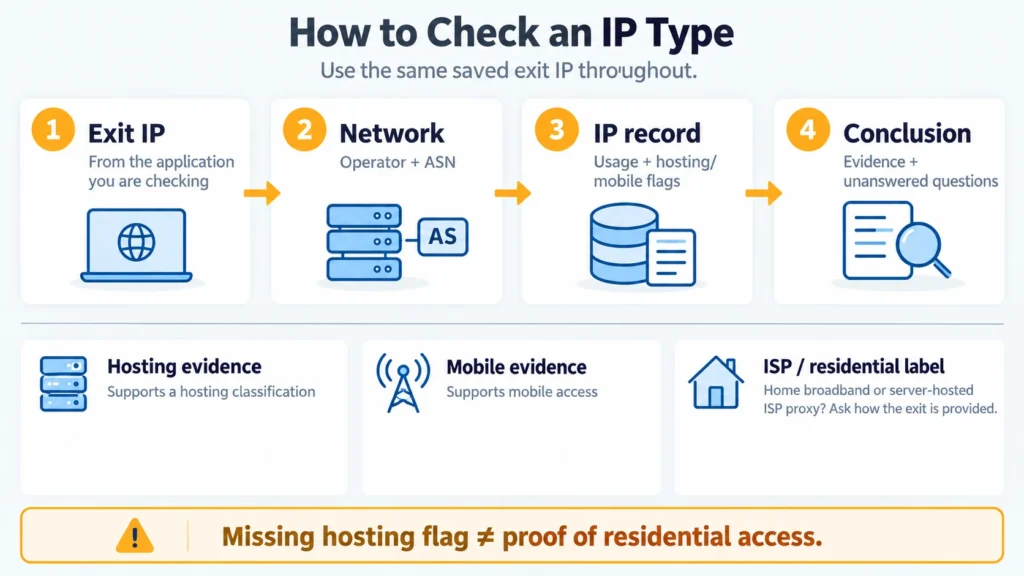
To check a proxy’s IP type, begin with the address the website sees. Enter that exit IP in an IP lookup. Start with the operator and ASN, then read the usage category and any hosting or mobile flags. If those details leave the type unclear, check the same IP in another database.
Hosting and mobile networks are often easier to recognize from these records. Household residential connections and server-hosted ISP proxies are less straightforward. An ISP or residential label may describe either one because both use addresses associated with an internet provider. You need more information about the connection and the proxy product.
Key Takeaways
- Check the exit IP. A proxy gateway’s address can differ from the address the website sees.
- An internet provider’s name in an ISP field does not establish which proxy product you bought.
- Network category, connection protocol, and IP rotation describe different properties.
- A blank field or missing hosting flag does not confirm that an IP comes from a household connection.
- Save the database name and check time with the result. Classifications can change.
What Do the Four IP Types Mean?
In the proxy market, these names describe address origins and how a service operates. A lookup service classifies networks in its own terms. It may use the same words as a proxy plan while describing a different property.
On home broadband, a residential address is associated with the subscriber’s connection. Several devices or connections can share one public IP, so it will not identify the subscriber or reveal how many computers are using it.
With an ISP proxy, the addresses come from an internet provider’s network while the proxy operates on servers. Its network affiliation can look similar to an ordinary broadband connection. A basic lookup may therefore show the provider’s network without offering a separate ISP proxy category.
A datacenter IP comes from a network used for servers, such as a cloud platform or hosting service. A lookup might label it hosting, datacenter, or DCH. Check whether the usage category and flags support what the operator name suggests.
Mobile refers to the access network behind the address. The lookup may name a carrier or display mobile, cellular, or MOB. For example, a laptop using a phone’s hotspot can appear under a mobile IP.
Some databases also list business, corporate, CDN (content delivery network), satellite or unknown. Use the database’s definition of whichever label appears. There is no need to force every result into one of the four proxy categories.
Our article Residential vs Datacenter vs ISP vs Mobile Proxies compares these categories and the tasks they suit. The steps below are for investigating an address you are already using.
Where Do You Get the IP to Check?
Open MangoProxy’s My IP page in the browser profile configured for your proxy. Copy the public IP it reports for that browser request.
Keep the profile name beside the copied IP. Country and provider are useful details, but neither tells you on its own which of these connection types you have.
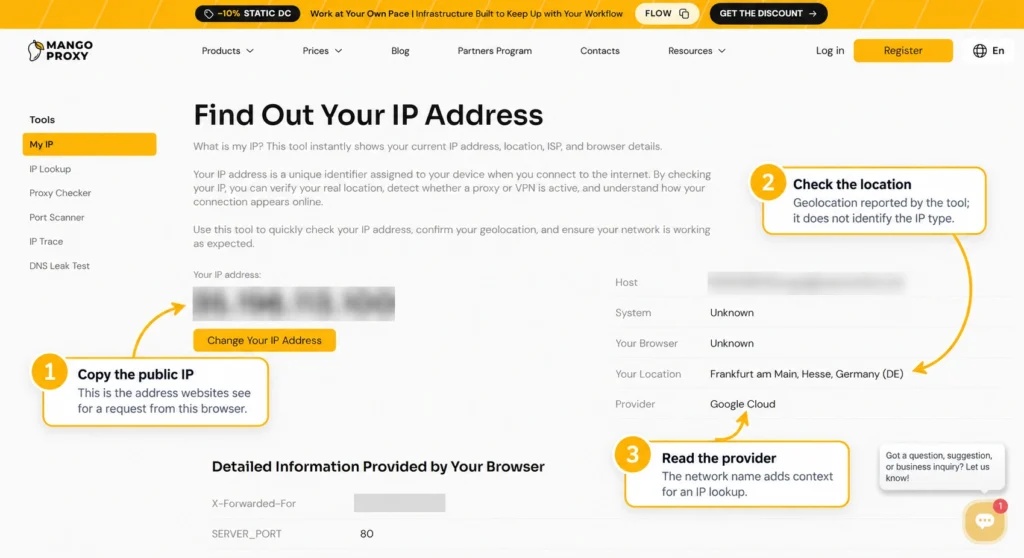
Your application reaches the provider through the gateway listed in its proxy settings. The provider can then forward the traffic through a different exit address. If you look up that entry server, you may be examining the gateway’s network instead of the exit seen by the website.
If you are checking a script or another application, obtain its exit address from a request made by that application. A separate browser may take another route. Keep a separate record for each IPv4 or IPv6 address.
Use the copied address for every lookup, even if the proxy has since rotated. An automatic IP detection page reports the address used for each new request; after rotation, that can be another exit.
How Do You Read the Network Record?
In IPinfo, search for the address you saved. Find the Summary section, which includes ASN and AS Type. Then examine the address’s individual indicators and compare information from other databases. This helps you understand what each service’s assessment is based on.
Network Operator and ASN
An ASN is the number of an autonomous system involved in internet routing. An IP record usually lists the number alongside an organization name.
Our article What Is ASN and Why It Matters for Internet Routing covers the routing background. Here, the useful distinction is between a description of the whole network and a description of one IP.
A network operator may serve households and businesses across different address ranges. Its AS category describes that wider network. Where data is available, also examine the individual IP or the range containing it.
The ISP field often holds the name of an internet provider or a company associated with the address. Hosting networks can have an ISP value too. A populated ISP field does not, by itself, mean that you bought an ISP proxy.
Usage Type and Connection Type
IP2Location calls fixed-line access ISP and mobile access MOB. DCH covers data centers, web hosting and transit within IP2Location’s classification. These labels describe network usage, whereas a seller’s ISP plan describes a proxy product.
In MaxMind, look for connection_type: its values include Cable/DSL, Cellular, Corporate and Satellite. It describes a different property from the ASN or a VPN/proxy flag. Check whether your tool and subscription supply the field before drawing a conclusion from its absence.
Reading Hosting, Mobile, and Proxy Flags
A positive hosting flag means the database associates that IP with hosting infrastructure. Mobile or cellular indicates mobile access. Separate VPN, proxy, or residential proxy indicators concern detected or suspected use of the address as an intermediary.
Residential and residential proxy are easy to confuse here. A residential label concerns the subscriber network. A residential proxy label adds a suspicion that an address from that network is being used in a proxy service. The value residential proxy: false leaves the network category unresolved; read the remaining fields before assigning a datacenter label.
What Does an ISP Label Leave Unanswered?
A home broadband IP and an ISP proxy running on servers may both be linked to the same internet provider. If both records say ISP, that shared label cannot distinguish how the two exits operate.
For how these server-based products work, see our guide to ISP proxies and static sessions. The question here is what the records reveal about your specific exit.
Take the product description back to the provider. For a plan called ISP or static residential, ask where the IPs come from and what infrastructure runs the exit. Check customer allocation and session persistence separately; having an IP assigned to one customer answers a different question from how a session retains it.
A static home connection can keep its IP, just as a proxy can retain an exit for one session; neither address persistence nor speed establishes the connection’s origin. Refreshing a page several times does not establish where the exit node physically runs.
Without independent information about the exit infrastructure, a precise finding would be: “The database associates this address with an internet provider’s network. These records do not establish how the proxy is provided.”
How Do You Check Mobile and Datacenter IPs?
A telecom brand may cover home broadband as well as mobile services. For mobile access, you need a more specific entry: Cellular, MOB, a mobile flag or carrier network details.
An IP lookup describes the network rather than the handset. It cannot reliably identify a phone model, confirm use of a physical SIM or establish the mobile generation used for the session. It does not inspect the device making your connection.
For a datacenter IP, useful evidence includes a hosting operator, a hosting or DCH category, and a corresponding address flag. For IP2Location, DCH also covers web hosting and transit.
Check the service’s field list and category definitions if hosting is absent from the response. An unavailable or omitted field is missing information, not evidence of a home connection.
How Should You Compare Conflicting Results?
Check the full address in each record against your saved IP, and note when you ran each lookup.
Read the field names next. AS Type: ISP describes the autonomous system; connection_type: Cellular describes the connection. A record can contain both without contradicting itself.
If comparable categories still conflict, keep both results and their definitions. Check the organization and address range information. Ask the provider why the records differ for your purchased proxy. Until you have an explanation, keep both classifications in your notes.
Still test the website you need from your usual application. A CAPTCHA can appear even with an IP labelled residential: the website evaluates the request using its own records and other signals.
Reading Three Example Results
The Public Address 8.8.8.8
For a learning example, you can look up 8.8.8.8, one of the Google Public DNS addresses. It belongs to an external service; it is not an example of your proxy’s exit IP.
At the time this article was prepared, IPinfo’s public record listed AS15169, Google LLC, and AS Type: Hosting. The example shows where to find network affiliation and category. It does not test your connection, and the location in the record cannot establish where all of that DNS service’s servers are physically located.
A Hypothetical ISP Result
Suppose you look up the exit IP of a proxy you bought and see a provider name and an ISP category. You can record how that database classifies the network. Ask the provider whether the exit runs on a household connection or on servers using ISP-associated addresses. The network label leaves that part unanswered.
A Hypothetical Mobile Result
In another example, a database shows Cellular and mobile carrier information. You can record this as mobile access in that database, without assuming that the proxy changes IP on every request. Check rotation rules separately.
Start with Your Exit IP
Use MangoProxy’s My IP page from the browser or profile you are checking and copy the reported exit address. Then look up its network characteristics in an IP database. If you decide to choose another product after checking, compare MangoProxy proxy types by task and operating mode.
Glossary
Exit IP: the public IP seen by the destination when your application sends a request.
Proxy gateway: the entry server your app connects to when using a proxy service. Its address can differ from the exit IP.
ASN: Autonomous System Number, the identifier used for an autonomous system in internet routing.
ISP: Internet Service Provider. Proxy vendors also use ISP as the name of a product type.
Usage category: a database’s description of how an IP or network is used. In IP2Location, fixed-line access is ISP, mobile access is MOB, and data centers, web hosting or transit fall under DCH.
IPv4 and IPv6: versions of the Internet Protocol, each with its own address format.
VPN: Virtual Private Network, meaning the network technology or a service that provides it. An IP lookup may use the label for a detected VPN exit.
CDN: Content Delivery Network, which serves content through a distributed set of nodes.
CAPTCHA: a website challenge intended to help distinguish human visitors from automated requests.
Rotation: a change of exit IP under the service’s rules. With session persistence, the service can retain one exit IP for the session.
Final Thoughts
Keep the lookup and your conclusion together. Include the IP, check date, database, operator, category and any flags you relied on. If something remains uncertain, say so in the note; you can return to the same address later and see whether its records have changed.
Frequently asked questions
Here we answered the most frequently asked questions.
Do the First Digits Reveal the IP Type?
An address’s opening digits may help you find its range. A residential or mobile classification comes from external records about the network and its use.
Will a Phone on Wi-Fi Use a Mobile IP?
The phone itself does not make the IP mobile. On home Wi-Fi, the phone normally uses the broadband connection. A VPN or proxy can change where the request exits, so check the address actually used.
Is a Static Home IP an ISP Proxy?
A static home IP stays the same under the subscriber’s connection terms. A proxy service additionally has an intermediary forwarding requests; a fixed address on its own does not perform that role.
Does an IP's Type Depend on SOCKS5?
No. SOCKS5 sets the rules for communication between the app and proxy. The service can use residential, ISP, datacenter or mobile exits with that protocol.