


Browser Context Isolation: How Modern Browsers Separate Sessions
Published: ≈ 8 min read
Quick Answer
Browser context isolation allows multiple independent browsing sessions to run inside a single browser process. Each browser context has its own cookies, Local Storage, Session Storage, and authentication state, making it possible to log into multiple accounts simultaneously without launching multiple browsers.
Key Takeaways
- Browser contexts isolate sessions without creating new browser installations.
- Every context has independent cookies and browser storage.
- Opening a new tab is not the same as creating a new browser context.
- Context isolation improves automation speed and reduces resource usage.
- Modern frameworks such as Playwright rely heavily on browser contexts for parallel testing and automation.
- Browser contexts are lightweight compared to full browser profiles while still providing strong session isolation.
Why Browser Context Isolation Exists
One of the most common misconceptions in browser automation is believing that opening another browser tab creates a completely independent session.
It doesn’t.
When you open a new tab in Chrome, Edge, or another Chromium-based browser, that tab continues using the same browser profile. As a result, it shares the same cookies, Local Storage, permissions, and authenticated session as every other tab in that profile.
This behavior is perfect for everyday browsing because it allows users to stay logged in across multiple tabs.
For automation, however, it quickly becomes a limitation.
Imagine testing an application with three different user roles:
- Administrator
- Manager
- Customer
If all three sessions share the same browser storage, logging into one account usually replaces the authentication state of the others.
Browser context isolation solves this problem.
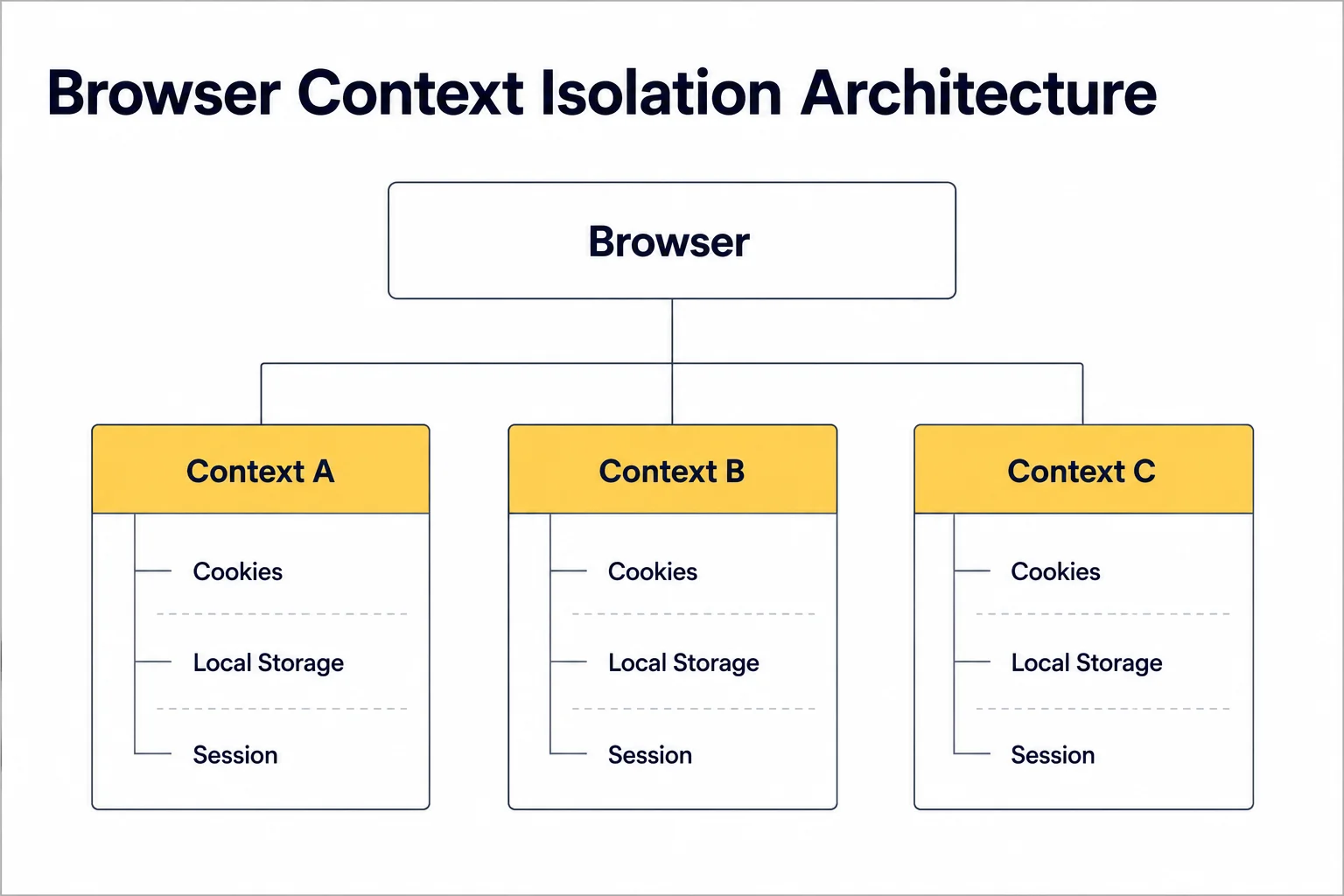
Instead of launching multiple browser processes, modern browsers can create several isolated browsing environments inside a single browser instance. Every context behaves like a fresh browser with its own session data while sharing the same rendering engine underneath.
This approach significantly reduces memory usage and startup time compared to launching several independent browsers.
As explained in How Session Persistence Works, authenticated sessions depend on browser storage rather than individual tabs. Browser contexts isolate that storage while keeping browser execution lightweight.
Browser Context Isolation in Action
A simplified architecture looks like this:
Browser Context Isolation
Browser
│
├──────────────┐
│ │
▼ ▼
Context A Context B
│ │
Cookies Cookies
Storage Storage
Session Session
│ │
User A User B
Each context maintains its own authentication state.
Logging out of Context A has no effect on Context B, even though both are running inside the same browser process.
This separation is what makes browser contexts one of the most important building blocks of modern browser automation.
What Does a Browser Context Actually Isolate?
A browser context is much more than an isolated cookie jar.
When a new context is created, the browser generates a separate environment for session-related data. This allows multiple authenticated users to interact with the same website without interfering with one another.
Each browser context maintains its own:
- Cookies
- Local Storage
- Session Storage
- IndexedDB
- Authentication State
- Permission Settings
This means two users can log into the same application simultaneously, even if they are using the same browser process.
For example:
- Context A logs into [email protected]
- Context B logs into [email protected]
Although both contexts use the same browser engine, each one stores its own login session independently.
What Is Shared Between Browser Contexts?
Browser contexts provide session isolation, but they do not duplicate the entire browser installation.
The browser process itself is shared.
| Component | Shared | Isolated |
| Browser Engine | ✅ | ❌ |
| Chromium Binary | ✅ | ❌ |
| Browser Process | ✅ | ❌ |
| Cookies | ❌ | ✅ |
| Local Storage | ❌ | ✅ |
| Session Storage | ❌ | ✅ |
| IndexedDB | ❌ | ✅ |
| Authentication State | ❌ | ✅ |
| Browser History | Usually ✅ | ❌ |
| Extensions | ✅ | ❌ |
This design makes browser contexts significantly lighter than launching multiple browser instances while still providing reliable session separation.
Browser Contexts vs Browser Tabs
Another common misconception is treating browser contexts as “advanced tabs.”
They are fundamentally different.
A browser tab belongs to an existing browser context.
Opening another tab simply creates another page that shares the same authentication state.
Browser
│
Context A
│
├── Tab 1
├── Tab 2
└── Tab 3
Shared Cookies
Shared Storage
Shared Session
Every tab has access to the same browser storage.
If you log out in one tab, every other tab using that context immediately loses access to the authenticated session.
Browser contexts behave differently.
Browser
├── Context A
│ ├── Tab 1
│ └── Tab 2
├── Context B
│ ├── Tab 1
│ └── Tab 2
└── Context C
└── Tab 1
Each context contains its own tabs, cookies, and storage.
The sessions remain completely independent.
Why Browser Contexts Matter for Automation
Browser contexts have become one of the core building blocks of modern automation frameworks.
Instead of launching ten separate Chrome windows, a framework like Playwright Browser Contexts can launch a single browser and create ten isolated contexts.
This approach offers several advantages:
- lower memory usage;
- faster browser startup;
- independent authentication sessions;
- simpler parallel testing;
- better scalability for automation.
It’s particularly useful when testing applications with multiple user roles or building authenticated scraping workflows.
For long-running projects, browser contexts are often combined with Residential Proxies or Static ISP Proxies to maintain consistent network identity across isolated sessions.
This combination allows both the browser state and the network layer to remain stable throughout an automation workflow.
Common Mistakes
Although browser contexts are simple to use, they are often misunderstood. Many automation problems stem from confusing browser contexts with other isolation mechanisms.
Assuming a New Tab Creates a New Session
This is by far the most common misconception.
Many developers open another browser tab expecting a completely fresh session.
Instead, every tab inside the same browser context shares:
- cookies;
- Local Storage;
- Session Storage;
- authentication state.
A new tab is simply another view into the same browsing environment.
If you need a separate login, create a new browser context, not another tab.
Confusing Browser Contexts With Browser Profiles
Browser contexts and browser profiles solve different problems.
A browser profile isolates the entire browser environment.
A browser context isolates only the session data inside an existing browser.
| Browser Profile | Browser Context |
| Separate browser environment | Separate browser session |
| Own browser settings | Shared browser settings |
| Own extensions | Shared extensions |
| Own cookies | Own cookies |
| Own storage | Own storage |
| Heavier | Lightweight |
We’ll explore browser profiles in much greater detail in How Anti-Detect Browsers Actually Work.
Creating Too Many Browser Instances
A common beginner approach looks like this:
User A
↓
Launch Chrome
—————-
User B
↓
Launch Chrome
—————-
User C
↓
Launch Chrome
While this works, it’s rarely the most efficient solution.
Launching multiple browser processes consumes significantly more CPU and memory than creating multiple browser contexts inside a single browser instance.
Whenever possible, prefer:
Browser
├── Context A
├── Context B
└── Context C
This architecture is one of the main reasons frameworks like Playwright can scale so efficiently.
Production Tips
Browser contexts become much more powerful when combined with good automation practices.
One Context Per User
Treat every authenticated user as an independent browser context.
This keeps authentication clean and prevents session conflicts.
For example:
- User A → Context A
- User B → Context B
- User C → Context C
This structure is much easier to maintain than constantly logging users in and out.
Reuse Contexts During Test Suites
If your automation executes multiple related actions, avoid recreating browser contexts unnecessarily.
Reusing an existing authenticated context often saves time and reduces repeated login operations.
As discussed in Cookie Persistence vs Session Persistence, preserving browser state is generally more efficient than rebuilding it for every test.
Keep Network Identity Consistent
Browser contexts isolate browser storage-but they do not isolate your network connection.
If your workflow depends on long-running authenticated sessions, pairing each context with a stable proxy configuration can improve consistency.
Before debugging browser-related issues, verify that your connection is behaving as expected using Proxy Checker.
Final Thoughts
Browser context isolation is one of the technologies that makes modern browser automation both fast and scalable.
Rather than launching multiple browser instances, automation frameworks create lightweight, isolated sessions that keep cookies, storage, and authentication data separate while sharing the same browser engine.
Understanding this distinction helps developers build cleaner automation workflows, reduce resource consumption, and avoid common session-related issues.
If you’re working with Playwright, Selenium, or any other browser automation framework, browser contexts should be your default choice whenever multiple independent sessions are required.
Frequently asked questions
Here we answered the most frequently asked questions.
Does a browser context create a new browser?
No. A browser context runs inside an existing browser process. It creates an isolated browsing session without launching another browser instance.
Can two browser contexts log into the same website?
Yes. Each browser context has its own cookies and browser storage, allowing multiple independent accounts to remain logged in simultaneously.
Are browser contexts faster than launching multiple browsers?
Usually, yes. Because browser contexts share the same browser engine, they consume fewer resources and start much faster than separate browser processes.
Should I use browser contexts or browser profiles?
It depends on your workflow. Use browser contexts when you need multiple isolated sessions inside the same browser. Use browser profiles when you need complete browser isolation, including extensions, browser settings, and profile-level configuration.