


How Anti-Detect Browsers Actually Work: Browser Profiles, Fingerprints and Isolation
Published: ≈ 15 min read
Quick Answer
Anti-detect browsers do not simply change browser fingerprints. Their primary purpose is to create isolated browser profiles that behave like independent devices. Each profile maintains its own cookies, Local Storage, browser fingerprint, permissions, proxy configuration, and session data, allowing developers, testers, and automation teams to manage multiple browser identities without sharing state between them.
Key Takeaways
- Anti-detect browsers are built around browser profile isolation, not fingerprint spoofing alone.
- Every profile behaves like an independent browser installation.
- Cookies, Local Storage, browser history, permissions, and fingerprints remain isolated between profiles.
- Fingerprint management is only one part of a much larger browser identity.
- Anti-detect browsers do not make users anonymous or automatically bypass detection systems.
- Proper session management and realistic browser behavior remain essential for reliable automation.
The Real Problem Anti-Detect Browsers Were Designed to Solve
Imagine trying to manage ten completely different online accounts using a single Chrome profile.
At first, everything appears to work.
Then problems begin to appear.
One account logs out unexpectedly.
Another starts showing verification requests.
A third suddenly requires two-factor authentication.
Soon you realize that every account is sharing parts of the same browser environment.
Modern browsers store much more than webpages.
They also maintain:
- cookies;
- Local Storage;
- browser cache;
- permissions;
- browsing history;
- saved certificates;
- service workers;
- authentication tokens;
- browser preferences.
When multiple accounts share the same browser profile, websites may associate them with the same browser identity.
For developers working with browser automation, QA testing, affiliate marketing, e-commerce management, or social media workflows, this quickly becomes difficult to manage.
Anti-detect browsers were created to solve this architectural problem.
Rather than modifying a single browser, they separate browser identities into completely independent environments.
It’s Not About Hiding
One of the biggest misconceptions is that anti-detect browsers exist primarily to “hide” users.
That isn’t how modern anti-detect browsers are designed.
Their primary objective is isolation.
Think of a normal browser profile as a person’s home.
Everything belonging to that person is stored there:
- documents;
- preferences;
- history;
- keys;
- personal belongings.
Now imagine trying to have ten different people live in the same house while keeping all of their belongings separate.
Eventually everything becomes mixed together.
Browser profiles behave in much the same way.
Without isolation, browser data naturally overlaps.
Cookies, permissions, cached resources, authentication state, and browsing history all accumulate inside the same profile.
Anti-detect browsers solve this by creating separate “homes” for every browser identity.
What Is a Browser Profile?
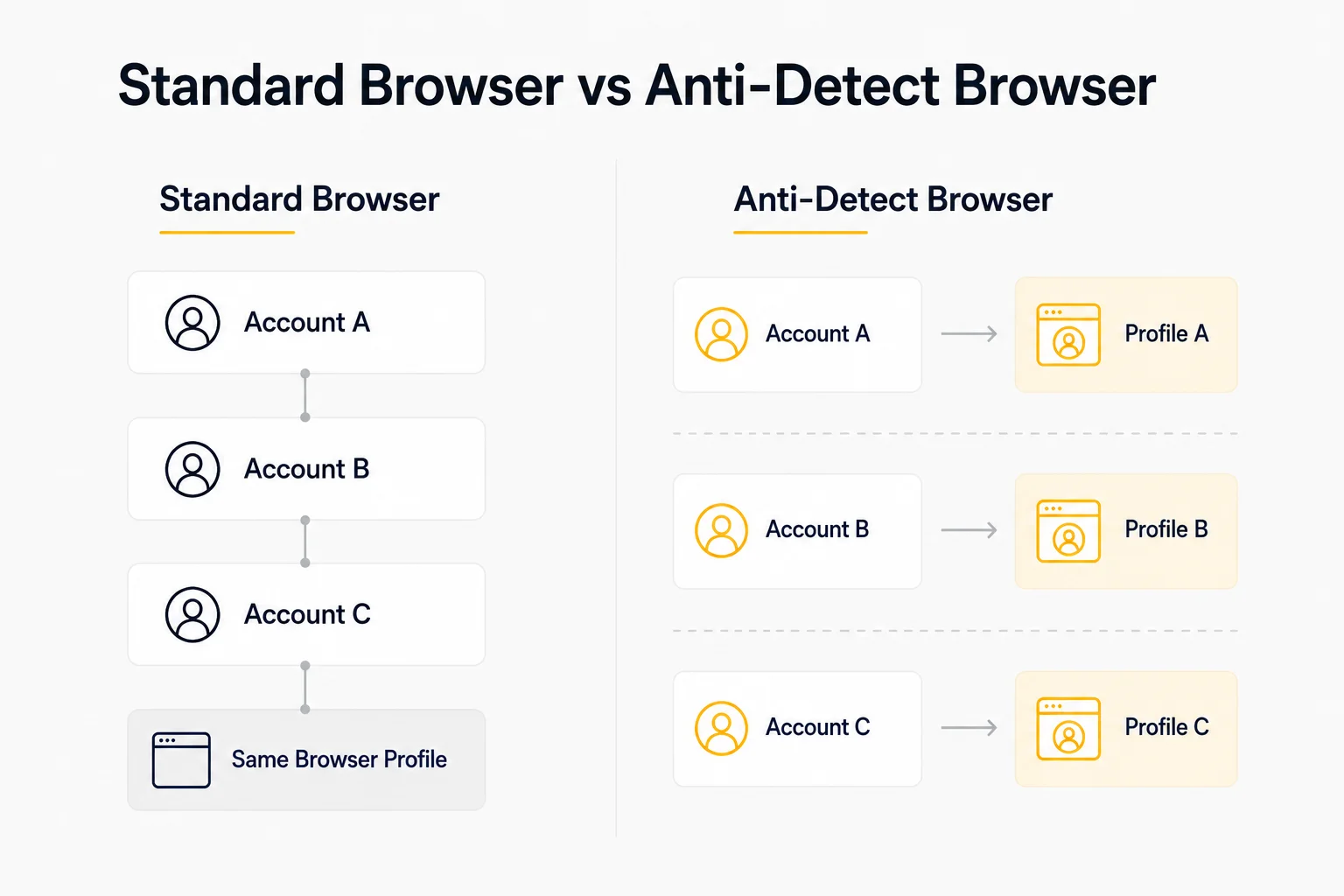
A browser profile is a complete collection of browser data associated with one browsing environment.
It contains far more than bookmarks or browsing history.
A typical browser profile includes:
- cookies;
- Local Storage;
- Session Storage;
- IndexedDB;
- cache;
- browser permissions;
- browsing history;
- saved certificates;
- extensions;
- autofill data;
- browser preferences.
When Chrome launches, it loads one browser profile.
Every website visited during that session shares this environment.
This is why remaining logged into multiple unrelated accounts inside one browser profile can become problematic.
As discussed in Cookie Persistence vs Session Persistence, cookies represent only one component of the overall browser identity.
Everything stored inside the browser profile contributes to maintaining trusted sessions.
How Browser Profiles Work
A simplified browser startup process looks like this.
Browser Startup Workflow
Launch Browser
↓
Load Browser Profile
↓
Cookies
Local Storage
Browser Cache
Permissions
Extensions
↓
Browser Ready
From this point onward, every website visited by the browser interacts with the same stored information.
This persistence is what makes browser profiles so useful for everyday browsing.
It’s also why professional automation often requires multiple isolated profiles rather than one shared environment.
Browser Profiles vs Browser Windows
Many users assume opening a new browser window creates a completely separate browser.
It doesn’t.
Unless a different browser profile is loaded, every new tab and window continues using the same underlying data.
For example:
Chrome Window 1
↓
Profile A
——————–
Chrome Window 2
↓
Profile A
——————–
Chrome Window 3
↓
Profile A
All three windows share:
- cookies;
- authentication sessions;
- browser history;
- cache;
- Local Storage;
- permissions.
From the perspective of most websites, they belong to the same browser identity.
This explains why logging out in one browser window often logs you out everywhere else.
Anti-detect browsers approach this very differently.
Instead of creating another window, they create another browser profile.
That difference is the foundation of everything else they do.
Why Isolation Matters
Modern websites don’t identify users using a single value.
Instead, they evaluate many independent signals that together create a browser identity.
These commonly include:
- browser fingerprint;
- authentication cookies;
- Local Storage;
- session tokens;
- browser profile consistency;
- IP address;
- browsing behavior.
As explained in How Session Persistence Works, authentication depends on preserving a consistent browser environment over time.
If several unrelated accounts share one browser profile, websites may observe unexpected changes in stored data, authentication state, or browser behavior.
Profile isolation helps prevent these interactions by giving every account its own independent environment.
Rather than trying to disguise one browser as many different users, anti-detect browsers maintain multiple self-contained browser identities from the start.
What Makes Every Browser Profile Independent?
The power of an anti-detect browser doesn’t come from changing one browser property.
It comes from isolating every major component that contributes to browser identity.
Instead of one shared environment, each profile maintains its own independent data.
Think of every browser profile as a completely separate computer.
Each profile has its own:
- cookies;
- Local Storage;
- Session Storage;
- IndexedDB;
- browser cache;
- extensions;
- permissions;
- browser fingerprint;
- proxy configuration;
- browsing history.
When one profile changes, the others remain completely unaffected.
This isolation is what allows developers and automation teams to manage multiple browser identities on a single machine.
Browser Profile Isolation
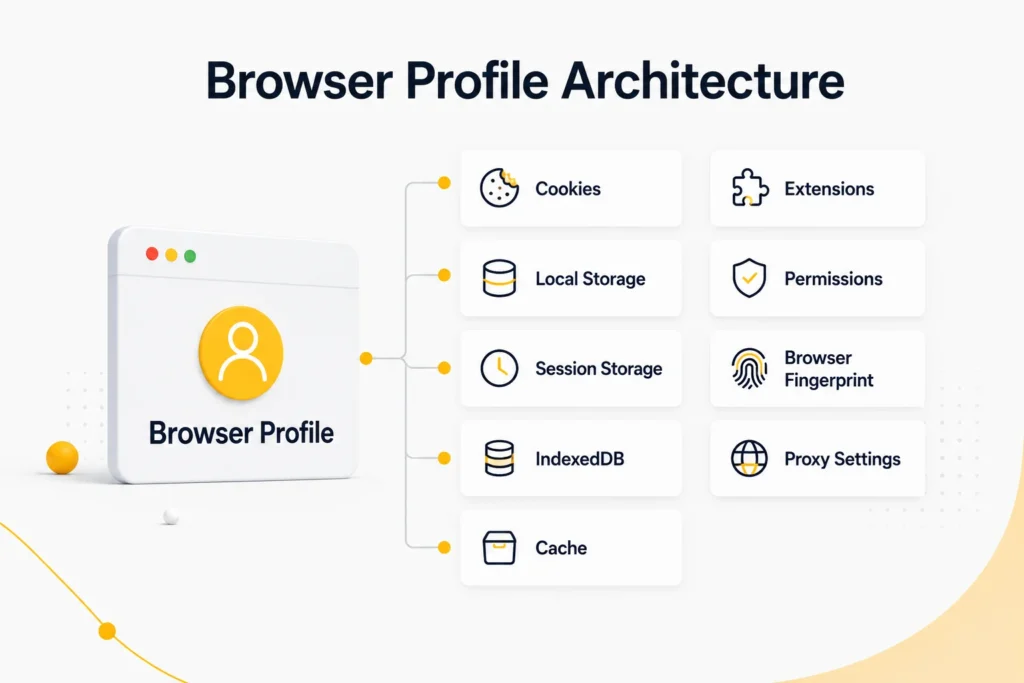
A simplified profile architecture looks like this.
Browser Profile Isolation
Launch Browser
↓
Load Browser Profile
↓
Cookies
Local Storage
IndexedDB
Extensions
Browser Fingerprint
Proxy
↓
Independent Browser Identity
Every profile starts with its own environment.
Nothing is shared unless the user explicitly chooses to synchronize or export data.
This architecture makes browser automation significantly more predictable than trying to reuse one browser profile across multiple workflows.
Fingerprints Are Only One Layer
Many articles describe anti-detect browsers as “fingerprint changers.”
That description is incomplete.
Browser fingerprints represent only one part of a much larger browser identity.
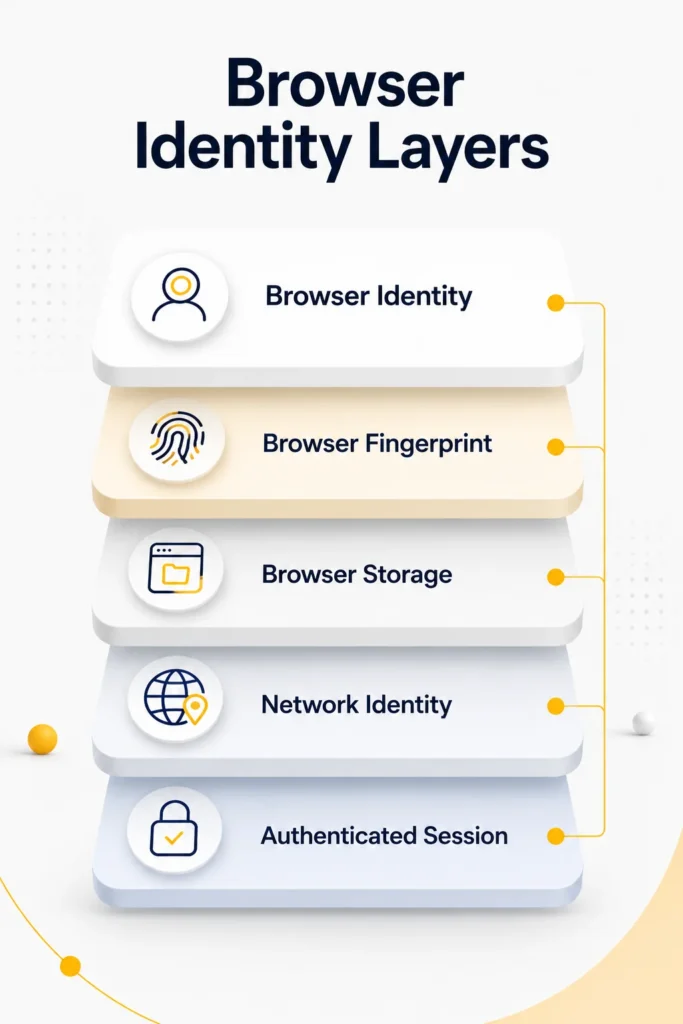
A simplified identity model looks like this:
| Browser Identity Layer | Examples |
| Browser Fingerprint | Canvas, WebGL, Fonts, Screen Resolution |
| Browser Storage | Cookies, Local Storage, IndexedDB |
| Browser Configuration | Language, Time Zone, Permissions |
| Network Layer | Proxy, IP Address, ASN |
| Session Layer | Tokens, Authentication Cookies |
| Behavioral Layer | Mouse Movement, Typing, Scrolling |
Changing only one layer rarely creates a convincing browser identity.
Modern websites evaluate how these layers work together rather than inspecting a single browser property.
We’ll explore fingerprint generation in much greater detail in Browser Fingerprinting Explained.
How Browser Fingerprints Fit Into the Picture
Browser fingerprints often receive the most attention because they are relatively easy to visualize.
A fingerprint may include characteristics such as:
- operating system;
- browser version;
- screen resolution;
- language;
- installed fonts;
- WebGL renderer;
- Canvas output;
- AudioContext;
- hardware concurrency;
- device memory.
However, these values are useful only when they remain internally consistent.
For example:
A browser claiming to be:
- macOS,
- Safari,
- Apple GPU,
while simultaneously exposing Windows-specific graphics drivers would immediately appear suspicious.
Modern anti-detect browsers therefore focus on maintaining consistent fingerprints, not simply randomized ones.
Consistency is generally more important than uniqueness.
Session Isolation
Another major advantage of anti-detect browsers is session isolation.
Every browser profile stores its own authentication data.
This includes:
- login cookies;
- access tokens;
- refresh tokens;
- Local Storage;
- Session Storage.
As discussed in How Session Persistence Works, websites use these components together to recognize returning users.
Without profile isolation, authentication data from one account can interfere with another.
With isolated browser profiles:
Profile A
↓
Cookies
Local Storage
Tokens
——————–
Profile B
↓
Cookies
Local Storage
Tokens
——————–
Profile C
↓
Cookies
Local Storage
Tokens
Each account maintains its own independent authentication state.
Logging out of one profile has no effect on any of the others.
Proxy Isolation
Network identity is another important component of browser isolation.
Most anti-detect browsers allow every profile to use its own proxy configuration.
Instead of routing all traffic through one network connection, each profile can operate independently.
For example:
Profile A
↓
Residential Proxy
——————–
Profile B
↓
Static ISP Proxy
——————–
Profile C
↓
Datacenter Proxy
This flexibility allows developers to match network configuration to specific workflows.
For example:
- Residential Proxies are often preferred for consumer-facing websites.
- Static ISP Proxies work well for long-running authenticated sessions.
- Datacenter proxies are commonly used for high-speed automation and testing.
Before investigating browser-related issues, it’s also helpful to verify the current connection using My IP and confirm proxy availability with Proxy Checker.
Why Profile Isolation Is More Important Than Fingerprint Randomization
Randomly changing browser properties does not automatically produce a realistic browser.
In fact, excessive randomization often creates combinations that real devices would never generate.
For example:
- Windows + Safari;
- macOS + DirectX GPU;
- mobile viewport + desktop hardware;
- English keyboard + inconsistent regional settings.
These inconsistencies are much easier for modern anti-bot systems to detect than a stable, realistic browser profile.
Anti-detect browsers therefore focus on building coherent browser identities rather than constantly changing individual values.
A believable browser is usually one that remains internally consistent over time-not one that looks different on every page load.
What Anti-Detect Browsers Do NOT Do
One of the biggest misunderstandings surrounding anti-detect browsers is believing they somehow make automation “undetectable.”
They don’t.
Modern anti-detect browsers are engineering tools-not invisibility tools.
Understanding their limitations is just as important as understanding their capabilities.
They Do Not Make You Anonymous
Running an anti-detect browser does not hide your network identity.
Websites can still evaluate:
- your IP address;
- ASN;
- proxy reputation;
- DNS configuration;
- connection quality;
- TLS characteristics.
A perfectly isolated browser profile connected through a poor-quality proxy may still trigger additional verification.
If you’re troubleshooting connectivity, start by checking My IP to verify your public address, then use IP Lookup to inspect its network information.
They Do Not Automatically Prevent Detection
Modern anti-bot systems analyze far more than browser fingerprints.
They also evaluate:
- browsing behavior;
- request timing;
- mouse movement;
- typing speed;
- navigation patterns;
- session history;
- authentication consistency.
A realistic browser profile cannot compensate for obviously automated behavior.
As explained in Headless vs Headful Browsers, browser mode alone is rarely responsible for detection.
They Do Not Replace Good Session Management
Even perfectly isolated browser profiles can lose authentication.
Why?
Because sessions still expire.
Cookies still become invalid.
Tokens still rotate.
Servers still revoke sessions.
Browser isolation improves reliability.
It does not eliminate normal authentication rules.
They Do Not Bypass Website Security
Anti-detect browsers don’t disable fraud detection systems.
They don’t remove CAPTCHAs.
They don’t bypass multi-factor authentication.
They don’t circumvent account security policies.
Instead, they provide a clean, isolated browser environment that reduces unintended interactions between unrelated browser sessions.
What Anti-Detect Browsers Actually Do
Now that we’ve covered the misconceptions, it’s easier to understand their real purpose.
Their primary responsibilities include:
- isolating browser profiles;
- separating browser storage;
- maintaining consistent browser identities;
- preventing cross-profile contamination;
- simplifying multi-account workflows;
- improving browser automation reliability.
Notice that none of these involve “becoming invisible.”
Instead, anti-detect browsers help create organized, independent browser environments.
Typical Workflow
A simplified automation workflow might look like this.
Anti-Detect Browser Workflow
Open Anti-Detect Browser
↓
Select Browser Profile
↓
Load Cookies
Load Local Storage
Load Fingerprint
Load Proxy
↓
Launch Browser
↓
Continue Existing Session
Every launch restores a complete browser identity rather than rebuilding one from scratch.
This approach is especially valuable for long-running automation projects.
Common Use Cases
Anti-detect browsers support many legitimate engineering and operational workflows.
Some of the most common include:
- browser automation;
- QA testing;
- multi-account management;
- localization testing;
- web application testing;
- affiliate campaign management;
- social media management;
- e-commerce operations;
- customer support testing.
In each case, the goal is the same:
Maintain separate browser environments without allowing one workflow to interfere with another.
Anti-Detect Browsers vs Standard Browsers
The architectural difference becomes much clearer when comparing the two approaches.
| Feature | Standard Browser | Anti-Detect Browser |
| Multiple Profiles | Limited | Designed for It |
| Profile Isolation | Basic | Complete |
| Fingerprint Management | No | Yes |
| Separate Storage | Limited | Yes |
| Independent Sessions | Limited | Yes |
| Proxy Per Profile | Usually No | Yes |
| Multi-Account Workflows | Difficult | Easy |
Both browser types use modern browser engines.
The difference lies in how browser environments are managed.
Production Tips
Successfully using anti-detect browsers is less about changing fingerprints and more about maintaining consistency.
One Profile Per Identity
Avoid using the same browser profile for unrelated accounts.
A better structure looks like:
Account A
↓
Browser Profile A
———————
Account B
↓
Browser Profile B
———————
Account C
↓
Browser Profile C
Treat every browser profile as its own independent device.
Keep Fingerprints Stable
Changing browser characteristics every launch usually creates more problems than it solves.
Consistency builds trust.
Frequent changes increase entropy.
Match Browser Profiles With Stable Networks
Whenever practical, pair one browser profile with one network identity.
For example:
Browser Profile
↓
Static ISP Proxy
↓
Stable Session
or
Browser Profile
↓
Residential Proxy
↓
Long-Term Identity
If authentication problems occur unexpectedly, verify your connection using Proxy Checker before assuming the browser profile is responsible.
Avoid Mixing Automation Workflows
Using one browser profile for:
- testing;
- scraping;
- social media;
- e-commerce;
creates unnecessary complexity.
Separate workflows are generally easier to maintain and debug.
Code Disclaimer
This article focuses on the architecture of anti-detect browsers rather than the APIs of any specific platform.
Most commercial solutions expose different automation interfaces, profile managers, and synchronization features.
However, the underlying concepts remain remarkably similar:
- browser profile isolation;
- storage isolation;
- fingerprint consistency;
- independent sessions;
- network separation.
Understanding these architectural principles will help you work effectively with almost any modern anti-detect browser, regardless of the specific software you choose.
Glossary
Anti-Detect Browser
A browser designed to create and manage multiple isolated browser profiles. Each profile maintains its own browser storage, fingerprint, proxy configuration, and authentication state.
Browser Fingerprint
A collection of browser and device characteristics used by websites to distinguish one browser from another. Examples include WebGL, Canvas rendering, fonts, screen resolution, hardware information, and browser APIs.
Browser Profile
A complete browser environment containing cookies, Local Storage, Session Storage, cache, extensions, permissions, and other browsing data.
Fingerprint Consistency
The degree to which all browser characteristics appear realistic and internally compatible. Consistency is often more important than randomness.
Local Storage
A browser storage mechanism that persists data after the browser is closed. Many applications store authentication tokens and application state here.
Profile Isolation
The practice of keeping browser data completely separate between different browser profiles so that sessions and identities never overlap.
Session Isolation
Separating authentication state-including cookies, tokens, and browser storage-between independent browser profiles.
Final Thoughts
Anti-detect browsers are frequently misunderstood because discussions often focus on fingerprint spoofing instead of browser architecture.
In reality, their greatest strength is much simpler.
They create isolated browser environments.
Each profile maintains its own cookies, browser storage, permissions, fingerprint, proxy configuration, and authentication state, allowing multiple browser identities to coexist without interfering with one another.
This isolation makes anti-detect browsers valuable for browser automation, QA testing, localization, multi-account workflows, and many other legitimate engineering tasks.
At the same time, they should not be viewed as a shortcut around modern security systems.
Successful browser automation depends on the combination of several factors:
- realistic browser identities;
- stable authentication sessions;
- consistent browser fingerprints;
- reliable network infrastructure;
- well-designed automation logic.
Understanding how these pieces work together is far more valuable than relying on any single browser feature.
Frequently asked questions
Here we answered the most frequently asked questions.
Are anti-detect browsers illegal?
No. Anti-detect browsers are general-purpose software tools. They are widely used for legitimate purposes including browser automation, software testing, QA, localization testing, customer support, web development, and managing multiple browser environments. Like many technologies, their legality depends on how they are used and whether users comply with the terms of the websites and services they interact with.
Do anti-detect browsers change browser fingerprints?
Yes, but fingerprint management is only one feature. Their primary purpose is to isolate browser environments so that every profile behaves like an independent browser installation. Fingerprint consistency is generally more important than constantly changing browser characteristics.
Can anti-detect browsers prevent websites from detecting automation?
No. Modern anti-bot systems evaluate many different signals beyond browser fingerprints. These may include:
- session consistency;
- browsing behavior;
- network reputation;
- authentication history;
- browser configuration;
- request timing.
Anti-detect browsers improve profile isolation, but they do not guarantee that automation will remain undetected.
Do I still need proxies?
Usually, yes. Browser identity and network identity are different layers. A well-isolated browser profile combined with a poor-quality network connection may still appear suspicious. Depending on the workflow, Residential Proxies or Static ISP Proxies can provide more consistent network characteristics.
Can I use a normal Chrome profile instead?
For a single account, absolutely. Standard Chrome profiles work perfectly well for everyday browsing. Anti-detect browsers become useful when managing multiple independent browser identities that should never share cookies, storage, authentication state, or browser fingerprints.
Do anti-detect browsers replace browser automation frameworks?
No. Frameworks like Playwright Browser Contexts and Selenium automate browser actions. Anti-detect browsers focus on managing isolated browser identities. The two technologies often complement each other rather than replacing one another.