


How to Set Up a Proxy in 0DETECT: Step-by-Step Guide
Published: ≈ 5 min read
0DETECT is an antidetect browser designed for multi-accounting, automation, and secure profile isolation. It helps separate browser fingerprint parameters, but without a dedicated IP address, full anonymity is impossible.
An antidetect browser alone does not hide network activity. In addition to fingerprint data, websites analyze IP addresses, GEO locations, and connection behavior. When multiple profiles operate through the same IP, this can appear suspicious to anti-fraud systems.
Proxies in 0DETECT help isolate the network environment of each profile and make account activity more independent. This is especially important for multi-accounting, automation, and long-term work across different platforms.
In this guide, we’ll show how to add proxies in 0DETECT, test the connection, and configure profiles for stable performance.
Why You Need Proxies in 0DETECT
Using proxies in 0DETECT allows each profile to operate through a separate IP address and isolated network environment. This helps reduce overlaps between accounts and makes profile behavior appear more natural to websites and platforms.
Proxies are especially useful for multi-accounting, advertising platforms, automation, and tasks where separating sessions by GEO and IP is important.
Even a well-configured fingerprint cannot solve the issue of shared IP addresses – network-level similarities are often what trigger additional verification checks and restrictions.
If you want to better understand how proxies work and why they are used, we recommend starting with this guide:
Step-by-Step Proxy Setup in 0DETECT
Step 1. Create a Profile
Open the Profiles section and click Create Profile.
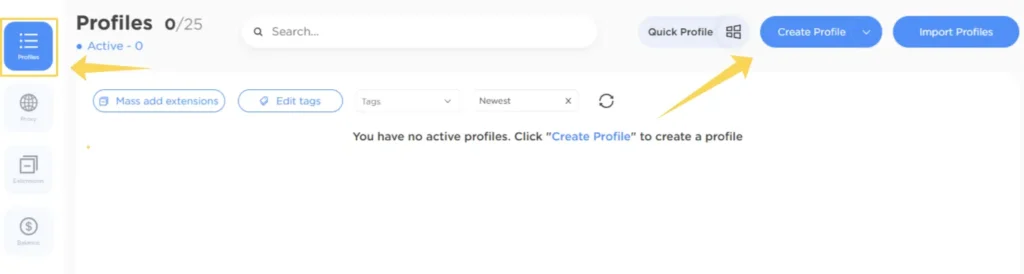
A new profile creation window will appear with browser, operating system, and fingerprint settings.
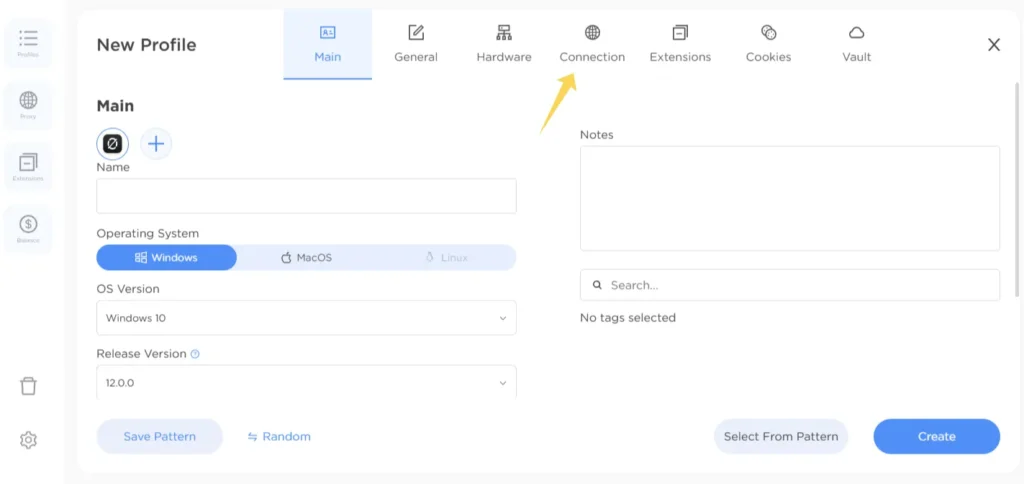
To connect a proxy, switch to the Connection tab.
Step 2. Add a Proxy
0DETECT supports two methods of connecting proxies:
- directly inside a profile
- through the separate Proxy section
Method 1. Connecting a Proxy Inside a Profile
In the Connection tab, select one of the connection methods:
- Chain to Profile
- From the list
- No proxy
For manual setup, choose Chain to Profile.
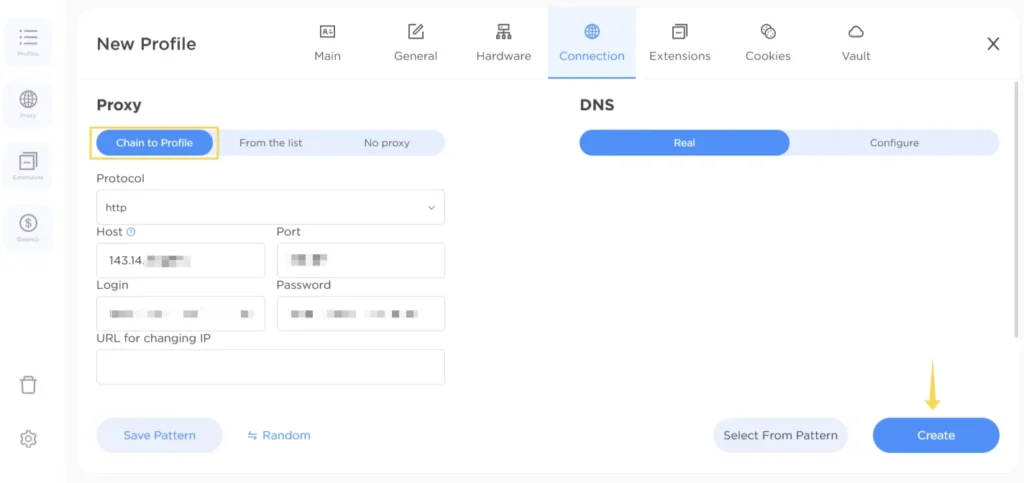
Then enter:
- protocol
- IP address
- port
- username
- password
0DETECT supports:
- HTTP
- SOCKS5
- other popular protocols
If you are using rotating proxies, you can additionally add an IP rotation URL.
After filling in the details, click Proxy Test to verify the connection.
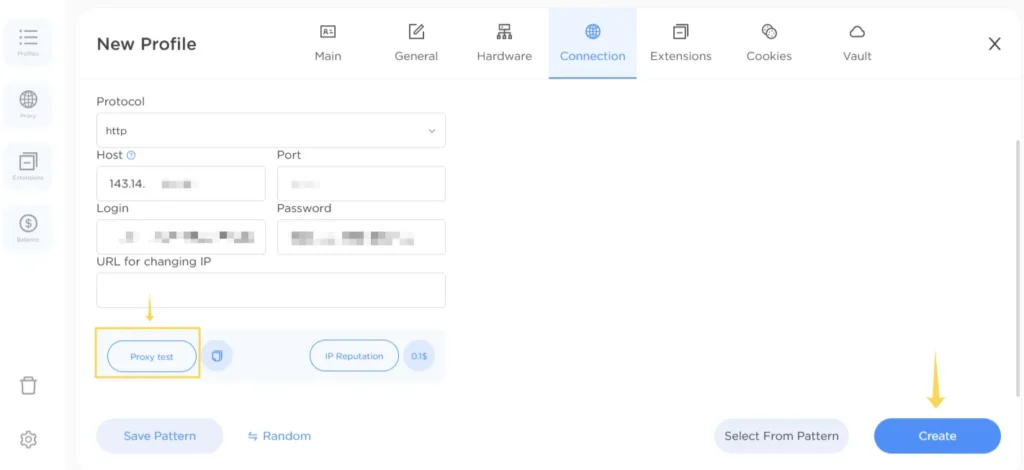
If the test is successful, click Create to save the profile.
Method 2. Adding a Proxy Through the Proxy Section
Open the Proxy section in the sidebar and click New Proxy.
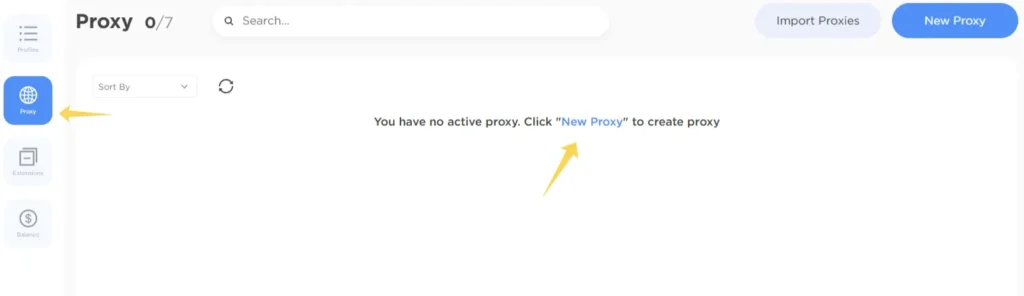
A proxy setup window will appear.
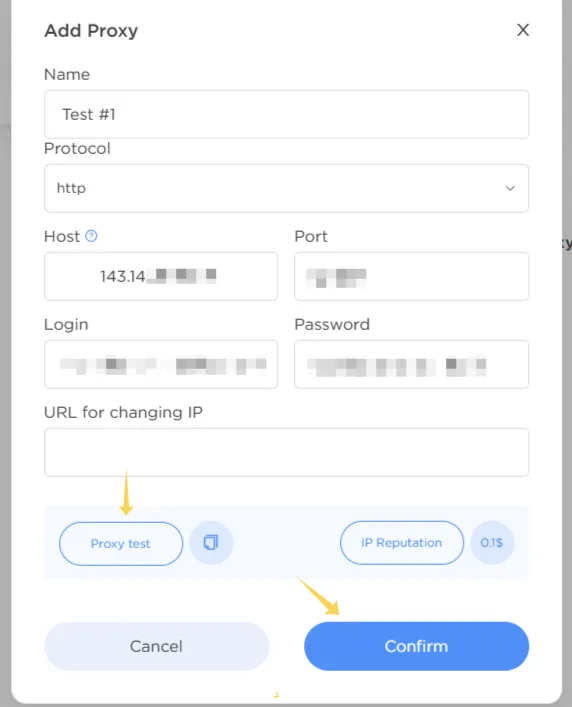
Enter:
- proxy name
- protocol
- IP address
- port
- username
- password
If necessary, you can also add an IP rotation URL.
After entering the details, click Proxy Test, then Confirm.
Once the test is successful, the proxy will appear in the main list and will be available for profile assignment.
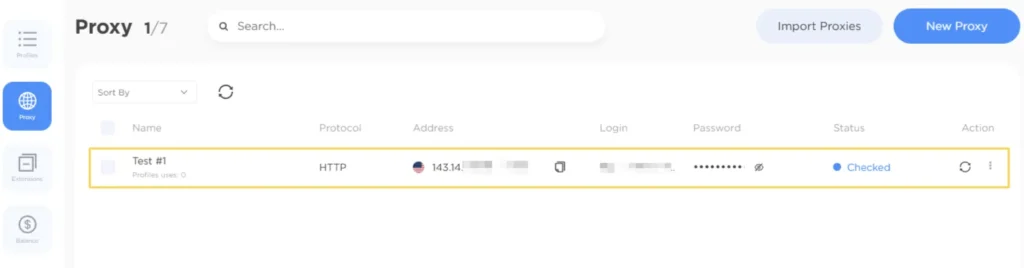
Connection Verification
After setting up a proxy, it’s recommended to check how websites and online services detect the connection. This helps ensure that the IP is displayed correctly, the GEO matches the selected location, and the connection works without issues.
For additional verification, you can use the following tools:
👉 IP address and GEO check: IP Lookup
👉 Proxy connection testing: Proxy Checker
👉 IP route and connection analysis: IP Trace
Best Proxy Types for 0DETECT
The best proxy type depends on your tasks, the number of accounts, and the anti-fraud protection level of the platform you work with. Different scenarios require different types of IP addresses.
| Proxy Type | Common Use Cases | Features |
| Residential | social media, marketplaces, arbitrage | appear as regular home users |
| ISP | long-term accounts and stable sessions | combine datacenter speed with residential trust |
| Datacenter | bulk actions and automation | fast and affordable but checked more often by anti-fraud systems |
| Mobile | platforms with strict moderation | high trust level due to mobile networks |
If it’s hard to choose the right option for your tasks, we recommend reading our detailed comparison:
👉 Residential vs Datacenter vs ISP Proxies
Main Use Cases
0DETECT combined with proxies is commonly used for:
- multi-accounting
- traffic arbitrage
- automation
- web scraping
- account farming
- managing advertising platforms
We also recommend:
Possible Connection Issues
Proxy fails the verification test
Check the correctness of the IP, port, and authentication details.
Incorrect GEO is displayed
Make sure the selected proxy belongs to the required region.
Slow page loading
Try another server or test a different proxy type.
CAPTCHA and restrictions
Use higher-quality IPs and avoid excessive activity.
Connection error
Make sure the proxy is active and the selected port is not blocked.
Security Tips
For more stable operation, it is recommended to:
- use a separate proxy for each profile
- avoid mixing different GEO locations within one session
- avoid sudden spikes in activity
- periodically rotate IPs during automation
- monitor connection quality regularly
Frequently asked questions
Here we answered the most frequently asked questions.
Which proxies work best with 0DETECT?
Residential and ISP proxies are the most common choices due to their higher trust level.
Can I use the same IP for multiple profiles?
Not recommended. A shared IP can link accounts together.
Which protocol should I choose?
SOCKS5 is the most popular option because it works well in antidetect environments.
Should I test proxies before launching profiles?
Yes, testing helps identify connection or GEO-related issues in advance.
Does 0DETECT support rotating proxies?
Yes, the browser supports proxies with IP rotation.
The profile import feature caught my attention. Being able to move existing setups instead of rebuilding everything from scratch is a huge plus when switching to a new browser.