
Why Your Internet Connection Feels Unstable (Even When Speed Tests Look Fine)

Quick Answer
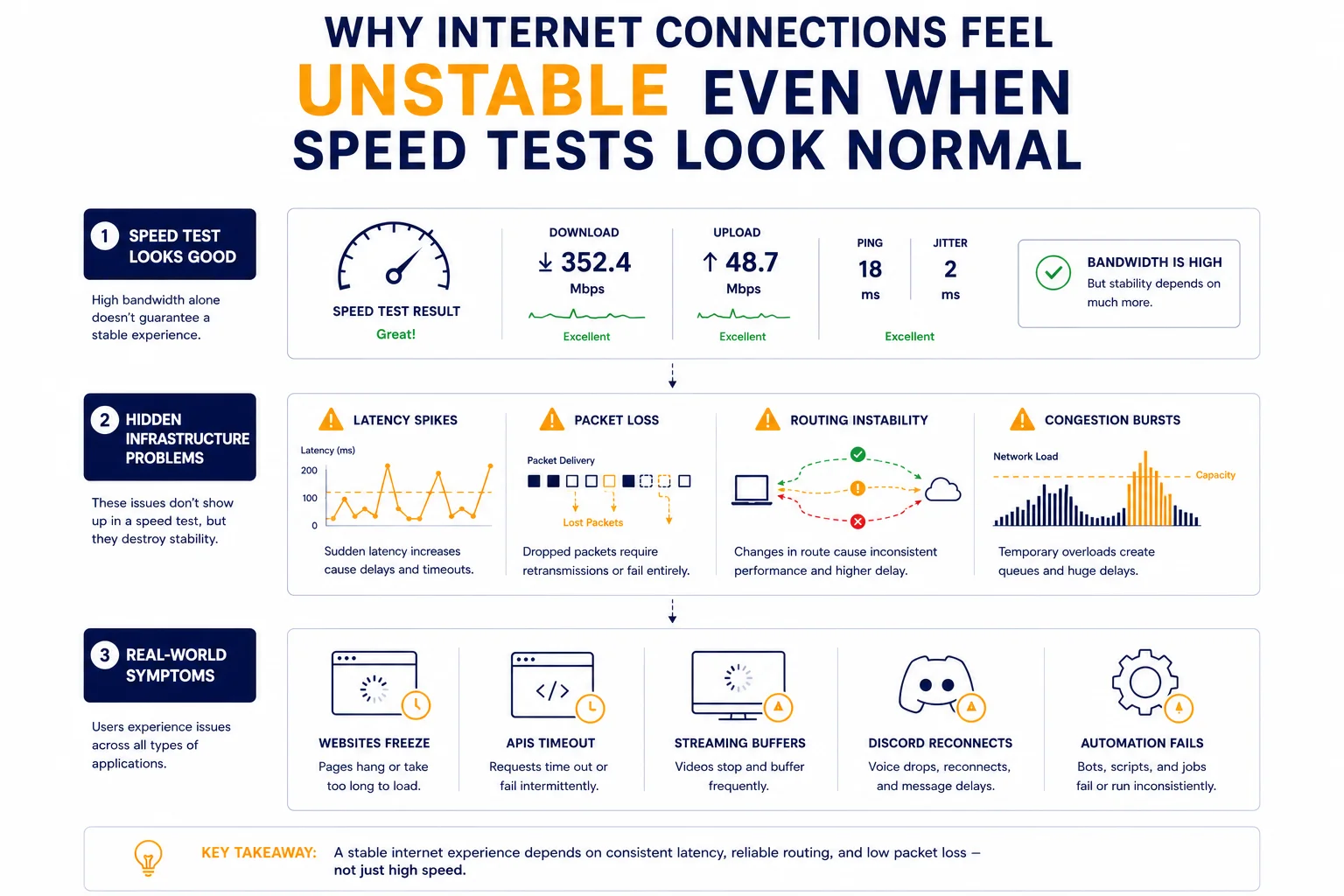
Internet connections often feel unstable because of latency spikes, routing problems, packet loss, or overloaded infrastructure even when bandwidth and speed test results appear normal.
Key Takeaways
- Speed tests do not always reveal real network instability
- Latency spikes often matter more than bandwidth
- Packet loss creates inconsistent browsing and failed requests
- Routing instability may affect only certain websites or services
- Automation systems and proxies are highly sensitive to unstable networks
Why “Fast Internet” Can Still Feel Broken
One of the most confusing networking problems happens when:
- speed tests look good
- bandwidth appears high
- but the internet still feels unstable
Users often experience:
- random lag spikes
- websites loading inconsistently
- Discord reconnects
- APIs timing out
- video calls freezing briefly
In many cases, the issue is not raw speed at all.
The real problem is inconsistent network behavior.
Signs Your Internet Connection Is Actually Unstable
Unstable connections rarely fail completely.
Instead, they create intermittent problems that appear randomly.
Common symptoms include:
- websites partially loading
- cloud dashboards freezing temporarily
- SSH sessions lagging
- automation requests retrying randomly
- streaming quality suddenly dropping
- browser tabs hanging for a few seconds
These problems are often difficult to diagnose because they appear inconsistently.
Why Speed Tests Often Miss the Real Problem
Traditional speed tests mainly measure:
- download bandwidth
- upload bandwidth
- average ping
However, they usually do not reveal:
- latency spikes
- unstable routing
- intermittent packet loss
- congestion bursts
This is why a connection may show:
900 Mbps download
18 ms average ping
…and still feel unreliable during real usage.
Why Instability Often Appears Only Sometimes
Many infrastructure problems are dynamic rather than constant.
For example:
- congestion may appear only during peak hours
- routing paths may change temporarily
- overloaded routers may fail under load spikes
As a result:
- one website works normally
- another becomes extremely slow
- APIs fail randomly
- gaming lag appears inconsistently
This intermittent behavior is one of the clearest signs of infrastructure instability.
Latency Spikes Are Often the Real Cause
Stable latency matters more than average latency.
For example:
| Connection Type | Average Ping | Real Experience |
| Stable connection | 25 ms | smooth |
| Unstable connection | 25-300 ms spikes | inconsistent |
Even short latency spikes may cause:
- frozen requests
- delayed loading
- buffering
- broken sessions
For related context, see Bandwidth vs Latency: What’s the Difference?.
Packet Loss Makes Networks Feel Random
Packet loss creates one of the most frustrating types of instability.
When packets disappear:
- requests retry automatically
- pages stall temporarily
- APIs wait for retransmissions
- sessions become inconsistent
From the user perspective, everything feels:
- random
- unreliable
- inconsistent
For deeper explanation, see What Is Packet Loss and Why It Happens.
Why Some Websites Break While Others Work Fine
A very common scenario:
- YouTube works normally
- but dashboards, APIs, or cloud services become unstable
This often happens because different services use:
- different routes
- different CDN paths
- different providers
The internet is not one single network.
Traffic constantly moves across multiple infrastructure providers.
Why ISP Routing Can Create Strange Problems
Internet providers continuously optimize traffic paths.
Sometimes these routing changes create:
- overloaded hops
- inefficient detours
- temporary instability
As a result:
- one region performs normally
- another experiences lag spikes
This is why users in different countries may experience completely different performance for the same service.
You can analyze routing paths using IP Trace Tool.
Home Network Problems vs Infrastructure Problems
People often assume instability always comes from their home Wi-Fi.
Sometimes this is true.
But many issues actually happen upstream.
Local Network Problems
Usually include:
- weak Wi-Fi signal
- overloaded router
- poor hardware
- wireless interference
Infrastructure Problems
Usually include:
- ISP congestion
- unstable routing
- overloaded cloud providers
- packet filtering
- overloaded proxy infrastructure
Understanding the difference saves a huge amount of troubleshooting time.
Why Automation and APIs Suffer More
Humans can tolerate small delays.
Automation systems cannot.
Unstable networks often cause:
- API retries
- broken authentication
- timeout errors
- inconsistent scraping results
This is especially important for:
- cloud infrastructure
- proxy systems
- automation tools
- monitoring platforms
For related context, see Proxy Success Rate Explained.
Why Proxy Traffic Is Sensitive to Instability
Proxy traffic already travels through additional routing layers.
Typical request flow:
Client → Proxy → Website → Proxy → Client
If instability appears anywhere along this route:
- latency grows
- retries increase
- sessions fail more often
This is why unstable networks affect proxy systems faster than normal browsing.
Real Infrastructure Example
Imagine a cloud dashboard that randomly freezes for 5-10 seconds.
The server itself remains online.
Bandwidth also appears normal.
However:
- one network hop becomes overloaded during peak hours
- latency spikes appear intermittently
- packet retransmissions increase
The result feels like “random instability” despite no visible outage.
Why Traceroute Helps Detect Intermittent Problems
Traceroute tools help identify unstable hops inside network routes.
They often reveal:
- inconsistent latency between hops
- timeout behavior
- overloaded routing paths
For related context, see Why Traceroute Shows Timeout or * * *.
How Engineers Actually Diagnose Instability
Professional diagnostics usually involve:
- route comparison
- latency monitoring
- packet loss tracking
- hop analysis
- regional testing
Engineers rarely rely only on speed tests.
Real infrastructure monitoring focuses on consistency rather than peak numbers.
Additional Tools for Network Diagnostics
Understanding unstable connections usually requires several diagnostics together.
Useful tools include:
• Proxy Checker – tests response behavior and connectivity
• IP Lookup – identifies ASN and network ownership
• IP Trace Tool – analyzes routing paths and latency consistency
Combining these diagnostics provides a more realistic picture of network quality.
Glossary
- Latency Spike
A sudden temporary increase in network delay. - Packet Loss
Packets disappearing during transmission. - Routing
The process of directing traffic through network paths. - Congestion
Overloaded infrastructure causing delays and instability.

Frequently asked questions
Here we answered the most frequently asked questions.
Why does my internet feel unstable even with high speed?
Because bandwidth alone does not guarantee stable routing or low latency.
Why do problems appear only sometimes?
Many infrastructure issues occur dynamically during congestion or routing changes.
Can packet loss make websites partially load?
Yes. Lost packets may interrupt requests and create incomplete loading behavior.
Why are APIs more sensitive to instability?
Because automation systems depend on predictable request timing and stable connectivity.