
How to Set Up a Proxy in MostLogin: Step-by-Step Guide

MostLogin is an anti-detect browser that allows you to create isolated profiles with unique fingerprints and run multiple accounts without overlap.
If you’re working with multi-accounting, automation, or traffic arbitrage, an anti-detect environment alone isn’t enough. Without proxies, all profiles will use the same IP, which quickly leads to restrictions.
In this guide, we’ll show how to connect proxies from Mango Proxy to MostLogin and set up stable profile operation.
Why You Need Proxies in MostLogin
An antidetect browser isolates the fingerprint, but the IP address remains a key factor.
Proxies allow you to:
- run multiple accounts without overlap
- reduce the risk of bans and CAPTCHAs
- work with different GEOs
- scale automation
- simulate real user behavior
👉 Learn more: What is a proxy server
Step-by-Step Setup
Step 1: Install and Launch MostLogin
Download MostLogin from the official website and log into your account.
Then:
- open the Dashboard
- click Create Profile
- choose OS and browser
- configure basic fingerprint settings
Each profile is a separate environment.
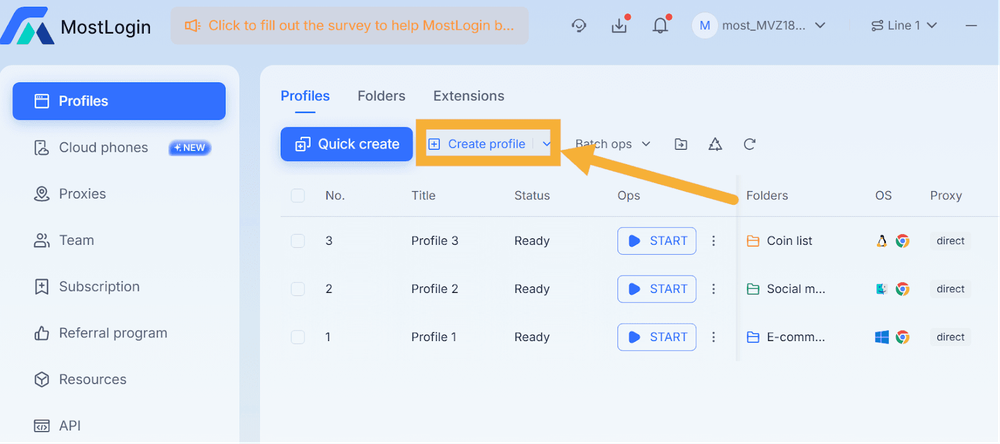
Step 2: Go to Proxy Settings
In the profile settings:
- open the Proxies tab
- choose the protocol
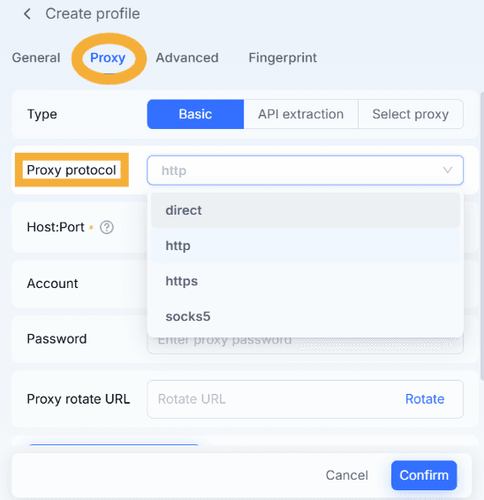
Step 3: Add a Proxy
Click Add Proxy and fill in:
- Host
- Port
- Username
- Password
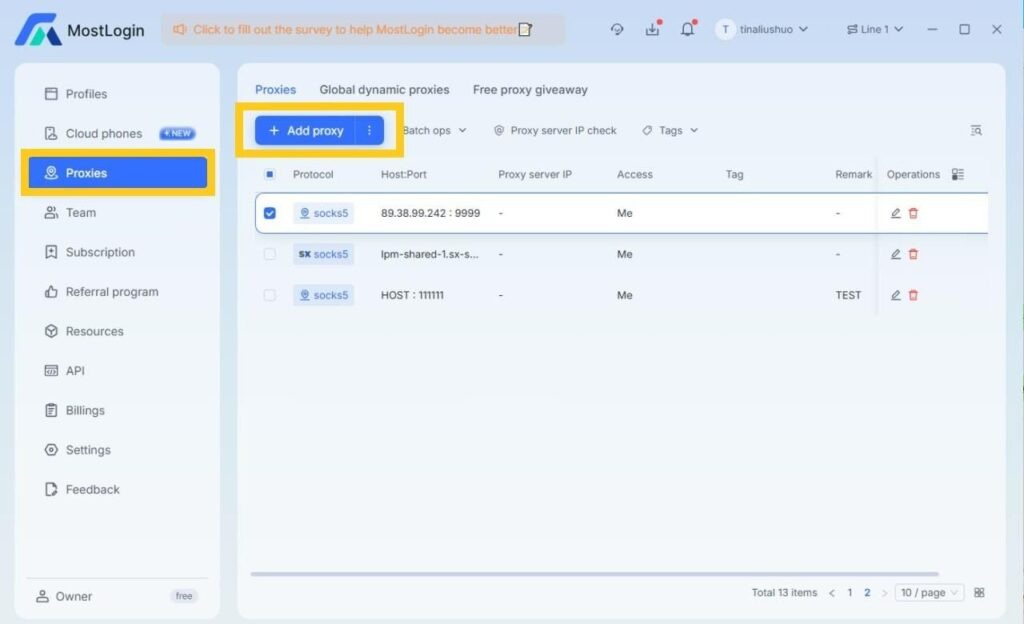
You can find these details in your MangoProxy dashboard. Before connecting, we recommend testing the proxy.
👉 Check your proxy here: Proxy Checker
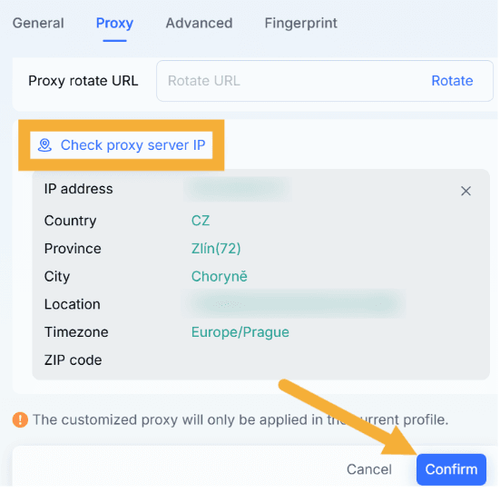
Step 4: Test the Connection
Click Check Proxy:
- IP should be detected
- GEO should match
- status should be successful
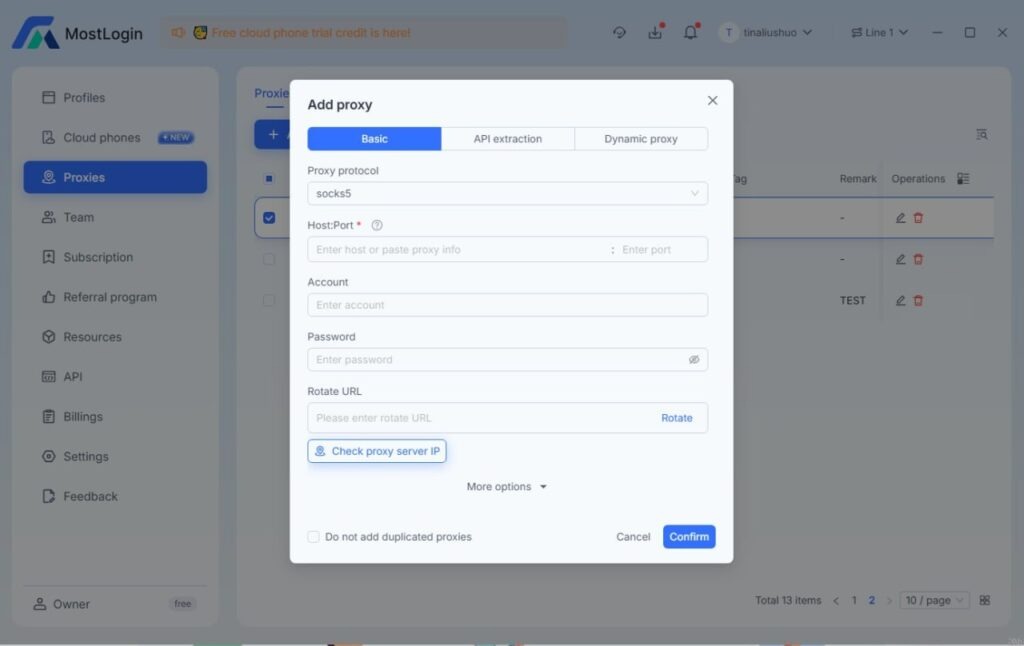
👉 Additional IP check: What is my IP
Step 5: Save and Launch
- click Confirm
- launch the profile
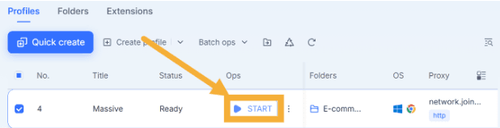
The browser will open with a new IP and a separate fingerprint.
Tip: test 2-3 profiles before scaling.
Proxy IP Verification
Before starting, make sure everything is configured correctly:
- GEO matches
- no DNS leaks
- IP is stable
Which Proxies to Use
| Proxy Type | Use Case | Stability | Trust Level |
| Residential | social media, ads, scraping | High | Very high |
| ISP | long sessions | Very high | High |
| Datacenter | high-volume tasks, speed | Medium | Medium |
| Mobile | complex platforms | High | Very high |
👉 Learn more: Residential vs Datacenter vs ISP vs Mobile Proxies
Main Use Cases
The MostLogin + Mango Proxy setup is suitable for:
- multi-accounting
- traffic arbitrage
- automation and bots
- web scraping
- GEO testing
👉 More use cases and strategies: Proxy Use Cases Guide
Common Errors
1. Proxy not connecting
Check your username and password
2. Incorrect GEO
Check parameters in the username
3. Blocks / CAPTCHAs
Reduce request intensity or change IP
4. 407 Error
Invalid authentication credentials
👉 Learn more: 407 Proxy Authentication Required
5. Low speed
Choose another server or proxy type
Security Tips
- do not use one proxy for multiple accounts
- match proxy GEO with fingerprint
- avoid sudden spikes in activity
- use rotation for scraping
- monitor IP quality
Why Proxy Stability Matters More Than It Seems
Even if a proxy connects and passes checks, it doesn’t guarantee stable performance. Websites analyze not only the IP, but also behavior, request frequency, environment consistency, and IP reputation.
This is especially important with MostLogin: the antidetect browser isolates the fingerprint, but if the IP behaves inconsistently or looks suspicious, the profile can still get restricted.
If proxy quality drops:
- CAPTCHAs increase
- page load speed decreases
- restrictions or bans appear
- session logic breaks in antidetect environments
- mismatches between fingerprint and IP occur
👉 Learn more: How websites evaluate IP quality
Frequently asked questions
Here we answered the most frequently asked questions.
Which proxies are better – rotating or static?
Rotating proxies are better for scraping, while static proxies are more suitable for long sessions.
Which protocol should I choose?
SOCKS5 is the optimal choice. It’s more универсal, works more reliably in antidetect environments, and doesn’t add extra HTTP headers that could increase detection risk.
Can I use one proxy for multiple profiles?
Not recommended – it increases the risk of bans.
How often should I change IP?
Depends on the platform, but avoid changing it too frequently.
Can I test proxies beforehand?
Yes, using Mango Proxy tools or directly inside MostLogin.
Binding assigned proxies directly inside MoreLogin’s Proxy Manager keeps IP rotation tied cleanly to individual browser profiles