
Playwright Stealth Techniques for Reliable Browser Automation
Published: ≈ 8 min read
Quick Answer
Reliable Playwright automation isn’t built by hiding a browser-it is built by maintaining a consistent browser identity throughout the automation lifecycle. Stable browser contexts, persistent storage, predictable network characteristics, and careful session management are often more important than individual stealth techniques.
Key Takeaways
- Reliable automation starts with browser consistency.
- Browser contexts should be isolated and managed deliberately.
- Persistent browser state improves long-running workflows.
- Stable network identity complements stable browser identity.
- Modern websites evaluate browser trust across multiple signals.
- “Stealth” today is less about hiding and more about behaving consistently.
Why “Stealth” Doesn’t Mean Hiding Anymore
Search for Playwright Stealth online and you’ll find countless articles promising to make browser automation “undetectable.”
That isn’t how modern browser security works.
Today’s websites rarely rely on a single detection technique.
Instead, they evaluate an entire browser environment by combining:
- browser fingerprints;
- browser storage;
- authentication history;
- behavioral signals;
- network characteristics;
- historical session consistency.
As explained in Risk Scoring Systems Explained, browser trust is built from dozens of independent signals rather than one technical characteristic.
This changes what stealth really means.
Modern browser automation isn’t about pretending to be invisible.
It’s about building browser sessions that remain technically and behaviorally consistent over time.
Reliable Automation Starts With Browser Identity
Many developers focus on avoiding detection during browser startup.
In practice, the browser’s lifecycle is much longer.
A reliable Playwright project should maintain consistency throughout every stage of execution.
Browser Launch
│
▼
Browser Context
│
▼
Authenticated Session
│
▼
Consistent Browser Identity
│
▼
Long-Running Automation
Every step influences the overall browser identity observed by a website.
For example:
- creating clean browser contexts;
- preserving authentication state;
- maintaining browser storage;
- using consistent browser settings;
- keeping network characteristics predictable.
Together, these practices create browser sessions that remain stable across longer automation workflows.
This complements the architecture described in Playwright Browser Contexts and Proxies: How to Build Stable Automation Sessions, where browser contexts and proxy configuration form the technical foundation of reliable automation.
Stealth Techniques and Consistent Browser Identity
Modern Playwright projects benefit more from consistency than from constantly changing browser characteristics.
Instead of asking:
“How can I hide this browser?”
Experienced automation engineers usually ask:
“How can I make this browser behave consistently throughout its lifecycle?”
That shift changes the design of the entire project.
Rather than rebuilding browser identity on every launch, successful automation often preserves:
- browser contexts;
- browser storage;
- authenticated sessions;
- browser preferences;
- network consistency.
These ideas connect directly to Browser Contexts vs Browser Profiles, Why Session Consistency Matters, and Why Browser Fingerprints Matter More Than IPs.
A stable browser environment is typically easier to maintain than repeatedly creating completely new identities.
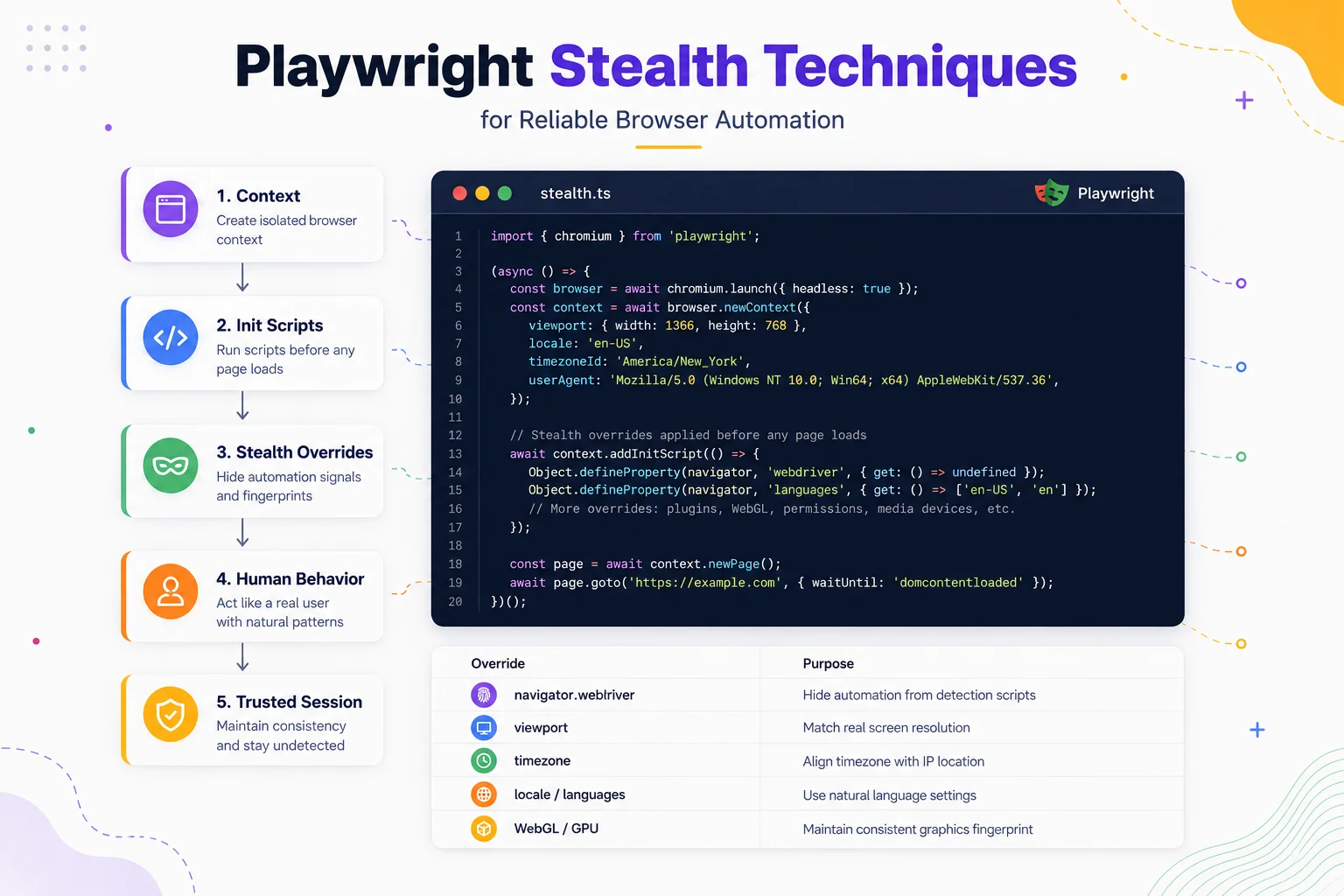
Managing the Browser Lifecycle
One of the biggest differences between beginner and production-grade Playwright projects is how they manage the browser lifecycle.
Many simple examples follow this pattern:
- launch the browser;
- perform one task;
- close everything;
- repeat.
While this approach works for demonstrations, large automation systems often benefit from treating the browser as a long-lived environment rather than a disposable process.
A well-designed automation workflow manages:
- browser launch;
- browser contexts;
- authenticated sessions;
- browser storage;
- graceful shutdown.
Keeping these components consistent helps create automation that is easier to maintain and more predictable over time.
Code Disclaimer
The examples below are simplified to illustrate Playwright concepts and recommended architectural patterns.
They are not intended to be complete production-ready implementations.
Real-world applications typically require additional error handling, retries, timeout management, logging, configuration, security controls, and infrastructure-specific adjustments.
Always adapt these examples to your own Playwright version, application architecture, and deployment environment.
Example 1 – Creating an Isolated Browser Context
import { chromium } from 'playwright';

const browser = await chromium.launch();

const context = await browser.newContext();

const page = await context.newPage();

await page.goto('https://example.com');
Why This Matters
Browser contexts provide lightweight isolation without launching additional browser instances.
This approach allows multiple independent sessions to coexist efficiently while keeping cookies, Local Storage, and authentication data separated.
For a deeper explanation of how contexts differ from full browser profiles.
Example 2 – Persisting Authentication State
await context.storageState({
  path: 'state.json'
});
Why This Matters
Saving the browser’s storage state allows future automation runs to restore authenticated sessions without repeating the login flow.
This improves session continuity and supports the consistent browser identity.
Example 3 – Restoring a Previous Session
const context = await browser.newContext({
  storageState: 'state.json'
});

const page = await context.newPage();
Why This Matters
Reusing stored authentication helps maintain long-running workflows while reducing unnecessary logins.
Combined with persistent browser contexts, this creates more stable automation sessions than repeatedly starting from a completely clean browser.
Network Consistency Matters Too
Reliable browser automation extends beyond Playwright itself.
Once browser identity is stable, the network environment should also remain predictable.
Different automation projects benefit from different proxy types:
- Residential Proxies for residential browsing environments.
- Static ISP Proxies for long-lived authenticated sessions.
- Datacenter Proxies for high-speed testing, monitoring, and infrastructure workloads.
- Mobile Proxies for scenarios requiring mobile carrier network characteristics.
Before you buy proxies, determine whether your workflow prioritizes persistence, throughput, geographic diversity, or mobile connectivity.
Stable browser identity and stable network identity complement each other, forming the foundation of reliable Playwright automation.
Example 4 – Closing Resources Gracefully
await page.close();

await context.close();

await browser.close();
Why This Matters
Closing browser resources in the correct order helps prevent memory leaks, orphaned browser processes, and resource exhaustion during long-running automation.
While this example is simple, proper lifecycle management becomes increasingly important as Playwright projects scale.
Production Tips
Reliable Playwright automation is built around consistency rather than complexity.
Keep Browser Identity Stable
Launching a brand-new browser for every task isn’t always the best approach.
Whenever appropriate, preserve:
- browser contexts;
- authentication state;
- browser storage;
- browser preferences;
- browser version.
Maintaining a consistent browser environment often produces more reliable long-running sessions.
Treat Browser Contexts as Isolated Workspaces
Each browser context should represent a separate session with its own cookies, Local Storage, and authentication state.
Avoid sharing session data between unrelated workflows unless persistence is intentionally required.
This architecture scales much better than attempting to manage multiple accounts inside a single context.
Think Beyond “Stealth”
Modern browser automation is no longer about hiding Playwright.
Instead, focus on creating automation that remains technically consistent.
That includes:
- stable browser fingerprints;
- predictable browser storage;
- coherent session history;
- realistic browser lifecycle management;
- consistent network characteristics.
These concepts align directly with Behavioral Detection Explained, where websites evaluate complete browser environments rather than isolated technical signals.
Match Your Proxy Type to Your Use Case
Different automation workloads benefit from different network characteristics.
Before you buy proxies, define the requirements of your Playwright project instead of selecting a proxy type based solely on cost.
Validate the Entire Environment
Reliable automation depends on both browser and network consistency.
Before troubleshooting Playwright itself, verify the surrounding environment using:
- Proxy Checker for connectivity and response validation.
- My IP to confirm the active public address.
- IP Lookup to inspect ASN and IP information.
- DNS Leak Test to verify DNS consistency.
- IP Trace to understand how websites see your network path.
Final Thoughts
Reliable Playwright automation is not built around making a browser “invisible.”
Instead, it is built around creating browser sessions that remain technically consistent from launch to shutdown.
Browser contexts, persistent storage, session continuity, browser lifecycle management, and stable network characteristics all contribute to automation that is easier to scale and maintain.
Rather than viewing stealth as a collection of tricks, modern automation engineers increasingly treat it as an architectural discipline centered on consistency.
Understanding these principles makes Playwright projects more predictable while also aligning with how modern websites evaluate browser trust through fingerprints, behavioral analysis, and risk scoring.
Glossary
Browser Context
An isolated browser session within a Playwright browser instance. Each context maintains its own cookies, storage, and authentication state.
Storage State
A Playwright feature that saves cookies and browser storage, allowing authenticated sessions to be restored later.
Browser Lifecycle
The complete sequence of browser launch, session creation, execution, persistence, and shutdown during an automation workflow.
Persistent Session
A browser session that preserves authentication and browser state across multiple automation runs.
Browser Identity
The collection of browser characteristics-including fingerprints, storage, settings, and behavior-that websites use to recognize a browser.
Session Consistency
The ability to maintain stable browser characteristics throughout an authenticated browsing session.
Playwright
An open-source browser automation framework supporting Chromium, Firefox, and WebKit for testing and browser automation.
Frequently asked questions
Here we answered the most frequently asked questions.
Does Playwright include a built-in stealth mode?
No. Playwright itself focuses on browser automation and testing. Reliable automation is typically achieved through good browser architecture, session management, and consistent browser identity rather than a single “stealth mode.”
Should I launch a new browser for every task?
Not necessarily. Many production systems reuse browser instances while creating new browser contexts for session isolation. The right approach depends on your workload, scalability requirements, and browser lifecycle strategy.
Is persistent storage better than logging in every time?
For many long-running workflows, yes. Persisting browser storage reduces repeated authentication and helps maintain consistent browser sessions across automation runs.
Which proxy type works best with Playwright?
There is no universal answer.
- Residential Proxies are commonly used for residential browsing scenarios.
- Static ISP Proxies are well suited to persistent authenticated sessions.
- Datacenter Proxies provide excellent speed for testing and automation.
- Mobile Proxies are useful when mobile network characteristics are required.
The best choice depends on the objectives of your automation project.