
Selenium Best Practices for Modern Browser Automation
Published: ≈ 14 min read
Quick Answer
Reliable Selenium automation depends less on individual tricks and more on architecture. Modern Selenium projects should manage the WebDriver lifecycle deliberately, use condition-based waits instead of fixed delays, isolate browser sessions, preserve state only when necessary, handle failures predictably, and treat browser and network configuration as part of the same automation environment.
Key Takeaways
- Use explicit waits instead of fixed sleep() delays.
- Keep WebDriver creation and shutdown under deliberate lifecycle management.
- Isolate unrelated browser sessions instead of sharing state accidentally.
- Treat cookies, authentication, and browser storage as part of session architecture.
- Build retries around specific recoverable failures rather than repeating every failed action.
- Keep browser and network configuration predictable in long-running workflows.
- Separate Selenium architecture from proxy-specific configuration.
Modern Selenium Problems Are Usually Architecture Problems
Selenium has existed for more than two decades, but many unreliable Selenium projects still fail for surprisingly familiar reasons.
The browser starts.
The script finds an element.
It clicks something.
Then eventually:
ElementNotInteractableException
TimeoutException
StaleElementReferenceException
The natural reaction is often to add another delay, retry the action, or restart the browser.
That can temporarily hide the problem without fixing its cause.
Modern websites are dynamic applications. Elements appear asynchronously, interfaces change after API responses, DOM nodes are replaced, authentication state evolves, and navigation can occur without a traditional page reload.
Reliable Selenium architecture therefore needs to account for the state of the browser, rather than assuming that every page becomes ready after an arbitrary number of seconds.
Reliability Starts With the WebDriver Lifecycle
A Selenium session has a lifecycle.
Driver Creation
│
▼
Browser Configuration
│
▼
Session Initialization
│
▼
Page Interaction
│
▼
State Management
│
▼
Graceful Shutdown
How each stage is managed affects the reliability of everything that follows.
A common mistake is treating WebDriver as a disposable object that can simply be recreated whenever something fails.
In production environments, uncontrolled driver creation can result in:
- orphaned browser processes;
- excessive memory consumption;
- inconsistent browser configuration;
- lost authentication state;
- difficult-to-debug failures.
The better approach is to define clearly when a driver should be created, how long it should exist, what state belongs to it, and when it should be terminated.
This follows the same architectural principle discussed in Why Session Consistency Matters: reliability improves when the environment evolves predictably instead of being recreated unnecessarily.
Code Disclaimer
The examples in this article demonstrate Selenium architecture and recommended development patterns.
They are intentionally simplified and should not be treated as complete production-ready implementations.
Real-world automation typically requires additional:
- logging;
- exception handling;
- timeout configuration;
- retries;
- resource monitoring;
- security controls;
- environment-specific configuration.
Always adapt the examples to your Selenium version, browser version, application architecture, and deployment environment.
Example 1 – Manage WebDriver With a Defined Lifecycle
A simple Python pattern is to make driver creation and cleanup explicit:
from selenium import webdriver
from selenium.webdriver.chrome.options import Options


def create_driver():
    options = Options()
    options.add_argument("--window-size=1440,900")

    return webdriver.Chrome(options=options)


driver = create_driver()

try:
    driver.get("https://example.com")

    print(driver.title)

finally:
    driver.quit()
Why This Matters
The finally block ensures that Selenium attempts to terminate the browser even if an exception occurs during execution.
This becomes particularly important when automation runs repeatedly on servers or CI infrastructure, where abandoned browser processes can gradually consume system resources.
It also establishes a simple architectural boundary:
One component creates the browser, and the same workflow is responsible for closing it.
As projects grow, this pattern can be moved into context managers, fixtures, driver factories, or dedicated lifecycle services.
Explicit Waits Beat Fixed Delays
One of the most important Selenium best practices is also one of the simplest:
Avoid using fixed delays as your primary synchronization strategy.
This:
import time

time.sleep(5)
doesn’t actually determine whether the application is ready.
It only tells Selenium to do nothing for five seconds.
If the element becomes available after one second, four seconds are wasted.
If it becomes available after six seconds, the automation still fails.
Modern browser automation should synchronize with conditions, not arbitrary time intervals.
Example 2 – Wait for the Condition You Actually Need
from selenium.webdriver.common.by import By
from selenium.webdriver.support.ui import WebDriverWait
from selenium.webdriver.support import expected_conditions as EC


wait = WebDriverWait(driver, 10)

login_button = wait.until(
    EC.element_to_be_clickable((By.ID, "login-button"))
)

login_button.click()
Why This Matters
Selenium now continues as soon as the required condition becomes true.
The automation is therefore both faster and more resilient to variations in:
- server response time;
- network latency;
- frontend rendering;
- JavaScript execution;
- API response timing.
This distinction becomes increasingly important in large automation systems where thousands of unnecessary fixed delays can significantly increase total execution time.
It also reduces timing-related failures without trying to hide them behind increasingly long sleep() calls.
Browser State Is Part of the Automation Architecture
Once an automation workflow becomes authenticated or begins maintaining state, the browser can no longer be treated simply as a page-rendering tool.
It contains:
- cookies;
- authentication tokens;
- Local Storage;
- Session Storage;
- application state;
- navigation history.
That state determines what the website sees during subsequent interactions.
This is where Selenium architecture begins to overlap with the concepts discussed in How Session Persistence Works and Cookie Persistence vs Session Persistence.
In the next part, we’ll move from basic WebDriver reliability into session management, browser isolation, state persistence, and error handling – the areas where production Selenium architecture becomes much more important than individual commands.
Isolate Browser Sessions Deliberately
Session isolation is one of the most important architectural decisions in Selenium automation.
If unrelated workflows reuse the same browser environment, they may unintentionally share:
- cookies;
- authentication state;
- Local Storage;
- cached application data;
- browser preferences.
This can create failures that are difficult to reproduce because one automation task changes the environment used by another.
A useful principle is:
One independent workflow should have one clearly defined browser state.
This doesn’t necessarily mean launching a new browser for every action. It means deciding deliberately which state belongs to which session.
The underlying concept is explored in more detail in Browser Context Isolation: How Modern Browsers Separate Sessions.
Example 3 – Preserve Cookies When Persistence Is Required
Selenium allows cookies from an authenticated session to be stored and restored later.
import json

# Save cookies
with open("cookies.json", "w") as file:
    json.dump(driver.get_cookies(), file)
Later, after navigating to the appropriate domain:
import json

driver.get("https://example.com")

with open("cookies.json", "r") as file:
    cookies = json.load(file)

for cookie in cookies:
    driver.add_cookie(cookie)

driver.refresh()
Why This Matters
Repeatedly authenticating during every automation run isn’t always necessary.
For workflows where persistent authentication is appropriate, preserving cookies can reduce repeated login flows and help maintain session continuity.
However, cookies represent only part of browser state.
Modern applications may also depend on Local Storage, IndexedDB, server-side sessions, and other mechanisms.
Don’t Preserve State Just Because You Can
Persistence is useful, but more persistence isn’t automatically better.
Consider two different workflows.
Automated application testing
A test may need a completely clean environment so previous state cannot influence the result.
Long-running authenticated workflow
The application may need to preserve authentication and other state between executions.
These requirements are fundamentally different.
A good Selenium architecture therefore decides explicitly whether a workflow requires:
New Session
│
├── Clean State
│
└── Independent Test
or
Persistent Session
│
├── Existing Authentication
├── Previous State
└── Continued Workflow
Consistency doesn’t mean preserving everything forever. It means ensuring that browser state matches the purpose of the workflow.
Handle Dynamic DOM Changes Correctly
Modern applications frequently replace elements after:
- API responses;
- component re-renders;
- navigation changes;
- AJAX updates;
- framework state changes.
This is one of the common causes of StaleElementReferenceException.
Consider this pattern:
button = driver.find_element(By.ID, "submit")

# Page updates here

button.click()
The variable may still exist in Python even though the original DOM element no longer exists in the browser.
The better strategy is often to locate the element again after the application changes.
Example 4 – Retry a Specific Recoverable Condition
from selenium.common.exceptions import StaleElementReferenceException
from selenium.webdriver.common.by import By


def click_submit(driver):
    for attempt in range(3):
        try:
            button = driver.find_element(By.ID, "submit")
            button.click()
            return
        except StaleElementReferenceException:
            if attempt == 2:
                raise
Why This Matters
This retry has a clearly defined purpose.
It handles a specific condition that may occur when the DOM is re-rendered.
That’s very different from wrapping the entire automation script in an unlimited retry loop.
Production automation should know:
- what failed;
- whether the failure is recoverable;
- how many retries are reasonable;
- when the workflow should stop.
Blind retries can hide application problems and make debugging significantly harder.
Browser Identity Is Part of Session State
As Selenium workflows become longer-lived, another layer becomes important: browser identity.
Websites may observe much more than authentication cookies.
The browser environment can include:
- browser version;
- operating system characteristics;
- screen configuration;
- Canvas and Audio fingerprints;
- browser storage;
- network characteristics.
This is why repeatedly changing unrelated browser settings while preserving the same authenticated session can create an internally inconsistent environment.
As explained in Why Browser Fingerprints Matter More Than IPs and Risk Scoring Systems Explained, modern websites can evaluate multiple browser, session, network, and behavioral signals together.
For reliable automation, the practical lesson is not to manipulate each signal individually. It is to keep the overall environment predictable and appropriate for the workflow.
Network Configuration Should Follow the Same Principle
The same architectural thinking applies to proxies.
Different Selenium workloads have different network requirements:
- Residential Proxies can be appropriate when residential network characteristics or broad geographic coverage are required.
- Static ISP Proxies fit long-running workflows where the same network identity should remain available over time.
- Datacenter Proxies are useful for high-throughput testing, monitoring, crawling, and infrastructure tasks.
- Mobile Proxies are relevant when the application specifically needs to be tested or accessed through mobile carrier networks.
Before you buy proxies, define the requirements of the Selenium workflow first: persistence, location, throughput, concurrency, and network type.
And because we already have a dedicated Selenium Proxy Best Practices: Avoid Blocks, CAPTCHAs and Detection article, we don’t need to turn this guide into another proxy tutorial. Here, network configuration is simply one part of the broader automation architecture.
Validate Network Configuration Before Debugging Selenium
A browser failure isn’t always a Selenium failure.
Before spending time debugging selectors or WebDriver configuration, verify the network layer when it is relevant to the problem.
For example:
- Proxy Checker can confirm whether the configured proxy is responding.
- My IP can verify which public IP the Selenium browser is actually using.
- IP Lookup can inspect the IP’s ASN and geolocation.
- DNS Leak Test can help identify unexpected DNS resolution paths.
- IP Trace can provide additional context about the network route.
Separating browser problems from network problems makes troubleshooting much faster.
In the final part, we’ll cover production architecture, logging, graceful failure handling, scaling practices, FAQ, glossary, and the final internal-linking structure for the article.
Production Tips
Modern Selenium automation should be designed as a system rather than a collection of scripts.
Once automation moves beyond simple local testing, reliability depends on how well the project manages browsers, sessions, failures, state, and infrastructure.
Separate Configuration From Automation Logic
Avoid scattering browser configuration throughout the codebase.
Keep settings such as:
- browser type;
- headless mode;
- timeouts;
- window size;
- proxy configuration;
- environment variables;
in a dedicated configuration layer.
This makes it easier to run the same automation across development, staging, CI, and production environments without rewriting the browser logic itself.
Log Context, Not Just Errors
A message such as:
TimeoutException
provides very little information when debugging a production failure.
Useful logging should provide context such as:
Timestamp
Workflow
Current URL
Action
Exception
Attempt
Session ID
Screenshots and page source snapshots can also be useful when diagnosing unexpected UI states in controlled testing environments.
The goal isn’t simply to know that Selenium failed.
The goal is to understand what state the browser was in when it failed.
Example 5 – Capture Useful Failure Context
from datetime import datetime
from selenium.common.exceptions import TimeoutException


try:
    element = wait.until(
        EC.element_to_be_clickable((By.ID, "checkout"))
    )
    element.click()

except TimeoutException:
    timestamp = datetime.now().strftime("%Y%m%d-%H%M%S")

    driver.save_screenshot(
        f"failure-{timestamp}.png"
    )

    print(f"URL: {driver.current_url}")
    print(f"Title: {driver.title}")

    raise
Why This Matters
The exception is still allowed to propagate, but the workflow captures enough information to investigate the failure later.
This is usually more useful than blindly retrying the same action several times.
At scale, the same principle can be extended with structured logging, tracing, centralized error reporting, and automated artifact collection.
Don’t Retry Everything
Retries are valuable when failures are temporary.
They become dangerous when used as a universal solution.
Good candidates for controlled retries can include:
- temporary network failures;
- stale DOM references;
- transient page-loading problems;
- temporarily unavailable external services.
Permanent problems such as invalid selectors, incorrect authentication logic, or broken application flows should normally fail visibly.
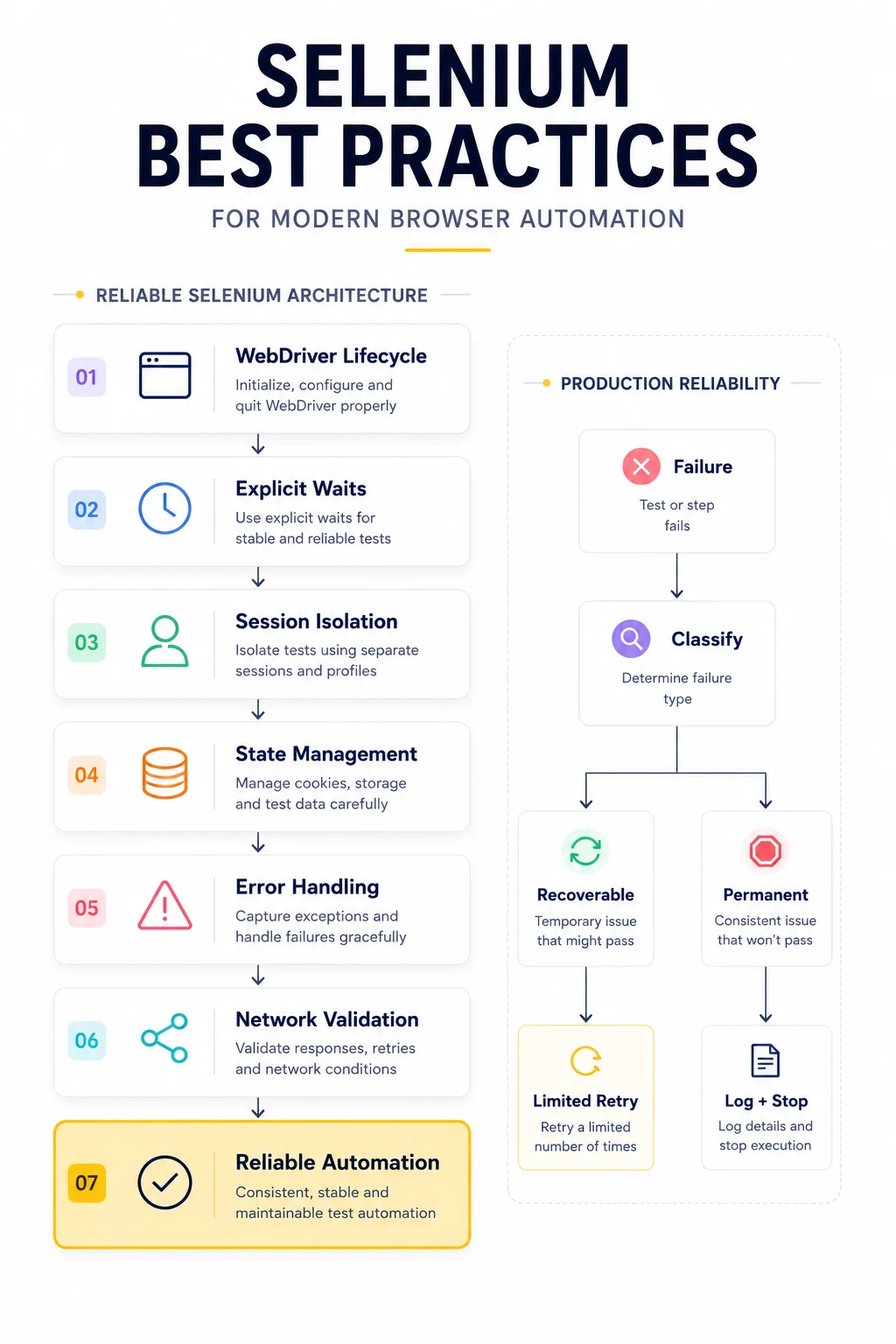
A useful production model looks like this:
Failure
│
▼
Classify Error
│
├── Recoverable ──► Limited Retry
│
└── Permanent ────► Log + Stop
This keeps failures observable instead of hiding them behind endless retry loops.
Scale With Isolation, Not Shared State
When Selenium workloads grow, simply running more browsers isn’t enough.
Each worker should have clearly defined ownership of:
- WebDriver;
- authentication state;
- cookies;
- browser storage;
- network configuration;
- temporary files.
Uncontrolled sharing of these resources can create race conditions and unpredictable session behavior.
Selenium and Playwright Require Different Architecture
Selenium and Playwright solve many of the same automation problems, but their architectures are not identical.
Playwright provides browser contexts as a first-class isolation mechanism, while Selenium traditionally operates more directly around individual WebDriver sessions.
That difference affects how developers approach:
- isolation;
- session reuse;
- browser lifecycle;
- parallel execution;
- persistent state.
For the Playwright side of this architecture, see Playwright Browser Contexts and Proxies: How to Build Stable Automation Sessions and Playwright Stealth Techniques for Reliable Browser Automation.
The goal isn’t to declare one framework universally better.
It is to design automation around the lifecycle and isolation model of the framework you’re actually using.
Selenium Production Checklist
Before moving a Selenium workflow into production, verify that:
- WebDriver creation and shutdown are controlled.
- Explicit waits replace unnecessary fixed delays.
- Independent workflows don’t accidentally share state.
- Authentication persistence is intentional.
- Recoverable and permanent failures are handled differently.
- Browser configuration is centralized.
- Failure context is logged.
- Browser and driver versions are compatible.
- Network configuration is validated separately.
- Parallel workers have isolated resources.
These practices won’t eliminate every automation failure.
They make failures predictable, observable, and easier to recover from.
Final Thoughts
Reliable Selenium automation is less about writing more code and more about controlling state.
The WebDriver lifecycle needs clear ownership. Dynamic pages require condition-based synchronization. Independent workflows need isolation. Persistent authentication should be intentional. Failures need classification and useful diagnostic context.
The same principle extends beyond Selenium itself.
Browser identity, session history, and network characteristics all form part of the environment in which automation operates. That’s why modern browser automation increasingly needs to be approached as an engineering system rather than a collection of browser commands.
Selenium remains a powerful foundation for that system – provided its sessions, state, failures, and infrastructure are managed deliberately.
Glossary
Selenium WebDriver
The browser automation interface used by Selenium to control browsers such as Chrome, Firefox, and Edge.
Explicit Wait
A synchronization technique that waits until a specific browser or DOM condition becomes true before continuing execution.
WebDriver Lifecycle
The sequence covering driver creation, browser initialization, automation execution, and driver shutdown.
Browser Isolation
The separation of cookies, authentication, storage, and other state between independent browser workflows.
Session Persistence
The preservation of browser or authentication state across multiple interactions or automation runs.
Stale Element Reference
A Selenium condition where a previously located DOM element is no longer attached to the current page structure.
Retry Strategy
A defined approach for repeating operations after specific temporary failures while allowing permanent failures to remain visible.
Browser State
The combination of cookies, storage, authentication data, configuration, and application state associated with a browser session.
Frequently asked questions
Here we answered the most frequently asked questions.
Should I use time.sleep() in Selenium?
Occasionally, fixed delays can be useful for debugging or very specific timing requirements. For normal browser synchronization, explicit waits are usually preferable because they react to actual application state instead of waiting for an arbitrary amount of time.
Should I reuse the same Selenium WebDriver?
It depends on the workflow. Long-running tasks may benefit from controlled driver reuse, while isolated tests often require completely independent browser sessions. The important part is making the decision deliberately rather than allowing unrelated workflows to share state accidentally.
Should Selenium sessions preserve cookies?
Only when persistence serves the workflow. Authenticated automation may benefit from cookie persistence, while independent tests usually require clean browser state. Remember that cookies alone do not represent the complete session. See Cookie Persistence vs Session Persistence for the distinction.
Is Selenium still suitable for modern browser automation?
Yes. Selenium remains widely used for browser testing and automation. Modern Selenium projects, however, benefit from disciplined lifecycle management, explicit synchronization, isolation, logging, and failure handling rather than relying on older script-style automation patterns.
Which proxy type should I use with Selenium?
It depends on the workload. Residential Proxies can provide residential network characteristics, Static ISP Proxies can support persistent network identity, Datacenter Proxies are useful for high-throughput infrastructure workloads, and Mobile Proxies are relevant when mobile carrier connectivity is specifically required. For detailed proxy configuration and network considerations, see Selenium Proxy Best Practices: Avoid Blocks, CAPTCHAs and Detection.