
Why Clean Proxies Still Get Blocked
Published: ≈ 18 min read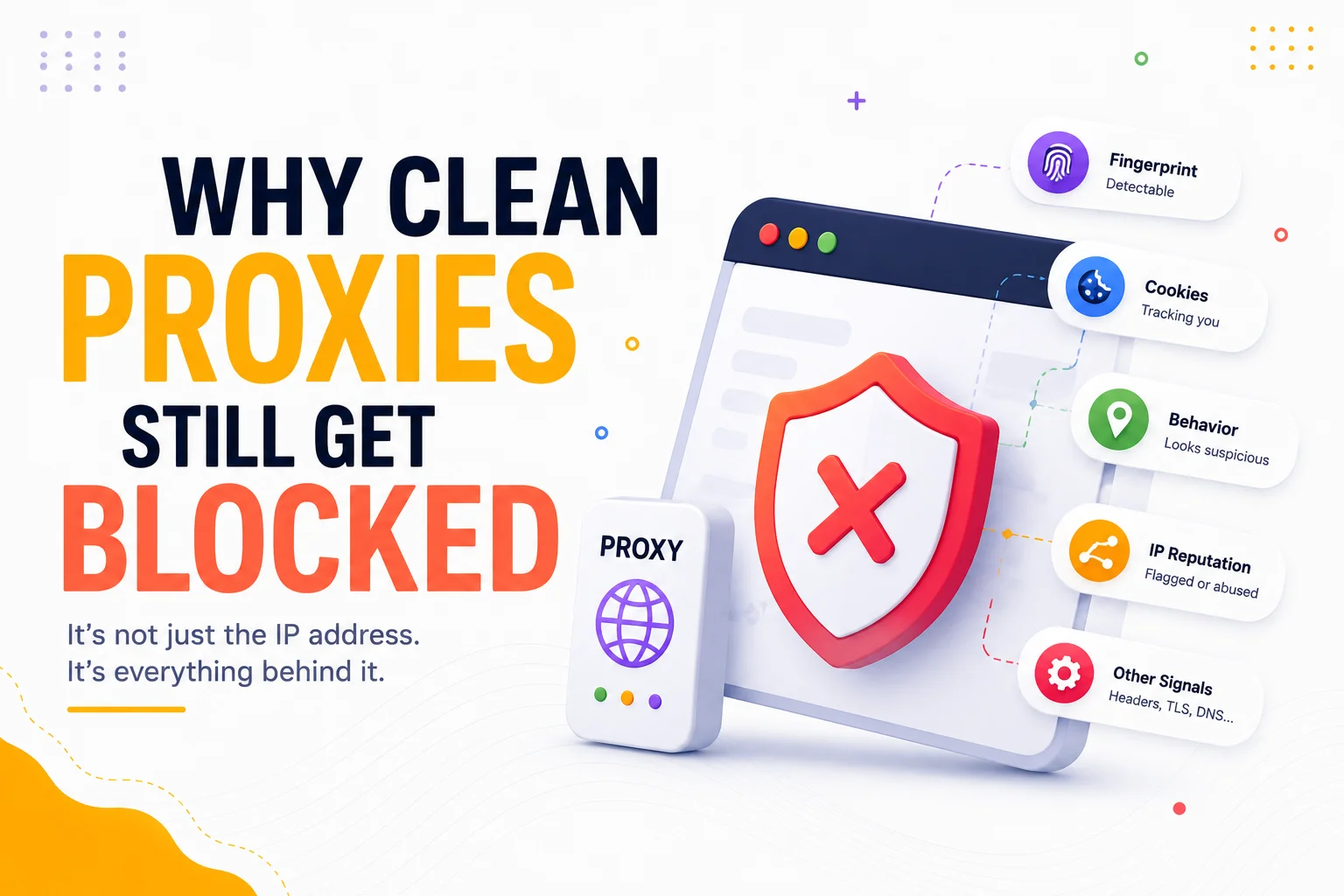
Quick Answer
A clean proxy can still get blocked because a working proxy and a trusted request are not the same thing.
In this article, a clean proxy means a proxy that works technically and shows no obvious problems in available basic checks. This does not mean that every target website will trust it. A website may evaluate the IP or network, request properties, browser environment, session history, request rate, user behavior, and other risk signals before allowing access.
The correct response is not to rotate the proxy immediately. First identify the observed symptom, determine which diagnostic layer could produce it, verify that layer independently, and then interpret the result.
Key Takeaways
- Passing a proxy test confirms basic functionality, not acceptance by a specific website.
- A 403 response, 429 response, CAPTCHA, redirect loop, or connection failure represents a different diagnostic path.
- A website may evaluate the entire request and session—not only the visible IP address.
- IP reputation can be target-specific and may change over time.
- Browser, session, and behavioral inconsistencies can cause a request to look suspicious even when the proxy itself works.
- Changing several variables at once makes the result difficult to interpret.
- No proxy category or successful basic test guarantees access to every target.
- Diagnostic conclusions should be based on repeatable, target-specific observations.
A Clean Proxy and a Trusted Request Are Not the Same Thing
For this troubleshooting guide, a clean proxy is:
A technically working proxy without obvious problems in available basic checks, but not necessarily a proxy trusted by a specific target website.
This is a working definition for this article, not a universal industry standard or certification.
A basic proxy test can answer questions such as:
- Does the proxy accept a connection?
- Are the credentials valid?
- Does the configured protocol work?
- Is traffic leaving through the expected IP address?
- Does the reported location or network match the intended configuration?
- Is the proxy responsive enough to complete a basic request?
These checks are important. Start with the process described in How to Test Proxies.
However, passing them does not prove that:
- a particular website trusts the IP;
- the target accepts the associated ASN or network;
- the browser environment is internally consistent;
- the request rate is acceptable;
- the current session has no suspicious history;
- the user behavior matches the target’s expectations;
- the target will return the same decision on a different endpoint or account.
If necessary, use What Is My IP to confirm the visible exit IP. This establishes the network baseline, but it does not test whether a specific target accepts the complete request.
Classify the Observed Symptom Before Changing Anything
“Blocked” is not a sufficiently precise diagnosis. Record the exact symptom before rotating the proxy, rebuilding the session, or changing the browser.
| Observed symptom | First diagnostic layer | Verification step | Possible interpretation | Related deep dive |
| Connection timeout or proxy authentication error across multiple sites | Proxy configuration, credentials, protocol, or routing | Test the same configuration against a neutral endpoint and confirm credentials and protocol | The proxy or client configuration may not be working correctly; this is not yet evidence of target blocking | Proxy testing |
| HTTP 403 on one target | Target authorization or security policy | Compare endpoints and sessions while keeping the proxy stable | The server understood the request but refused it; the response alone does not identify the rejected signal | 403 Forbidden When Using Proxy |
| HTTP 429 | Rate limiting | Review request timing, concurrency, account, cookie, and any Retry-After response | The target considers the request volume excessive under its counting policy | Rate and behavioral layer |
| CAPTCHA or JavaScript challenge | Target risk or challenge system | Repeat the test with a stable, internally consistent session | The request received an elevated-risk decision; this does not prove that the IP alone caused it | Risk layer |
| Redirect or login loop | Session, cookies, authentication state, or target policy | Start an authorized clean session and preserve its state | The session may be inconsistent, expired, or rejected | Session layer |
| Proxy works on other sites but fails on one target | Target-specific decision | Repeat controlled tests without changing several variables | The proxy works technically, but the target applies a different policy or risk threshold | Target-specific diagnosis |
| Failure disappears once but later returns | Unresolved or time-dependent layer | Repeat the same controlled test and log the conditions | The improvement may be temporary; one successful attempt does not establish the root cause | Outcome monitoring |
Under RFC 9110, a 403 response means that the server understood the request but refuses to fulfill it. It does not specify whether the refusal resulted from the IP, session, permissions, request properties, or another policy.
Under RFC 6585, a 429 response means that too many requests were received within a period of time. The specification allows servers to count requests in different ways, including by credentials or cookies. A 429 therefore does not automatically prove that the proxy IP has a poor reputation.
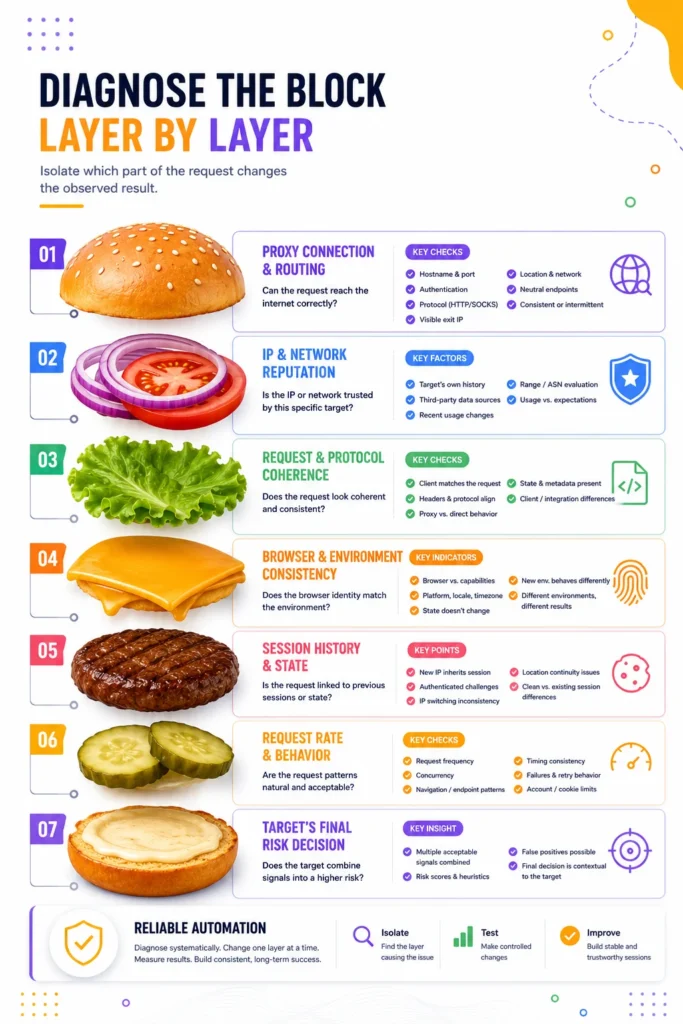
Diagnose the Block Layer by Layer
The purpose of layered diagnosis is not to reconstruct a target’s private security system. It is to isolate which part of the request changes the observed result.
Layer 1: Proxy Connection and Routing
Start here when the request cannot reach multiple unrelated destinations.
Verify:
- proxy hostname and port;
- authentication credentials;
- selected protocol;
- visible exit IP;
- expected location and network;
- whether neutral endpoints are reachable;
- whether failures occur consistently or intermittently.
A failure at this layer means that deeper analysis of browser behavior or target risk is premature.
If the reported IP or network context requires investigation, use IP Lookup. Treat the returned network information as diagnostic context, not as proof that a target will accept or reject the address.
Layer 2: Target-Specific IP and Network Reputation
A proxy can be reachable and absent from obvious public warnings while still receiving an unfavorable decision from a specific target.
Possible reasons include:
- the target has its own history for the address or network;
- the target uses a third-party data source unavailable in basic checks;
- recent traffic has changed the address’s risk profile;
- the target evaluates an IP range or ASN, not only one address;
- the IP’s observed usage does not match the target’s expectations.
The important distinction is that IP reputation is not a permanent universal label. Review How IP Reputation Works for the underlying reputation concepts without treating any individual public score as a guarantee of access.
Layer 3: Request and Protocol Coherence
Some security systems evaluate properties of the complete request rather than looking only at the source IP.
Diagnostic questions include:
- Does the declared client match the request it produces?
- Are headers and protocol behavior internally coherent?
- Does the same client behave differently through the proxy and without it?
- Are requests missing state or metadata normally present in that workflow?
- Does the failure occur only with one HTTP client or integration?
Public technical documentation shows that some detection systems combine heuristics, machine learning, and request-level signals rather than making a decision from the IP alone. Cloudflare, for example, documents multiple bot detection engines.
This does not mean every target uses the same vendor, signals, or weighting. Use it only as evidence that modern request evaluation can be multi-layered.
For the broader mechanisms, see How Websites Detect Proxy Traffic.
Layer 4: Browser and Environment Consistency
When the request comes from a browser or browser automation environment, the apparent browser identity may not agree with the environment that produced it.
Potential diagnostic indicators include:
- a declared browser that does not match observable capabilities;
- inconsistent platform, locale, timezone, or display information;
- a browser state that changes unexpectedly between requests;
- a newly created environment behaving unlike the existing session;
- different browser environments producing different outcomes through the same proxy.
Do not attempt to change every browser property at once. Keep the proxy stable, compare controlled environments, and record the result.
The detailed relationship between network identity and browser identity is covered in Why Browser Fingerprints Matter More Than IP Addresses.
Layer 5: Session History and State
A target can associate the current request with earlier activity through an account, session identifier, cookie, or server-side state.
This can create situations where:
- a new IP inherits the outcome associated with an existing session;
- an authenticated account continues to receive challenges after an IP change;
- switching IPs during a workflow creates an inconsistency;
- a session started in one location appears to continue from another;
- a clean browser session and an existing session produce different results.
Test session state separately from proxy state. If you change both at the same time, you cannot determine which change affected the outcome.
See Why Session Consistency Matters for the deeper session model.
Layer 6: Request Rate and Behavior
A technically valid request may still be rejected because of how requests are sequenced.
Check:
- request frequency;
- concurrency;
- repeated navigation or endpoint patterns;
- identical timing across multiple sessions;
- repeated failures followed by immediate retries;
- account- or cookie-level limits;
- whether the target provided Retry-After.
For 429 responses, reduce request pressure and respect target instructions before testing again. Avoid treating rapid IP rotation as a default response: the target may count activity using an account, cookie, or other identifier instead of—or in addition to—the IP address.
The behavior layer is explained further in Behavioral Detection Explained.
Layer 7: The Target’s Final Risk Decision
The target may combine several individually acceptable signals into a higher-risk result.
For example:
- the proxy works and the IP has no obvious public problem;
- the browser looks generally valid;
- the request rate is not extreme;
- but the combination of network, session, request, and behavior differs from the target’s normal traffic.
Risk-based systems can also produce false positives. Cloudflare’s official troubleshooting documentation explicitly recognizes the possibility of legitimate traffic being challenged or blocked. Google similarly documents request-level assessments that produce risk scores and reasons which the site must interpret before selecting an action in reCAPTCHA assessments.
These examples demonstrate possible system designs. They do not establish which vendor or method a particular target uses.
For a focused explanation of combined decisions, see Risk Scoring Systems Explained.
Run a Controlled Troubleshooting Workflow
Use the following sequence for authorized testing.
1. Record the exact outcome
Capture:
- target and endpoint;
- date and time;
- status code;
- relevant response headers;
- whether a challenge or redirect appeared;
- proxy identifier or visible exit IP;
- browser or client used;
- session or account context;
- request rate and concurrency;
- whether the same request worked previously.
Do not reduce the record to “proxy blocked.”
2. Verify the proxy baseline
Confirm that the proxy connects to neutral endpoints and exposes the expected IP, protocol, and location.
If the baseline fails, resolve the proxy or client configuration before testing target-specific explanations.
3. Reproduce the result without changing multiple layers
Keep the proxy, client, session, endpoint, and timing stable long enough to determine whether the outcome is repeatable.
An isolated success or failure may not be sufficient evidence.
4. Change one diagnostic layer
Examples:
- same proxy, different clean session;
- same proxy and session, lower request rate;
- same proxy, different authorized client;
- same client and session, different proxy;
- same proxy and client, different target endpoint.
Record the change and resulting outcome.
5. Compare target-specific results
A proxy that succeeds on neutral services but fails consistently on one target is technically working. The remaining question is why that target rejects the request.
Conversely, a proxy that fails across unrelated services is more likely to have a configuration, routing, availability, or authentication problem.
6. Respect target policies and stop conditions
A troubleshooting process is not permission to bypass access controls.
Stop or revise the workflow when:
- the target explicitly denies the requested access;
- continued retries would create unnecessary load;
- authorization is absent or unclear;
- the test conflicts with applicable terms, rules, or legal requirements.
7. Measure outcomes by target
Do not combine all requests into one global proxy success number. Track failures by target, status, client, session, and proxy context.
For measurement principles, see Proxy Success Rate Explained.
What Not to Conclude from a Block
Avoid these unsupported conclusions:
| Observation | Unsupported conclusion | Better interpretation |
| The proxy passes a checker | Every target must accept it | Basic connectivity passed; target trust remains untested |
| One request returned 403 | The IP is definitely banned | The target refused the request; identify the rejected layer |
| A CAPTCHA appeared | The browser fingerprint is definitely wrong | A risk or challenge decision occurred; several layers may contribute |
| Rotating the IP worked once | The original IP was the sole cause | The result needs controlled repetition |
| A public blacklist shows no issue | The IP has universally clean reputation | Private target data and recent activity may differ |
| Many IPs receive 429 | Every IP is blocked | The target may count by account, cookie, endpoint, or another scope |
| A different proxy category works | That category always bypasses the target | The test shows a contextual difference, not a universal guarantee |
Production Tips for Repeatable Diagnosis
For ongoing authorized proxy workflows:
- Log status codes, target endpoints, timestamps, proxy identifiers, sessions, and clients separately.
- Distinguish connection failures, 403 responses, 429 responses, challenges, redirects, and content-level soft blocks.
- Use bounded retries instead of retrying indefinitely.
- Respect Retry-After when it is provided.
- Do not rotate automatically after every failure without classifying the symptom.
- Correlate outcomes with both proxy and session identifiers.
- Preserve enough context to compare one-variable changes.
- Recheck conclusions when the target, client, workflow, or proxy data changes.
- Treat target-specific acceptance as an observed result, not a permanent proxy characteristic.
Practical Examples
Example 1: Proxy Passes Basic Checks but One Website Returns 403
Observed symptom: The proxy connects successfully and works on unrelated sites, but one target consistently returns 403.
Diagnostic layer: Target authorization, target-specific IP/network reputation, request coherence, or session state.
Verification step: Keep the proxy stable. Test an authorized clean session, review the exact endpoint, and compare the same client under controlled conditions.
Possible interpretation: The proxy is technically working, but the target refuses the complete request. The status code alone cannot identify whether the decisive factor is the IP, network, session, permissions, or request properties.
Next action: Follow the target-specific 403 troubleshooting path. Do not rotate blindly before collecting a controlled comparison.
Example 2: CAPTCHA Appears After an IP Change During a Session
Observed symptom: An established session works until its exit IP changes, after which the target presents a challenge.
Diagnostic layer: Session consistency and combined risk evaluation.
Verification step: Compare an authorized session that maintains one network identity with a session that changes network identity during the same workflow.
Possible interpretation: The change may have created a mismatch between the session’s prior history and its current network context. The result does not prove that either IP is inherently unclean.
Next action: Review how the workflow creates, preserves, and closes sessions.
Example 3: Multiple Proxies Receive 429 Under the Same Account
Observed symptom: Rotating proxies does not remove the 429 response while the account and session remain unchanged.
Diagnostic layer: Rate limiting, account scope, cookie scope, or behavioral pattern.
Verification step: Stop immediate retries, inspect Retry-After, and compare authorized tests at a lower request rate without changing multiple variables.
Possible interpretation: The target may be counting requests by account, cookie, endpoint, or another identifier. More IP changes may not address the actual limit.
Next action: Adjust request scheduling and respect the target’s rate policy.
Example 4: The Same Proxy Fails Across Unrelated Sites
Observed symptom: The proxy cannot reliably reach several neutral endpoints.
Diagnostic layer: Proxy availability, authentication, routing, or client configuration.
Verification step: Recheck credentials, proxy protocol, hostname, port, and visible exit IP using a minimal neutral test.
Possible interpretation: The issue is more likely to be at the proxy or client layer than in a single target’s risk system.
Next action: Resolve the baseline failure before investigating browser or behavioral signals.
Check the Baseline Before Diagnosing Deeper Layers
Confirm that the proxy connects and exposes the expected basic properties before investigating sessions, browser environments, or behavioral signals.
Check the proxy with MangoProxy Proxy Checker.
A passed check establishes a technical baseline. It does not guarantee that a particular target will accept the request.
A product-specific CTA and Product Page URL have not been added because an approved formulation and exact confirmed destination are not currently available.
Glossary
Clean proxy
For this article, a technically working proxy without obvious problems in available basic checks. The term does not imply universal acceptance by target websites.
Proxy health
The proxy’s ability to accept authenticated connections, route traffic, and expose the expected network properties.
Target trust
A target-specific decision to accept, challenge, limit, or reject a request.
IP reputation
Information or an assessment associated with the historical or observed use of an IP address or related network.
ASN
An Autonomous System Number identifying a network operated under a common routing policy.
Browser fingerprint
A set of observable browser and environment characteristics that can help distinguish clients or evaluate consistency.
Session consistency
The degree to which network, browser, account, cookie, and activity context remain coherent throughout a session.
Risk score
A system-specific assessment used to estimate the likelihood that a request or interaction presents risk. Scoring methods and thresholds vary.
Soft block
A restricted outcome that may return normal-looking content or redirects instead of an explicit blocking status.
403 Forbidden
An HTTP response indicating that the server understood the request but refuses to fulfill it.
429 Too Many Requests
An HTTP response indicating that too many requests were received within a period of time.
Final Thoughts
A proxy can be technically healthy and still fail on a specific website. That is not a contradiction: basic proxy checks and target trust answer different questions.
The most reliable troubleshooting method is to begin with the observed symptom, select the corresponding diagnostic layer, verify one variable at a time, and interpret the result without assuming that the IP is always the cause.
Treat “clean” as a limited technical baseline—not as a promise of universal access. Target-specific testing, consistent sessions, controlled request behavior, and repeatable records provide a stronger basis for decisions than immediate rotation or unsupported conclusions.
Sources Used
All sources were checked on 17 August 2026.
| Source | Purpose |
| RFC 9110, HTTP Semantics, §15.5.4 | Meaning and interpretation limits of HTTP 403 |
| RFC 6585, §4 | Meaning of HTTP 429, Retry-After, and possible counting scopes |
| Cloudflare: Bot Detection Engines | Evidence that some systems use multiple detection approaches |
| Cloudflare: False Positives | Confirmation that legitimate traffic can be challenged or blocked |
| Google Cloud: Interpret reCAPTCHA Assessments | Request-level risk assessment and site-controlled actions |
| OWASP Automated Threats to Web Applications | Vendor-neutral context for automated web activity |
Only primary technical documentation and an authoritative technical standard were used for material factual claims. Vendor-specific behavior is identified as an example, not presented as universal implementation.
Frequently asked questions
Here we answered the most frequently asked questions.
Can a clean proxy still be blocked?
Yes. A proxy can pass basic connection and IP checks while a target rejects the complete request because of network reputation, request properties, browser consistency, session history, request rate, behavior, or a combined risk decision.
Does a 403 response mean that the proxy IP is banned?
No. A 403 means that the server understood the request but refused it. The response alone does not identify whether the cause is the IP, account, session, permissions, request properties, or another target policy.
Why does a proxy checker pass when the target website fails?
A checker verifies basic properties such as connectivity and the visible exit IP. The target may evaluate additional signals that the checker is not designed to test.
Should I rotate the proxy immediately after a block?
Not automatically. First record the symptom and test one diagnostic layer. Immediate rotation can destroy evidence and may not help when the decision is associated with an account, cookie, session, request rate, or browser environment.
Can browser fingerprinting cause a block even when the IP works?
It can contribute to a target’s decision. The correct test is to keep the proxy stable and compare controlled browser environments rather than assuming that the browser is the cause.
How can I determine whether a block is target-specific?
Confirm that the proxy works against neutral endpoints and unrelated authorized targets. Then reproduce the failure on the affected target without changing several variables. Consistent failure on one target indicates a target-specific path, although further diagnosis is still required.
Does a 429 response mean the proxy has poor reputation?
Not necessarily. A 429 represents rate limiting. The target may count activity using the IP, account, cookie, endpoint, or another identifier.
Does any proxy type guarantee that a website will allow access?
No. Proxy category, network type, or successful basic testing cannot guarantee acceptance by a particular website.